
Array modifier eats up a lot of RAM ... and more duplicates methods tests
To make it short
The Array modifier eats almost half the amount of RAM that a full copy "manual array" would, though not getting closer in file size. I was hopping it would behave more like a bunch of linked duplicates though
Am i thinking it wrong, or could (and should) really the array modifier "duplicate" as linked meshes?

And to go deeper ( and make it a long reading, but with a lot of figures :) )
I've tested different methods of duplicating a mesh through 3D space, and compared its use of RAM (blender's calculation, not task manager one), each file size. Of course some of those methods are more flexible than a simple array, but machine resources are my concerns in here, specially RAM.
Also i hope it give someone out there some new ideas of different/better ways of duplicating objects. So enjoy it ;)
Going to anticipate file size here, hope the file's names says what each one does. If it does not, i'll explain it going down the page. ![comparison file's sizes][files sizes]
First, a empty scene record
Simple as that, an empty default scene, saved and reloaded to clear any cached data ![blender's empty scene][empty]
Than, a suzanne monkey
I got a subdivided monkey, to have some amount of tris/verts. These one, 15'744 tris ![blender's subdivided suzanne monkey][monkey]
Make an array
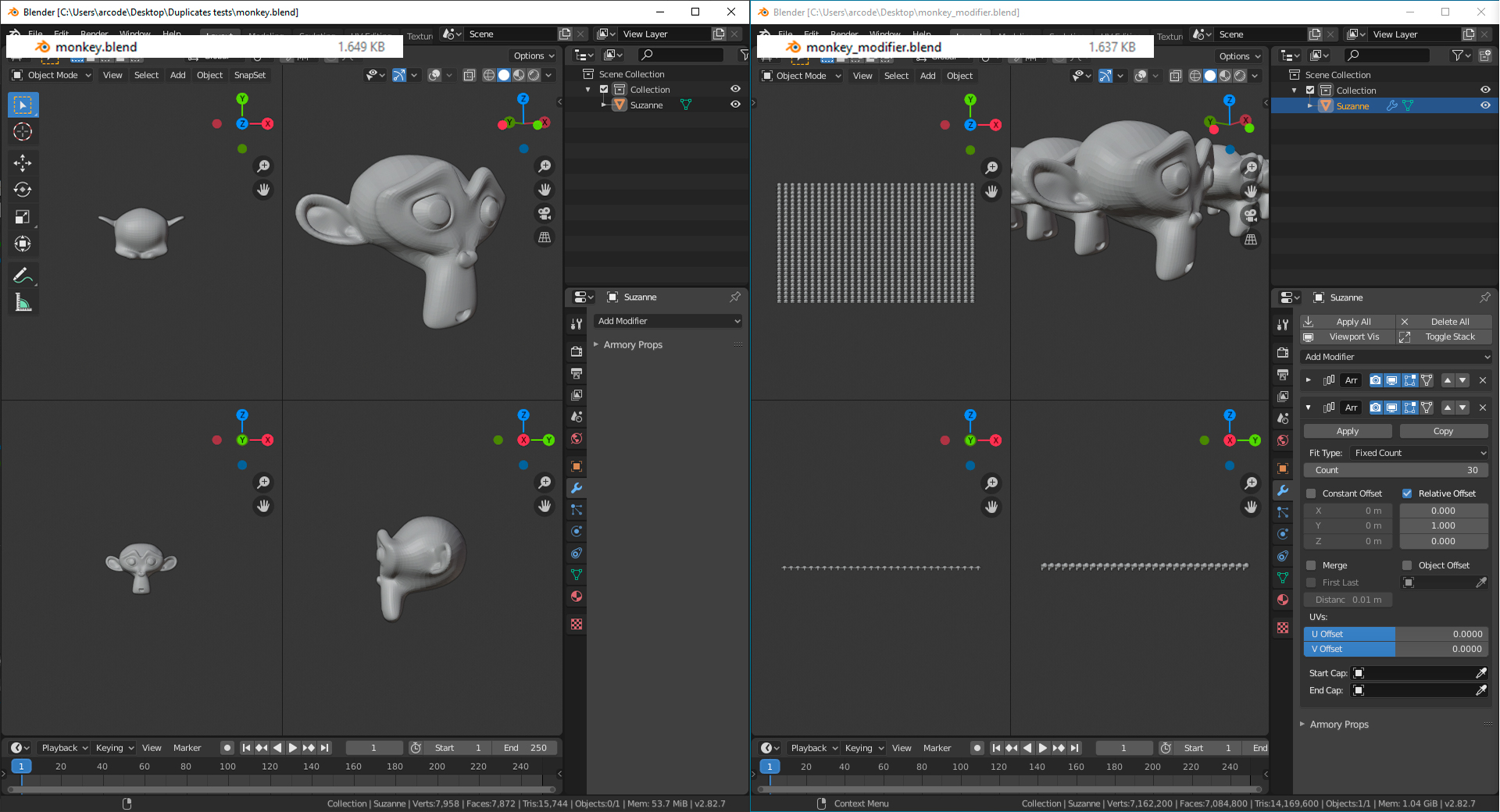
We finally start to do some duplis now. A simple 30x30 grid, getting a 900 floating heads troop (bet you human wanted to been evolved from than hum). Made by two arrays stacked
It occupies even less hard drive than the suzanne does, it looks that the default gray material was kept as ghost on the other file, but somehow not on this one. But it is a really small diference, so it is not going to have a considerable affect.
However, uses 20x the RAM of the forever alone chimp, it maybe not that bad really, tough not good too. In real case scenes it may slow things down. ![and 30x30 grid opf monkeys made by Array modifier][modifier]
The natural way
Than i needed to compare it to the most simple/common ways to make duplicates: duplicate
Here's the simple duplicate ( ctrl+d ), and linked mesh ( alt+d )
![linked duplicates of monkey][duplis] ![copies of monkey][copy]
For curiosity purposes, lets see what about a single object grid (applyed modifiers) ![900 monkey heads in a single object][singleMesh]
.
So with the array Blender calcs 14M tris, the same as the full copies or the single mesh, that by the way, in term os computer resources look very alike and demanding. It still takes almost a third of RAM in comparison to then, and insignificant files sizes. But i doesn't seems as good when comparing to de linked duplicates, that is more laborious to do and kind of make "non destructive" workflow gone, however take way more easy on our loved silicon boxes
Alternative methods
Now, Blender still have some other ways to make duplicates i'll show now.
Do a "File -> link" to the mesh (not object) of other .blend file.
Not really more useful than a linked duplicate, have more work to do this one, a microscopic loss of file size, and approximately same RAM (though print show some significant diference, posterior openings of this file got less RAM usage, who know why) It is in fact more of a feature do big projects, where there a base shape already defined, someone to place it around, and later on (or simultaneously) other person make fine tuning of geometry/shading
ok, to be honest it this is a lot specific "duplicate" method, but this is a comparison you fool, can't let none of then fell excluded on purpose, it's mean. ![image description][duplis-linkedMesh]
I'm sure you know that one, so no much explaining. Make a collection, instance it out ![image description][collectionInstances]
Child instancing
This may be not that ease to make at first. You will have to create a mesh (like a plane), parent the object you want to duplicate to it, go over the Object Properties of this second object, and on Instancing option set from "none" to "vets', to create a copy on each vertice, or "faces" to do the same on each mesh's face
A tip here, duplicating to vertices allow you a free placement with less resources (vert vs face amount), but instancing to faces give you the power to control each duplicate rotation (connected face may be a problem for this though). You can than hide the instancer mesh checking out the "Display Instancer" and "Render Instancer", and hide (or better position) the original duplicate object
This method is awesome, low file size, small RAM usage, great freedom to placement, and some kind of easiness to manipulate it ![image description][parentInstancing]
What? Child instancing is evolving!
ok, it's finally over, the final one i got to show. The most efetive as an array, less use of general resources.
Simply make the Child instancing method with the Instancer object as a single face/vert mesh, and Array the Instancer ![image description][parentInstancing-modifier]
So that it you humans! A question that developed itself to a book, with some tips in it, i hope ps. particles are probably better resources economical, but would be a real pain to make it an Array replaceable
[//]: #( imagens com arquivos sozinhos ) [files sizes]: i.imgur.com/LqdjoNk.jpg [empty]: i.imgur.com/s5ilLAo.jpg [monkey]: i.imgur.com/Zb4gSze.jpg [modifier]: i.imgur.com/H0KV7dO.jpg [duplis]: i.imgur.com/eosHIDd.jpg [copy]: i.imgur.com/44YJtHC.jpg [duplis-linkedMesh]: i.imgur.com/1KHupPh.jpg [collectionInstances]: i.imgur.com/hQy1wLn.jpg [parentInstancing]: i.imgur.com/vajph0P.jpg [parentInstancing-modifier]: i.imgur.com/5xnte2c.jpg [singleMesh]: i.imgur.com/d1loi8s.jpg
[//]: #( side by side compasisons )
14 Comments
array a single point instead, then instance your geometry to the points. It would be good if the array modifier had an 'array as instances' option, which when checked disable the merge checkbox.
* @3d illusions * actually, i think the "instance to points (vertices)" you talking about is cited on the post's end: "What? Child instancing is evolving!". But i know, it's a lot of text up there
The 'array as instances' option is really the whole point of this question\small research. But look like a kind of verbose and procrastination addicted
I think that a checkmark option to have an instance-array is not bad, but mind that it would only be possible if "Array" is the last modifier in the stack. Because once you add any other modifier, Blender should evaluate all the geometry, therefore the concept of instance is lost.
* @ Lsscpp * I think the simple solution would just be to grey out the checkbox if it isn't the last modifier, similar to how the subdiv modifier disables adaptive subdiv when its not last
* @Zach Hixson * Hmm. But, for example, Lattice can deform instanses. And they stay instanses. But I am not sure, what happens with memory. if instances deformed, they still have same topology except vertex positions. So only info about deformations can be added. Like a shapekey.
* @ Vyacheslav * Are you sure??? You mean Linked duplicated object maybe? I've just tested and real instances don't get deformed by lattices
* @ Lsscpp * Yes, I mean objects with linked meshes. Anyway, deform is not changing whole data. It is adding data to existing, that can reduce memory usage at least for editing. What about hait dynamics? Is it consumes memory as each hair is individual mesh?
I was actually just thinking of this the other day. I instanced a collection with hundreds of detailed objects and only had a small performance hit, but the array modifier chugs shit when I make an array of 50 objects. This definitely needs to be an option!
You should make a link to this on devtalk.
* @Josephbburg * ok, just did it
In short, arrays should create instances instead of copying the geometry. This would be a MASSIVE memory save on scenes with a lot of arrays.
This would be a good option but the reason the Array modifier doesn't instance the meshes is because of one simple option. Merge vertices. This requires that each duplicates vertices are reliable for the merge operation as you cant merge vert 1 to 5 without it merging internally as opposed to on the boundary. I think the Array modifier would benefit greatly from an instancing option that greys out the settings that cant work with instancing.
I think, it just should instance object, when merging is off
* @ Vyacheslav * The issue is that this might interfere with modifiers applied on top of it, as they probably require a physical mesh.
Obviously you could argue that it should just instance it if there is no merging, and there are no modifiers after it, but then you run into the world of user expectations, where performance was buttery smooth until they added a simple UV project modifier and suddenly for no explainable reason their performance dropped to a stand still.
Users are weird