
Render Resolution Percentage should be a float, not an integer!
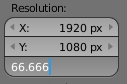
Teeny tiny issue: Resolution Percentage is an integer, meaning that if you want to quickly scale down your resolution from 1920 x 1080 to 1280 x 720 by changing the percentage to 66.666%, it will round to 67%, giving you 1286 x 723, which is kinda dumb.
If this property were a float rather than an integer, you could enter whatever precise value you want.
5 Comments
I've run into this issue myself, so I agree. floating point precision would be very helpful here. On another note, the percentage is capped at 100%. I imagine it would also be helpful to be able to set the scale to 150%, 200%, etc.
@Wessel van der Es: It is actually possible to type in 150% or 200%, the percentage is not capped.
@Brecht Van Lommel @Craig Jones: Ah, you're absolutely right. My mistake! I just slid the slider with the mouse and made a hasty assumption... 😅
Thing is... if you know that you want your resolution to be 1280x720, why not just enter that value? Does being able to enter one value (and do the math for that value) instead of two really save you all that much time?
7 years late, I know.
It's faster to click and rewrite one input than having to click and entirely rewrite two inputs. So if you make a one-time change, it's worth being able to get what you want from the percentage input.
That being said, if anyone is still looking for a solution that is both versatile and fail proof, I personally always set my render resolution to 2560 x 1440. From there, round percentages give all the common resolutions:
Maybe 75% WQHD could be the default values. They are mine already.