
Numeric input for Manipulator
I know that you can use shortcuts for easily move objects for a certain distance. I know as well that while you are using a manipulator you can type numeric values, but while doing this you should keep pressed the left mouse button. This can be a bit difficult because usually a right-hand person uses the same hand for both numpad and mouse.
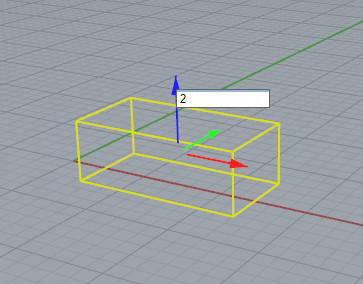
I'm suggesting to look at how Rhino works. In Rhinoceros you have similar manipulators that allows you to drag ad move/rotate/scale objects. If you want to do with numeric input you can just click on a manipulator (single click, not drag) and it pop-up a text box for numeric inputs. This feature is really nice, and makes things much more easier.
Of course this can be really usefull also for other manipulators, like the new tools manipulator (Spin, Extrude, etc)
7 Comments
G, Z, 2 is faster and should be the way if you need that level of control, lets not go overboard after left click.
@benny_kleinert: I agree with you. Howerver, Blender 2.80 is mainly about UI and UX ! That means better user feedback during operations. This is the purpose of this proposal. And I think it is quite beginner-oriented, no ?
@benny_kleinert: hi Benny. To be honest I don't see how it could go overboard. In the image I'm showing how Rhino do that, but later in the comments I proposed a less invasive way to implement something similar in blender. I use blender since 10 years and I do everything with shortcuts, but I'm also a teacher and I always see what sounds frustrating for new users. One thing is that sometimes the control in blender is a bit hidden. You already have those nice manipulators, but not an immediate way to use them precisely. What I'm proposing seems to me really easy, not intrusive, and more efficient also for pro users: "Click on Blue arrow" = "G Z" (1 click vs 2 keys) And if you are in local orientation: "Click on the local Blue arrow" = "G Z Z" (1 click vs 3 keys)
I don't see any side effects or cons. Actually now if you do a single click you can move the object by mistakes. This should also prevent that...
Maybe an easy way to improve it, could be to consider an event like "single click on blue arrow" as "G+Z" that automatically listen for numeric input (no popup, just the usual bar with numerc values). I don't know if this strategy can be generalized for all new manipulators in Blender 2.8, but to me it seems easier to do in Blender.
I like the idea. However, I would suggest to put the input field at the bottom of the 3D View to avoid overlapping the gizmo.
@pcsd24: Yes, exactly. Blender already have his own way to give input during transformations. There is no reason to change that. It could be enough just change the event handling when you click on a manipulator without dragging it.
@Alessandro Zomparelli: What can be done is to give the focus to the input field of the corresponding property in the panel.
So, when clicking on the Z axis of the gizmo without dragging it, the focus is put on the "Move Z" input field in the tool panel.