
Override environment per render layer
Using "render layers" my images and animations become much better. I used them a lot. And for animations, it's a time sever.Example: when you need to render separate light, which you can combine in postproduction.
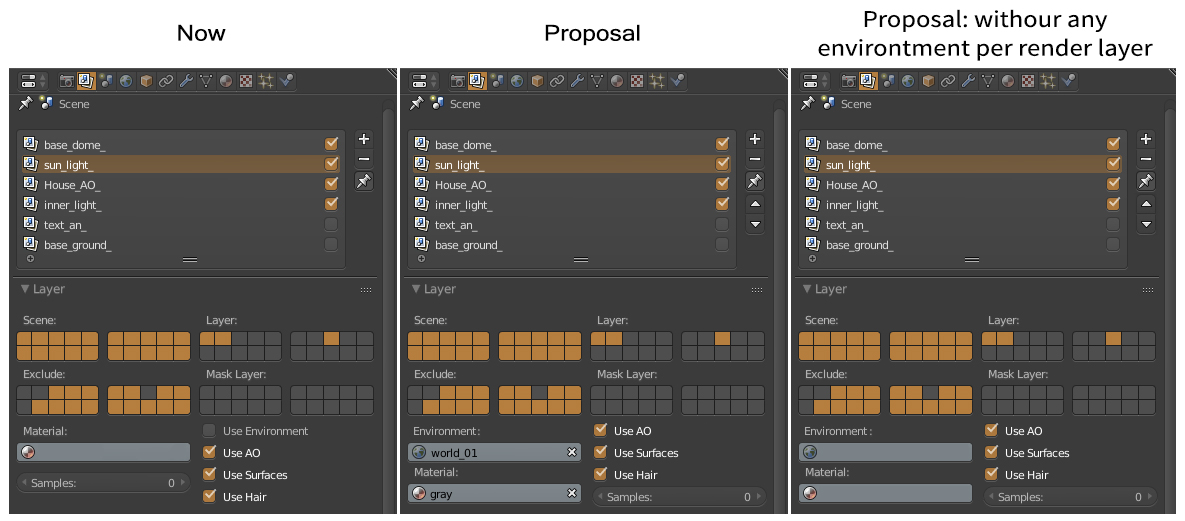
"Render layers" can be more flexible with an option when you can choose "environment" for an individual layer. With this, you can render different HDRIs and combine them in post-effect. Blender already has override option for material. And for the environment, this will be an awesome feature).
Also, arrows for moving layers between another are missing ;).
Maybe in 2.8, with new outline, it will be included. But I didn't find any information.
4 Comments
Can you please tell a typical use case?
@: Example: when you need to render separate light, which you can combine in postproduction. Or make some light test in animations.
To keep with Blender terminology, it would be best to label that field as World , rather the Environment, because you're using a World datablock there.
@Jason van Gumster: Yes, with "World" it's better.