
Blender 2.82 Fluid Sim Broken?
Hi, I wanted to try the new fluid sim in Blender 2.82, but I can't get it to work. There is just no fluid showing up at all. I'm following this tutorial: youtube.com/watch Anyone any idea what I could be doing wrong?
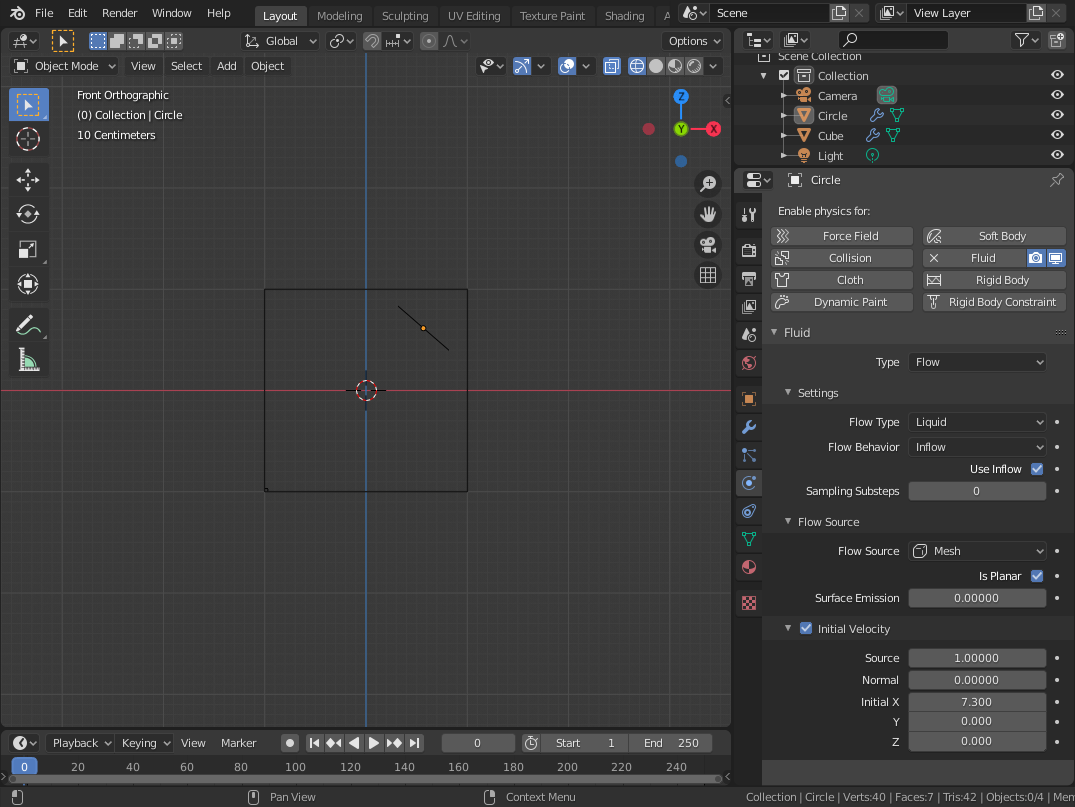
Hi, I wanted to try the new fluid sim in Blender 2.82, but I can't get it to work. There is just no fluid showing up at all. I'm following this tutorial: youtube.com/watch Anyone any idea what I could be doing wrong?
30 Comments
You need to setup up Cache to Type: Replay, or cache the sim first prntscr.com/r30bo6
* @Vojtěch * Then the Bake button is gone. If I bake using Modular and then change to Replay I don't see anything either. If I just press play using Replay without any baking I get 5fps and don't see any liquid either.
* @grosser.meister.morti * Changed Data File Format from Uni Cache to OpenVDB and it didn't change anything either.
* @grosser.meister.morti * Tried now - in Replay mode Bake button is gone, but fluid is displayed in Domain cube. When Modular is selected - Bake is back. I have official 2.82 installation. Not sure what can cause your problem in this case.
I have the same problem. I just reported the bug. Though somebody might have already reported it, I cannot find any info about it. I tested with a beta daily build from last month, and it works in the beta. I think it is a bug, hopefully it will be fixed soon.
* @EaryChow * Can you link me the bug report so I can subscribe to it? Thank you!
* @grosser.meister.morti * It is not triaged yet, and it can potentially be closed since I don't know if there is already a report, which makes this a duplicate. Once it is confirmed I will be sure post a link to it.
* @grosser.meister.morti * It is closed as invalid.
* @EaryChow * So you did something wrong, they told you what to do differently and it works now for you? If yes, what are you doing now to make it work?
* @grosser.meister.morti * They tell me to increase the resolution divisions. I am stll not satisfied and I am trying to update the task description. Because it did work in the 2.82 beta version, with the default 64 resolution division, with a plane emittor.
This had me two days trying to figure out why sometimes replay works and sometimes does not , well get all set., If all is right just click Jumpto FirstFrame on the timeline and guides will appear back on the flow object and play shows the calculation.
* @parsec3d * Nah, this post was out when replay was not default, the default was modular
Also have exactly the same issue on 2.82 and 2.83
Still the same issue on 2.83, no fix found online seem to work.
* @azagwen * set guides on, set cache to replay, and click jump to first frame on the timeline.
I am having the same problem And it is very irritating can someone please send a detailed explanation if available, thank you
this video by "Blender Made Easy" has just been released and could help with solving your issues. It helped in my case.
youtube.com/watch
I am experiencing the same issues on 2.82. Though, if I play around long enough with creating new cache folders, deleting them + switching between modular and replay - it sometimes works that the liquid particles show up. Also randomly baking sometimes worked. This random trial and error pattern is the only way I found to make it work. It usually takes 10 minutes to make it work. MacOSX Catalina 10.15.4
Did anyone stumble on a fix for this? Maybe we should try with 2.90 that has just been released and see if it works.
* @allan * Have you tried 2.82a? A beta version of 2.83 or 2.90 alpha?
Works fine.....
* @sudoblenux * Yeah, no matter what I do I don't get any fluids. Just nothing. Here is my file: drive.google.com/open
I have the same problem (Liquid particles are not showing) but if you enable mesh and bake it, it works fine (particles are still not showing but there is a correct mesh)
It is not good with a face mesh. You can do a cube mesh.{attachment Flow00png}
* @lenoremaritima * What do you mean? For the inflow? The tutorial also just uses a circle with a n-gon face. The domain is a cube.{attachment Screenshot_20200216_171253png}
* @grosser.meister.morti * The domain does not matter. It means that the flow cannot be done with a mesh of the face. This video is doing the flow in the face mesh, In the new 2.82, it seems to be a situation that can not be done with a face mesh.
* @lenoremaritima * Didn't change anything for me. :(
(I tried with and without Is Planer. What is that anyway?)
The domain settings: {attachment Screenshot_20200216_024657png}
* @grosser.meister.morti * In your inflow object settings, under Flow Source that you have Surface Emission turned up to at least 1. It's preset to 0.00000. That should help.
* @worley.matt * Thanks man, worked like a charm