
Error in new version of blender 2.8
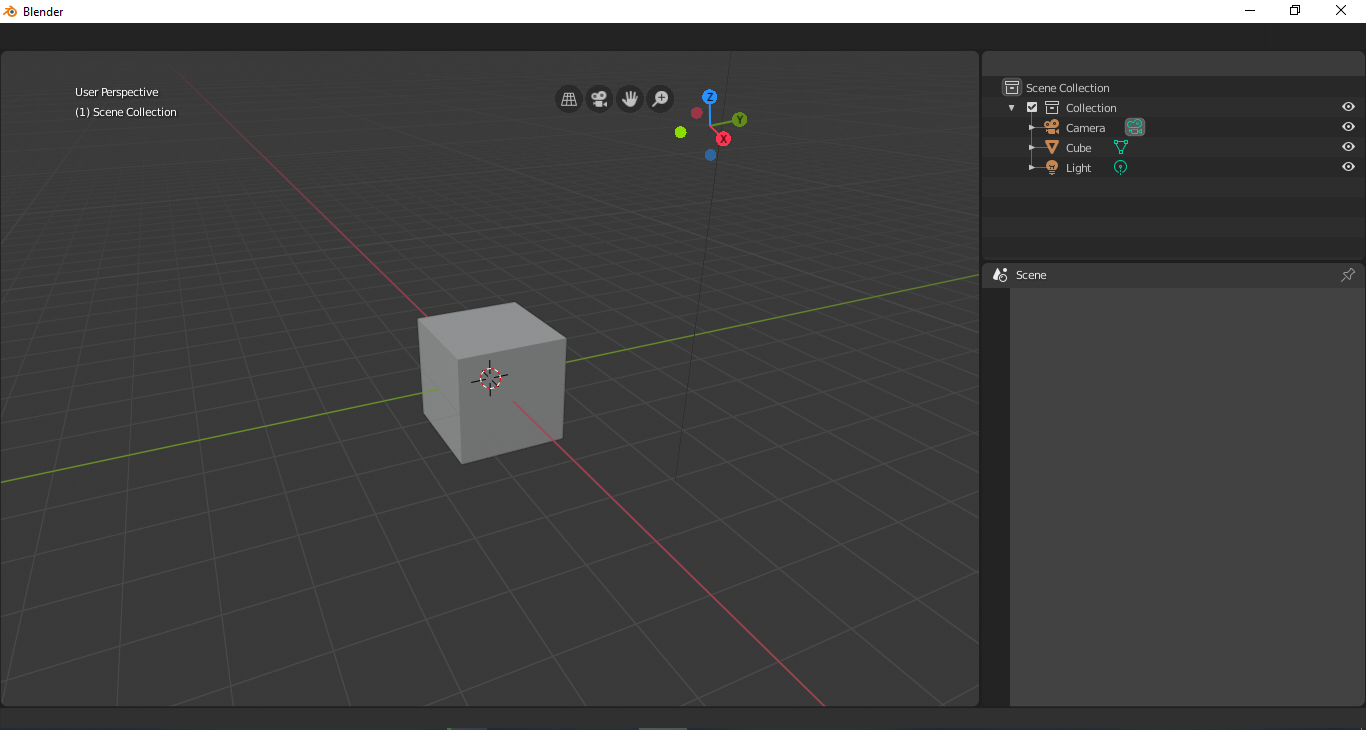
guys I used the RC 2.8 good version but now when I downloaded the official version my blender after the installation is like this, his interface is not showing any words or buttons and I have no way to handle viport 3d and to get better all my blender 2.79 files no longer open in 2.79, I need a solution because I have more than 10GB of jobs that don't open
Help!
8 Comments
I have downloaded 2.79 zip-file (not msi) and launched it from it's folder. This way I can still open 2.79 files from within that version.
C:\Users*name*\AppData\Roaming\Blender Foundation\Blender\2.80 Look here and save any files you may need first. Then delete this folder and start it up again, should work fine.
* @zephusees * unfortunately it didn't work :( Thanks anyway
* @paulohenriquencosta * Maybe you can load factory settings from the RC? Anyways, maybe your startup .blend is screwed up somehow. Does is show a splash screen? What's it say?
Do you have a tool for checking a file's checksum? I use 7zip for this. Anyhow, this is what you should get from the Windows installer, if it's not corrupted:
* @Josephbburg * I checked and everything is correct, but it doesn't work I'll have to format the pc to see if I can work and recover the files thank you so much for helping
* @paulohenriquencosta * That's super bizarre. Try using a portable build on a flash drive on your PC and someone else's. A portable build could be the .zip download or maybe from portableapps.com (great site). If it runs on some one else's PC and not yours, then it probably isn't Blender.
Deleting your blender 2.80 user settings in your windows user folder may help. Just delete the Blender user settings folder and restart Blender. All should be fine. Then you have to reinstall your addons again, to be shure all is clean.
Download again