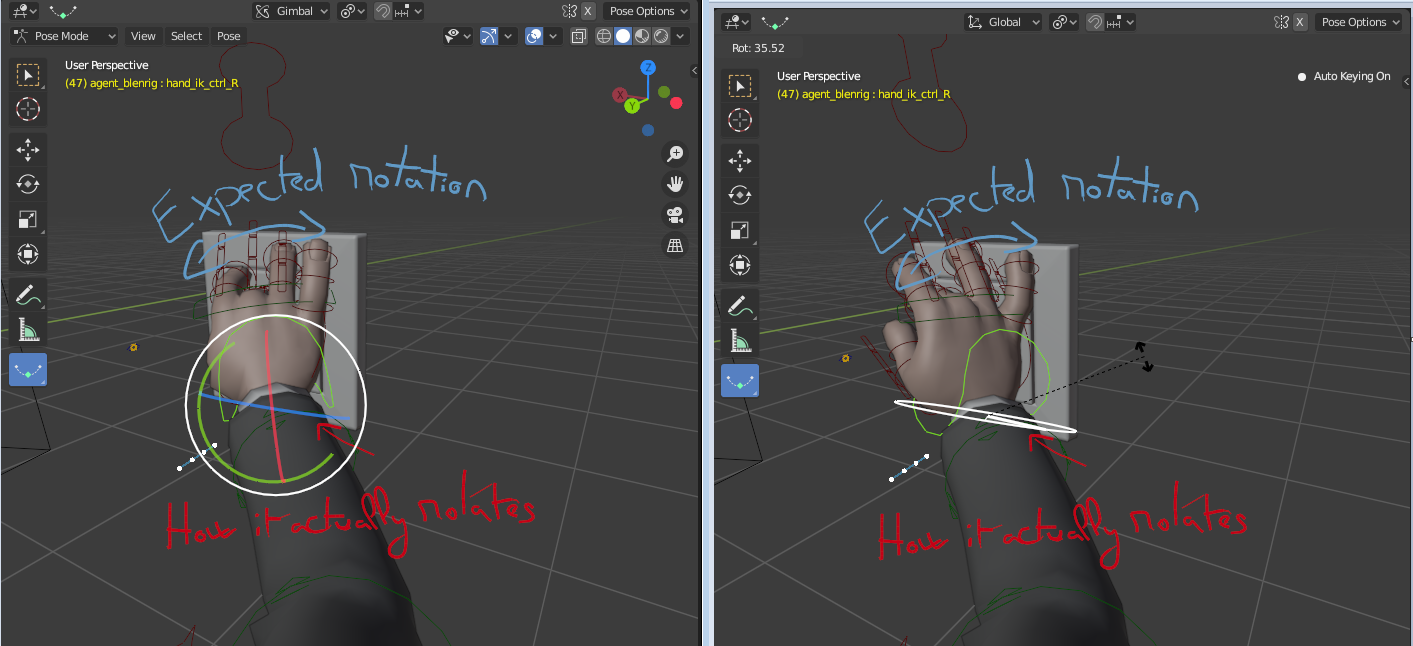
Tittle is self explanatory, but if its necessary I'll recreate it with a video.
V
Velorth
26 Jun 2020
8 Comments
3
3dcinetv
you're using glimbal. Glimbal is using EULER or QUATERNIONS depending on which settings you have on the N panel.
r
rafa.olhalak
*
@3dcinetv
* well this beyond my knowledge
3
3dcinetv
*
@rafa.olhalak
* press N, look at the end of the transformation panels: it would say QUATERNION or EULER. After checking it out, go to the middle of your 3d viewport: see where it says GLIMBAL? switch it to LOCAL. That should fix it.
V
VelorthAuthor
*
@3dcinetv
* Nop , didn't fix it, it happens in local, global, gimbal thats why I'm possting it here. The only way to make it work its with "View" but this isn't supposed to work like it. That white controller is supposed to rotate by default as you see it on the screen and it doesn't do it ¿Whats the point of having a white extra controller if it just rotates as X,Y or Z alone? That's why is either missleading and/or not working properly.
r
rafa.olhalak
shouldn't you move the green circle to get the expected rotation?
V
VelorthAuthor
*
@rafa.olhalak
*
Yes in this particular case, but sometimes you want a rotation thats the combination of two axis, and to work faster the white controller is supposed to rotate the bone without having to use two rotation axis.
1
r
rafa.olhalak
*
@Velorth Lässain
* had no idea you could combine axis rotation
V
VelorthAuthor
*
@rafa.olhalak
* You can also move in two axis pressing G (to move) and then Shift + X/Y/Z (And you'll move in the ones you didn't select) It's super useful. But im still pissed at the white axis rotation control not working well -.-

8 Comments
you're using glimbal. Glimbal is using EULER or QUATERNIONS depending on which settings you have on the N panel.
* @3dcinetv * well this beyond my knowledge
* @rafa.olhalak * press N, look at the end of the transformation panels: it would say QUATERNION or EULER. After checking it out, go to the middle of your 3d viewport: see where it says GLIMBAL? switch it to LOCAL. That should fix it.
* @3dcinetv * Nop , didn't fix it, it happens in local, global, gimbal thats why I'm possting it here. The only way to make it work its with "View" but this isn't supposed to work like it. That white controller is supposed to rotate by default as you see it on the screen and it doesn't do it ¿Whats the point of having a white extra controller if it just rotates as X,Y or Z alone? That's why is either missleading and/or not working properly.
shouldn't you move the green circle to get the expected rotation?
* @rafa.olhalak *
Yes in this particular case, but sometimes you want a rotation thats the combination of two axis, and to work faster the white controller is supposed to rotate the bone without having to use two rotation axis.
* @Velorth Lässain * had no idea you could combine axis rotation
* @rafa.olhalak * You can also move in two axis pressing G (to move) and then Shift + X/Y/Z (And you'll move in the ones you didn't select) It's super useful. But im still pissed at the white axis rotation control not working well -.-