Armature Templates - Free Add-on
 "Armature Templates"
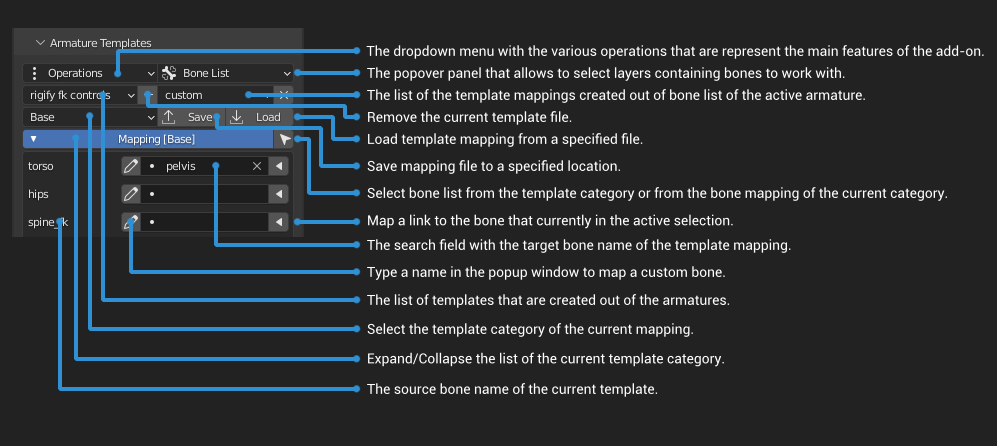
is an add-on for Blender that allows to manipulate skeleton with the help of various features depending on the predefined or custom template data. The main purpose of this add-on is to provide the possibility to export animated character rig to game engine or edit animation of the imported character from the game engine. The created template out of armature skeleton is a unified container of bone name list, which allows to make a particular mapping from the bone list of another skeleton as a link data and then perform some operations between those two armatures afterwards.
"Armature Templates"
is an add-on for Blender that allows to manipulate skeleton with the help of various features depending on the predefined or custom template data. The main purpose of this add-on is to provide the possibility to export animated character rig to game engine or edit animation of the imported character from the game engine. The created template out of armature skeleton is a unified container of bone name list, which allows to make a particular mapping from the bone list of another skeleton as a link data and then perform some operations between those two armatures afterwards.
Blender Version: 2.93+, 3.0+
Main Feature List:
-
Templates
- Create Template - Make a new json file as a template based on the naming convention of the active armature.
- Edit Template - Edit the selected template and tweak the bone list depending on the active armature.
- Guess Mapping - Search for bone names of the active armature and try to match them in the naming convention of the current template.
- Rename Bones - Rename the active armature bones if they match in the template list.
- Fit Meta-Rig - Choose the skeleton rig to align and to place the active armature bones, according to the template mapping.
- Clean Imported Animation - Clear the transform keyframes to fix dislocated bones.
- Constrain Armature - Choose a skeleton rig to constrain transformation of the active armature according to the template mapping.
- Scale Skeleton - Parent the armature to the empty and then scale.
Installation
- Download
- Open Blender and select Edit->Preferences
- Click Add-ons category and then 'Install...' button.
- Select the downloaded archive file from the link.
- Check the 'Armature Templates' option.
Armature Templates Video Course (Complete Playlist)