
Vide Sequencer displays different from Scene Layout
I am working on an animatic, creating scenes with 3D-objects and Grease Pencil objects:
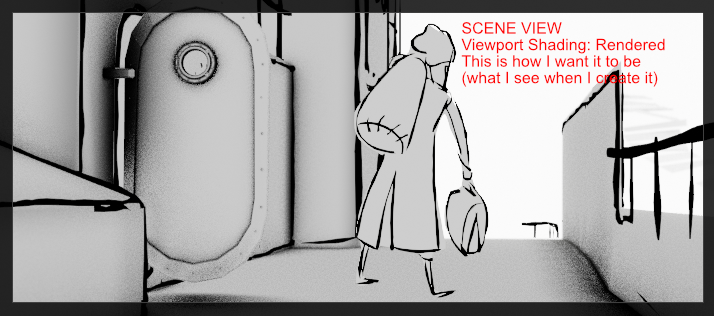 But when I collect my scenes in the timeline of the Video Sequencer, things suddenly look very different:
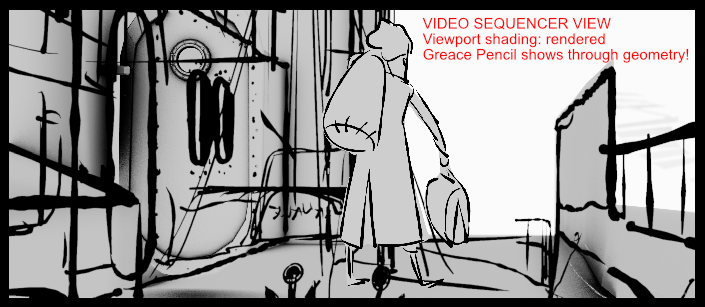 The main problem is: the GP objects show through the 3D-objects.
I can't seem to tweak any settings. The Sequencer doesn't seem to care about the display settings that I created for each scene.
The main problem is: the GP objects show through the 3D-objects.
I can't seem to tweak any settings. The Sequencer doesn't seem to care about the display settings that I created for each scene.
Also, and that's another inconvenience, the audio that I put in each scene does not appear in the Sequencer, when I add the scene there. Blender scenes appear without audio in the sequencer, as far as I know. Is this right?
Am I doing something wrong?
6 Comments
@erik, in scene properties, do you have Z pass enabled?
Thanks for thinking with me! It does seem to have something to do with z pass indeed... That is the solution to the shine-through GP! Thanks!
But I still can't seem to find a way to have the sequencer display a scene exactly the way the scene itself is displayed in the viewport. I will fiddle with the settings a little more and report what I learn here. If I learn anything...
I would suggest trying to render out in Workbench. There is a known issue with rasterization with eevee - it will produce z-overlaps when distances are small between grease pencil and mesh, such as writing on surfaces - it will look different in the viewport than in render.
When I'm editing animation I just use View > Viewport Render Animation to have a preview video from this animation. I do not like the scene thing in the sequencer.
Yes, that is my workaround. However, I do like the Sequencer, for I can speed up or slow down scenes easily, or parts of scenes. Without having to adjust millions of key frames. I use it to tweak timing of my animatic-sequence. It is quite a powerful tool.
Deselect "View Only Selected" in the graph editor. Put anchor to the cursor and place cursor on the first frame of animation. Then select everything and S > X.