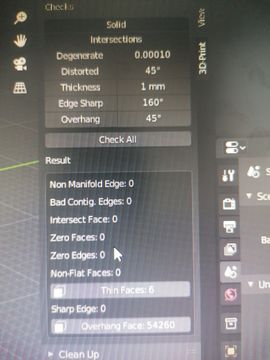
I have Run check all and gives this warning. How to fix the thin faces warning?
f
fatihhamurcu
1 Feb 2022
3 Comments
l
loaferslodge
It happens to me when I inadvertently more than once use the f-key to connect several vertices.
go into edit mode for the object.
Click on the thin Faces warning and it should highlight the offending faces.
f
fatihhamurcuAuthor
What do we do after we find the faces that cause warning?
l
loaferslodge
It depends on what actually caused the error.
My approach has so far been to save the blend file under a new name and delete the offending faces.
Then go into object mode and have a look at the model to determine what I need to do to fix it.
BUT there is an alternative, that is a bit tedious and it might not be what you want.
In windows 10 there is a pretty good app called 3D Builder.
Before you try this, make sure that you have applied Scale to the model.
If only a loose part of your model has the errors, export that part as stl (select the part you want to export.
Ctrl+i to invert the selection and delete all those parts - this is why you saved under a new name first.) and then load it into 3D Builder.
Click on the model and you will se a warning that it needs to be repaired. Click yes to repair and see what happens. More often than not it fixes the problems.
Save on top of the stl you just loaded.
Import the stl into your blend file and change the tri based mesh into quad based.
Whenever I create anything for 3D printing I always run it through 3D Builder to get it fixed if it needs.
If 3D builder can't fix it, I go back to the original and fix it as described at the start.

3 Comments
It happens to me when I inadvertently more than once use the f-key to connect several vertices.
go into edit mode for the object.
Click on the thin Faces warning and it should highlight the offending faces.
What do we do after we find the faces that cause warning?
It depends on what actually caused the error.
My approach has so far been to save the blend file under a new name and delete the offending faces. Then go into object mode and have a look at the model to determine what I need to do to fix it.
BUT there is an alternative, that is a bit tedious and it might not be what you want.
In windows 10 there is a pretty good app called 3D Builder. Before you try this, make sure that you have applied Scale to the model. If only a loose part of your model has the errors, export that part as stl (select the part you want to export. Ctrl+i to invert the selection and delete all those parts - this is why you saved under a new name first.) and then load it into 3D Builder.
Click on the model and you will se a warning that it needs to be repaired. Click yes to repair and see what happens. More often than not it fixes the problems. Save on top of the stl you just loaded.
Import the stl into your blend file and change the tri based mesh into quad based.
Whenever I create anything for 3D printing I always run it through 3D Builder to get it fixed if it needs. If 3D builder can't fix it, I go back to the original and fix it as described at the start.