
Scaling not working properly
Hi everyone,
I am trying to make a barrel (learning how to use Blender) and I am in the part where I want to make ridges at two places in the center.
I have pressed Control R (Loop Cut) and then with the Bevel Tool I have created the ridge, but when I want to scale the ridge in the middle of the three loop cuts I have created it does not scale it proportionally. I have exagerated this in the picture so you can see it.
I tried already going to Object mode and the pressing Control + A and "Scale" before Scaling, but it does not work.
I tried also pressing Shift + Z before scaling and it did the same thing.
If I use Vertex Select instead of Edge select it works, but I would like to know why is it not working.
Can you please tell me what is it that I am doing wrong?
Thanks!
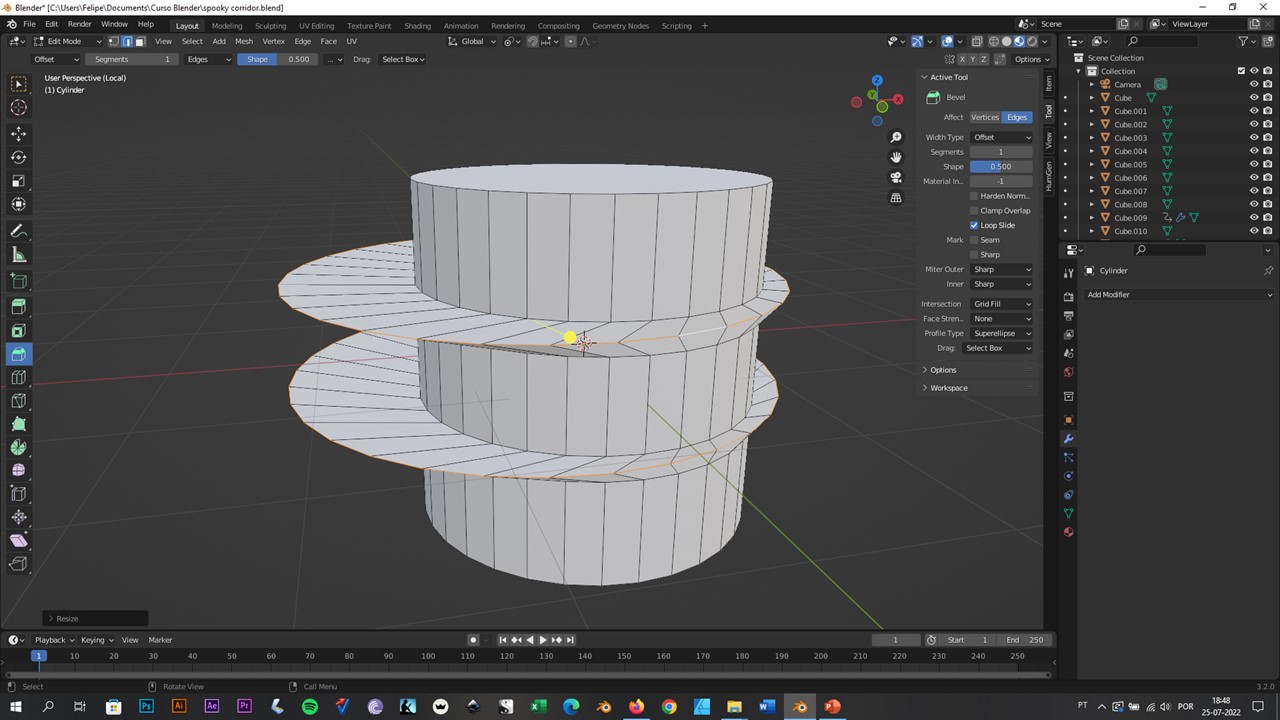
2 Comments
Hi, you need change the transform pivot point to individual origins, icon is located on top screen, near the magnet.
Or press alt+s :)
Thanks!