← Blender.TodayArtwork6 Jan 2021ivansouzatjdibb.coivansouzatjdBlender_Defenderchynah.mithrajakobe.elliskoko_zemelodee.joodniles.torrysharaya.labellaskyelar.kennis
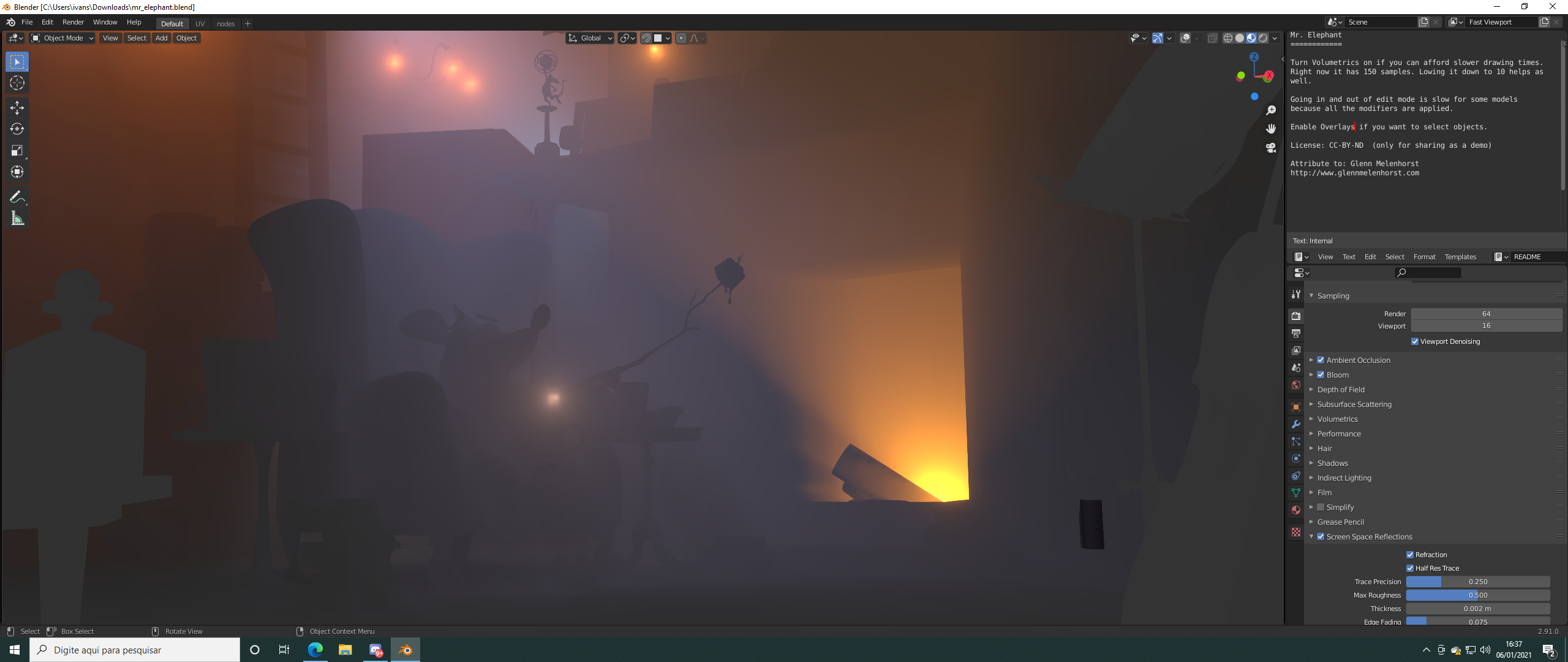
I decided to learn blender last month and tryed to open those demo files just to see how my computer would run it, and everything worked great. I could see everything perfect with no problems. So i completed a yt tutorial with no problems so far. Then i tryed to model a flower on my own and notice that it had a texture glitch. So i decided to unninstal and install blender and it did not fix the problem. So a reseted my computer and installed all the stuff again, and tryed to open another demo file to see what happens. And thats what you can see in the image. Evertything fucked up. Can someone help me? I tryed to instalL different versions of blender and it was useless. My setup is RX 580 8GB, RAZEN 5 2600, 16GB RAM. The demo file i used is Mr Elephant and you can download at
blender.org/download/demo-files/
I play Warzone and Cold War, so imagine that is not a GPU problem,
3
B
Blender_Defender
*
@ivansouzatjd
* Here is an explanation I've found for your problem:
I don't believe that it is a problem with Blender, since the problem occurs independently of the Blender version. It must be a problem with the file(s) then.
As seen in the image, the overall density of the Volume is too high (That's why everything is looking so blurry/out of focus).
You probably messed up the
Mr. Elephant-Scene
by accidentally changing the Volume Density Parameter and clicking on "Save" when closing Blender. So before you give it all up, try to
download the Mr. Elephant-Scene again,
and check if you are still having troubles.
I hope that helps, please answer this comment if that fixed your problems or not.
Greetings,
Blender Defender
3
i
ivansouzatjdAuthor
*
@Blender Defender
* Man, can you believe that the problems was with the amd drivers? I need to use the november 2020 version to use blender without any problems . It took me days to think on this possibility!

3 Comments
I decided to learn blender last month and tryed to open those demo files just to see how my computer would run it, and everything worked great. I could see everything perfect with no problems. So i completed a yt tutorial with no problems so far. Then i tryed to model a flower on my own and notice that it had a texture glitch. So i decided to unninstal and install blender and it did not fix the problem. So a reseted my computer and installed all the stuff again, and tryed to open another demo file to see what happens. And thats what you can see in the image. Evertything fucked up. Can someone help me? I tryed to instalL different versions of blender and it was useless. My setup is RX 580 8GB, RAZEN 5 2600, 16GB RAM. The demo file i used is Mr Elephant and you can download at blender.org/download/demo-files/
I play Warzone and Cold War, so imagine that is not a GPU problem,
* @ivansouzatjd * Here is an explanation I've found for your problem:
I don't believe that it is a problem with Blender, since the problem occurs independently of the Blender version. It must be a problem with the file(s) then.
As seen in the image, the overall density of the Volume is too high (That's why everything is looking so blurry/out of focus). You probably messed up the Mr. Elephant-Scene by accidentally changing the Volume Density Parameter and clicking on "Save" when closing Blender. So before you give it all up, try to download the Mr. Elephant-Scene again, and check if you are still having troubles.
I hope that helps, please answer this comment if that fixed your problems or not.
Greetings,
Blender Defender
* @Blender Defender * Man, can you believe that the problems was with the amd drivers? I need to use the november 2020 version to use blender without any problems . It took me days to think on this possibility!