
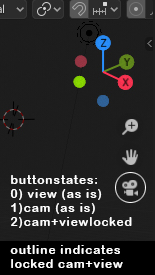
"Lock camera to view" via cam-icon in the viewport
i teach blender, and its always a bump on the road, to explain where the fundamental option is to lock the camera to the view. submenu of a hidden panel... not so userfriendly. solution: the camera-icon in the viewport! one click on the icon=view jumps to camera. second click on the icon could lock the view to cam. the icon could get a red outline, or a lock symbol to show the state. what do you guys think?
3 Comments
I'm not sure if your indication proposal is the right one, but I'm also missing some more direct access to this function.
I map this to 'Ctrl-NumPad 0'. Toggles the lock on the camera. It's a little strange, for sure. I suppose part of adapting to Blender, or adapting Blender to me.
* @andy.tanguay * sure, you can also script python code to do so... but thats not 'usability'. again: i teach graphic designers who are rookies in 3d, and i see that "lock camera to view" is to crucial to be hidden as it is.