
Blender Tip: Multiple Fcurve Modifiers
Animation modifiers are extremely useful but somewhat under developed. Here's some tips to point out some ofter overlooked possibilities.
Adding to multiple channels
Simply select all your chanels, here I've filtered to channels containing 'Z'. After adding, untick 'Only Active' in the Redo popover.

Pasting to multiple channels
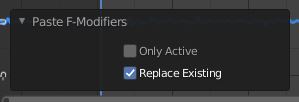
Here I'm using paste to update all of the existing modifiers by disabling 'Only Active' and enabling 'Replace Existing' .
Editing specific properties on multiple modifiers
Unfortunately holding 'Alt' won't do it, so here's a python snippet. I've made it as simple as possible so it should be pretty easy for anyone to understand. The code should be pasted into Blenders text editor, edit quoted "" areas and click Run Script >.
github.com/OtherRealms/Tips/blob/master/Edit%20multiple%20Fcurve%20modifiers
