
Geometry Nodes Very Basic -- Generate object instances of Point CLoud Above Plane.
- Create a point cloud Object
2.- Create a grid (or plane object) and Monkey or object that u want replicate above the plane.
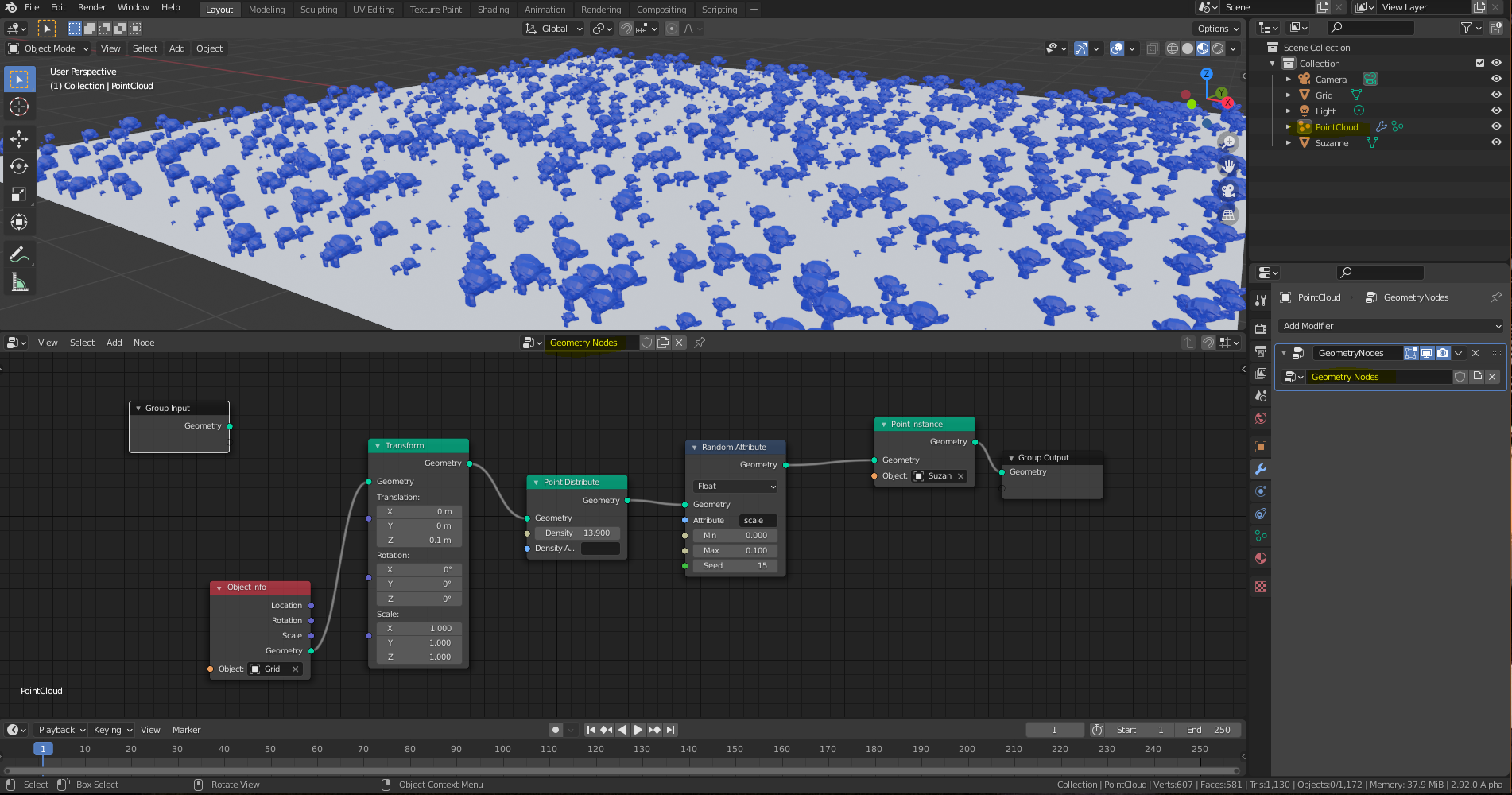
2.- Select the ponit cloud object and create here the Geometry nodes modifier.
3.- In the Geometry Nodes Editor, create the object info node and select the plane or grid object.
4.- Connect the info object to Point distribute for more density or instances of object.
5.- Maybe add a Random node for diferents sizes of monkey.
6.- Connect random node to Point instance , in this node , select a Monkey or object that u want replicate.
7.- Connect the Point Instance to Group Output. u can watch many monkeys above the plane.
8.- U can use the transform node in z for up little bit the monkey in the plane (between Object Info node and Point Distribute Node).
I Share the imagen for the node.. Thanks a Juan Gea , i will wait ur guide fundamentals of Geometry node for make more amazing things!!
1 Comment
I have no point cloud in the add menu using 2.92 Release candidate