
Is it possible?
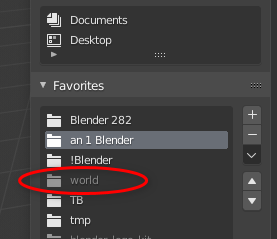
Hi, I'm not sure this is the right place to post my question. Sorry. I have placed bookmarks for some folders that I have removed and now I still have the Grey / Unselectable / Undeletable folders in the Favorites. How can I remove them? Please help. Thanks.
6 Comments
i reply you in support chat channel one more easy way to clean your older broken favorite folder, use cleanup option {attachment Clipboard2png}
* @NiCapp * Thank you. This was the best solution. Thank you.
Or you can press the little down arrow, just below the minus sign and then: X Cleanup (Delete all invalid Bookmarks).
* @martinbergwerf * Best! This is the bet solution to the problem and it looks the developer took care of it. Thanks. Easiest method.
Edit [Bookmarks] entry in bookmarks.txt file and remove unused path to folder line. Path for your version of Blender:
Linux:
'/home/$USER/.config/blender/2.82/config/bookmarks.txt'
Windows:
'c:\Users\%username%\AppData\Roaming\Blender Foundation\Blender\2.82\config\bookmarks.txt'
Restart Blender if it was opened.
* @roundmetry * OK. Thanks. It worked!