
¿New Display design for Bone Axes in Blender 3.4.0?
Hello; Blenderfolks;
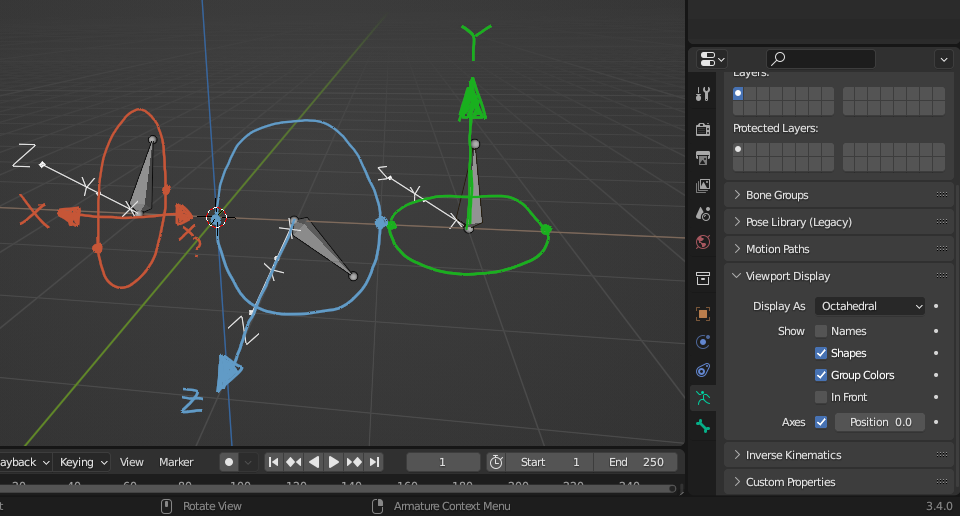
¿Has anyone seen the apparently new Viewport Display design for Bone Axes in Blender 3.4.0? I've just started using it but now I'm in a bit of trouble.
I'm not even sure if this change was intended; it looks pretty confusing in relation to the previous Display. I also couldn't find any documentation on this change.
Not only all the Axes are stacking on a same direction, but they also lost their default Colors. Their size also looks a bit too big for useful visualization. I hope this gets fixed, because if this is anyhow useful, I have no idea how this should be used properly.
I've included this image to show what's this about. I've drawn Colored Annotations so that it would be (maybe) clearer the notion that the currently Displaying Bone Axes are not really… helping. I suspect something is wrong.
Sorry if Post is off-topic; I just want to make it this evident as much as possible because it looks so essential.
2 Comments
Weird ... I'm not seeing that at all. Could you reset your theme or maybe do a re-install? I'm seeing the default colors and "standard" layout. What you have there is just bizarre ...
Thanks for the verification.
I'm currently assuming it might be a bug between Blender 3.4 in relation to the Mint OS I'm using. I will make a bug Report.
I've tried resetting to factory standards all the Preferences and Startup conditions, to no avail; then I tried to find 3.4.0 for download but it was already at 3.4.1, so I downloaded that one (maybe it would have been fixed already somehow), but the problem persisted.
Normally I do use the 'real' installed Blender —although I still have it installed from the OS default store. I use Blender as 'portable'. I guess for now I'll just keep using 'portable' Blender 3.3.1 LTS which didn't have this unexpected issue.
If I get more information I'll write it down here. Cya.