
[Help] Export Blender to Unity with perfect Transform
Hey there! I have research a lot about this topic but seems there is not a clear answer around it. I would like to get together a solution to this matter so we don't have to bother anymore with weird rotations or scales.
I will start sharing my little knoledge:
While exporting, if you set the units to: "FBX Unit Scale" you get the same scale you have in blender insetad of maby x100;
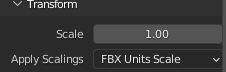
I know the "Apply Transform" option already solve this issue, but for animated fbx is not a valid solution, and there must be a better way to get a clean export workflow. Maby tweaking the Forward axis and Up axis?. But I couldn't get the correct combination.
UPDATES:
->mangel_grp: Rotating the Object in -90x , apply the rotation and then rotate 90x back, set the object well oriented and with clean values when exporting to Unity.
Any contribution is welcomed . Cheers!
1 Comment
This is the best explanation I have seen. polynook.com/tutorial/how-to-export-models-from-blender-to-unity/