
QUESTION: Bone layers locked mode? How do I disable it?
Hello. I have been animating for some time. Today I don't know what I have touched or what I shortcut I have pressed, that the bone layers have begun to act strangely.
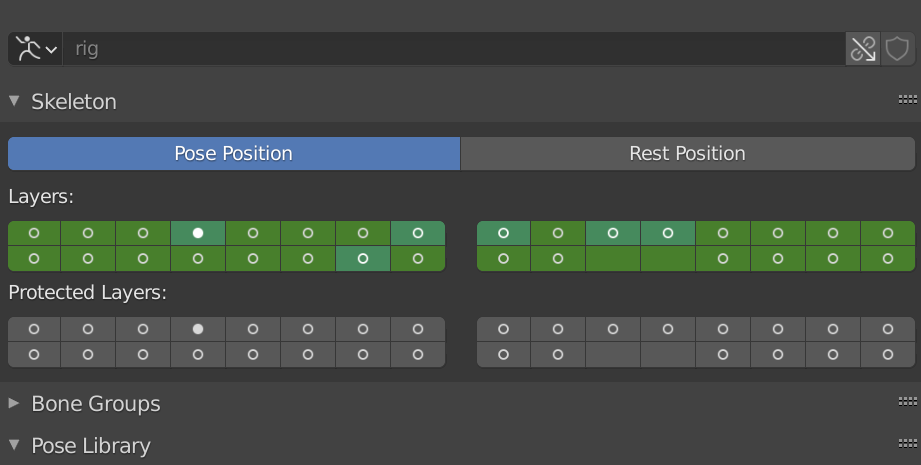
First of all, bone layers are now coloured in green, as you can see in picture 1. Also, blender seems to 'remember' which bone layers I have in use for animation.
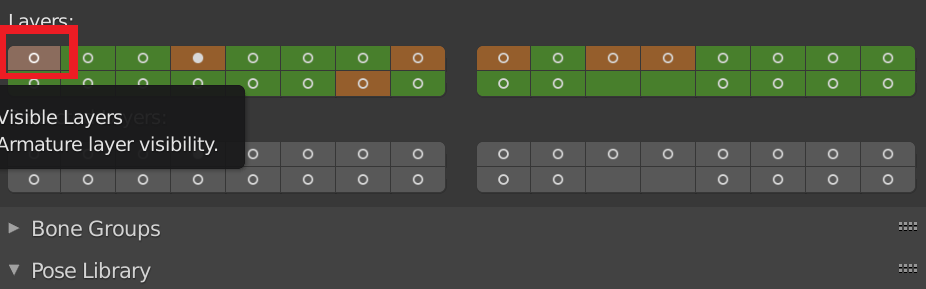
Second, If I now try to select another layer, for example, the first one, the other layers that were in use previously, efectively, gets remembered, as the layer used gets permanently coloured in orange.
Now, If I move the time bar by any frame, the new bone layer I just selected to work in, gets de-selected, and the previous 'remembered layers' gets active again.
I think this mode would be useful to restrict the bone layers to the ones I want, but now, I don't know how to enable it or disable it, and I cannot work with different layers.
I cannot find anything in the official manual, and since I don't know how this mode is called, I cannot google it.
HALP! Save me, please!
2 Comments
I was just about to post that you might want to check for keyframes ... since that green and orange indicate animated channels (watch out for that pesky "i" key press)
Glad you got it figured out :)
OMG I figured it.
The bone layers were animated too!!
Rigth click on the bone layer panel, 'remove keyframe'. And everything back to normal.