this is interesting but there is a problem. you are moving your points on the curve so if you have several keys its doing some nodes. isn't it possible to do a copy then suppr? directly on keys. I watched the api about graph editor wow this is very minimalist :(
k
karmaralAuthor
*
@1conscience0dimension
* Sorry I'm this late for replying. I'm not sure I understand your question. what do you mean by 'doing some nodes'?
I briefly after discovered that in the curves the handles weren't being shifted along with the points, and I fixed that. But, maybe that's not what you're talking about. Could you elaborate a bit?
1
1COD
*
@Amaral Krichman
* If you move keys further that another existing key this is melting curves because not cutting but just moving (watch in graph editor). maybe it was not the purpose but when I tried I had this issue.
k
karmaralAuthor
*
@1conscience0dimension
* you mean this {attachment thisPNG}instead of this?{attachment insteadPNG}
I see. I hadn't had that issue within my workflow, but it's definitely a problem. I'll see what I can work around it. Thank you!
Edit: Yeah, I can just call the regular blender function to move them around, that takes care of that. I don't know why I didn't use this before... Anyways. I'll be updating shortly, along with a few more features. I'll keep you in the loop if you're interested.
1
1
1COD
*
@Amaral Krichman
* yea I have a lot of trouble to communicate with devs because this is a complex organisation for me and I hope 1 day I understand it better. but the only way I found was to report a bug (lol) I'm asking for more features in API because I tried to do the same directly in timeline but I couldn't too. maybe there is a tricky way but dude this possible to cut keyframe in timeline so for me something is missing in the python API.
developer.blender.org/T71923
in fact I created a little addon an basically this is a step to move the cursor I could mix it with what you done (instead of "amount in your script). but I couldn't do a copy of the frames so I give it up. now I'm on real time straight array and trying to understand some python/blender concepts so...
youtube.com/watch
1
1COD
*
@Amaral Krichman
* if you can manage it I'll watch how you did. I began python in July so...but I did some stuffs since
1
1COD
*
@Amaral Krichman
* if you have an idea on how to open an animation branch I'm in.
k
karmaralAuthor
*
@1conscience0dimension
* The problem, I believe, is that my initial approach was too low-level, as I was just modifying parameters without no interface to 'care' for such parameters. (for example like checking if it's about to overlap an adjacent keyframe)
Though it would be cool if blender accounted for such small cases, I don't think these parameters are supposed to be as interactive. The regular transform.translate or transform.transform functions work just fine in managing these possible 'error scenarios' from a high-level perspective, but as I switched to this approach I encountered a few problems that are colliding with some other functionality I was implementing.
It seems that a lot of functions aren't properly 'wrapped' in their nice interfaces when it comes to the keyframe realm. You have to do some raw low level workarounds. I'm not sure I understand what you're saying about cutting keyframes, there is no cut() function as far as I know, but you could pull it off using the regular copy function, deleting the keyframe, and then pasting it elswhere.
Anyways, I'll keep you posted on the solution once I get it to work properly.
____
Regarding the animation branch, I'd love it, but I'm afraid I am as clueless as you are on the matter. My C is not good enough yet and I havent even began to peek the source code. I'm very enthusiastic about expanding these little animation features, but that'll come next year hopefully. Gotta get them addons working first!
1
1
1COD
*
@Amaral Krichman
* there is not direct cut indeed but there is copy and delete so...I tried around this but there is no "selected_frames" to select what you want when you want. I can deduce this is existing in the code in C behind. working on several frames allows to do more advanced things. talking about addons do you know how to create a key + modify one in a same script.
k
karmaralAuthor
*
@1conscience0dimension
* If you want to operate on selected keyframes you can use the procedure I used in the fetch_selected method in my addon. That's the only way of selecting keyframes I know of.
About the keymaps, no, I don't. It is one of the subjects I have pending for research.
There's a method for accessing everything in
bpy.context.window_manager.keyconfigs.active.keymaps
but that's all I know.
1
1COD
*
@Amaral Krichman
* ok thank you guy I could figure out how to do I think with hotkeys I have to run some tests but seems ok now. I was on it since a while

12 Comments
this is interesting but there is a problem. you are moving your points on the curve so if you have several keys its doing some nodes. isn't it possible to do a copy then suppr? directly on keys. I watched the api about graph editor wow this is very minimalist :(
* @1conscience0dimension * Sorry I'm this late for replying. I'm not sure I understand your question. what do you mean by 'doing some nodes'?
I briefly after discovered that in the curves the handles weren't being shifted along with the points, and I fixed that. But, maybe that's not what you're talking about. Could you elaborate a bit?
* @Amaral Krichman * If you move keys further that another existing key this is melting curves because not cutting but just moving (watch in graph editor). maybe it was not the purpose but when I tried I had this issue.
* @1conscience0dimension * you mean this {attachment thisPNG}instead of this?{attachment insteadPNG}
I see. I hadn't had that issue within my workflow, but it's definitely a problem. I'll see what I can work around it. Thank you!
Edit: Yeah, I can just call the regular blender function to move them around, that takes care of that. I don't know why I didn't use this before... Anyways. I'll be updating shortly, along with a few more features. I'll keep you in the loop if you're interested.
* @Amaral Krichman * yea I have a lot of trouble to communicate with devs because this is a complex organisation for me and I hope 1 day I understand it better. but the only way I found was to report a bug (lol) I'm asking for more features in API because I tried to do the same directly in timeline but I couldn't too. maybe there is a tricky way but dude this possible to cut keyframe in timeline so for me something is missing in the python API. developer.blender.org/T71923 in fact I created a little addon an basically this is a step to move the cursor I could mix it with what you done (instead of "amount in your script). but I couldn't do a copy of the frames so I give it up. now I'm on real time straight array and trying to understand some python/blender concepts so... youtube.com/watch
* @Amaral Krichman * if you can manage it I'll watch how you did. I began python in July so...but I did some stuffs since
* @Amaral Krichman * if you have an idea on how to open an animation branch I'm in.
* @1conscience0dimension * The problem, I believe, is that my initial approach was too low-level, as I was just modifying parameters without no interface to 'care' for such parameters. (for example like checking if it's about to overlap an adjacent keyframe)
Though it would be cool if blender accounted for such small cases, I don't think these parameters are supposed to be as interactive. The regular transform.translate or transform.transform functions work just fine in managing these possible 'error scenarios' from a high-level perspective, but as I switched to this approach I encountered a few problems that are colliding with some other functionality I was implementing.
It seems that a lot of functions aren't properly 'wrapped' in their nice interfaces when it comes to the keyframe realm. You have to do some raw low level workarounds. I'm not sure I understand what you're saying about cutting keyframes, there is no cut() function as far as I know, but you could pull it off using the regular copy function, deleting the keyframe, and then pasting it elswhere.
Anyways, I'll keep you posted on the solution once I get it to work properly. ____ Regarding the animation branch, I'd love it, but I'm afraid I am as clueless as you are on the matter. My C is not good enough yet and I havent even began to peek the source code. I'm very enthusiastic about expanding these little animation features, but that'll come next year hopefully. Gotta get them addons working first!
* @Amaral Krichman * there is not direct cut indeed but there is copy and delete so...I tried around this but there is no "selected_frames" to select what you want when you want. I can deduce this is existing in the code in C behind. working on several frames allows to do more advanced things. talking about addons do you know how to create a key + modify one in a same script.
* @1conscience0dimension * If you want to operate on selected keyframes you can use the procedure I used in the fetch_selected method in my addon. That's the only way of selecting keyframes I know of.
About the keymaps, no, I don't. It is one of the subjects I have pending for research. There's a method for accessing everything in
bpy.context.window_manager.keyconfigs.active.keymapsbut that's all I know.
* @Amaral Krichman * ok thank you guy I could figure out how to do I think with hotkeys I have to run some tests but seems ok now. I was on it since a while
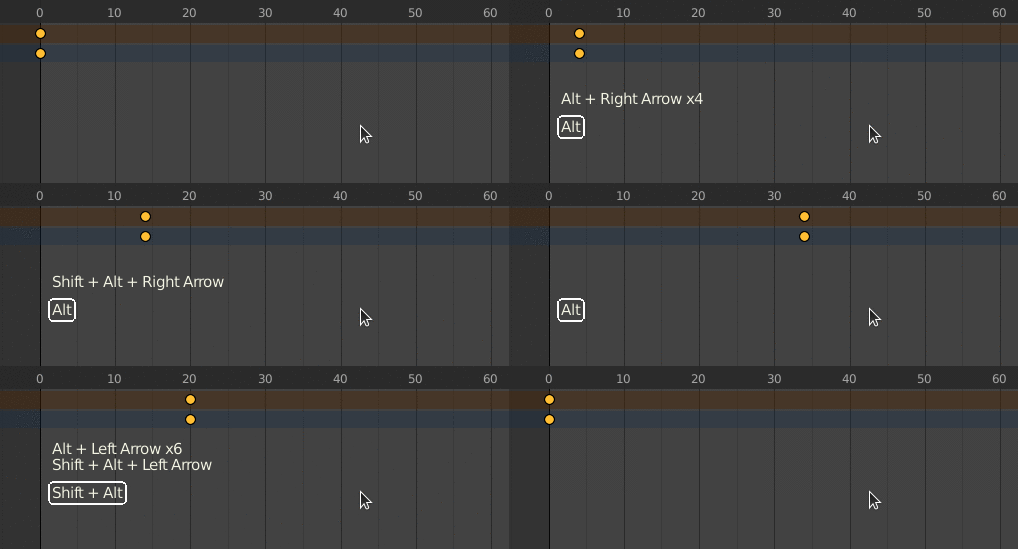
Gif preview not working, here it is: