
Motion blur in Eevee addon, v 0.31 new feature: Adaptive samples
Download here from Github. –Uncompress and install the .py as an addon–
Theres a new version of my addon that implements a workaround to have motion blur in eevee renders: Adaptive samples.
The MB works using a simple technique, for each frame ir renders a number of subframes. The more subframes rendered, the smoother the image.
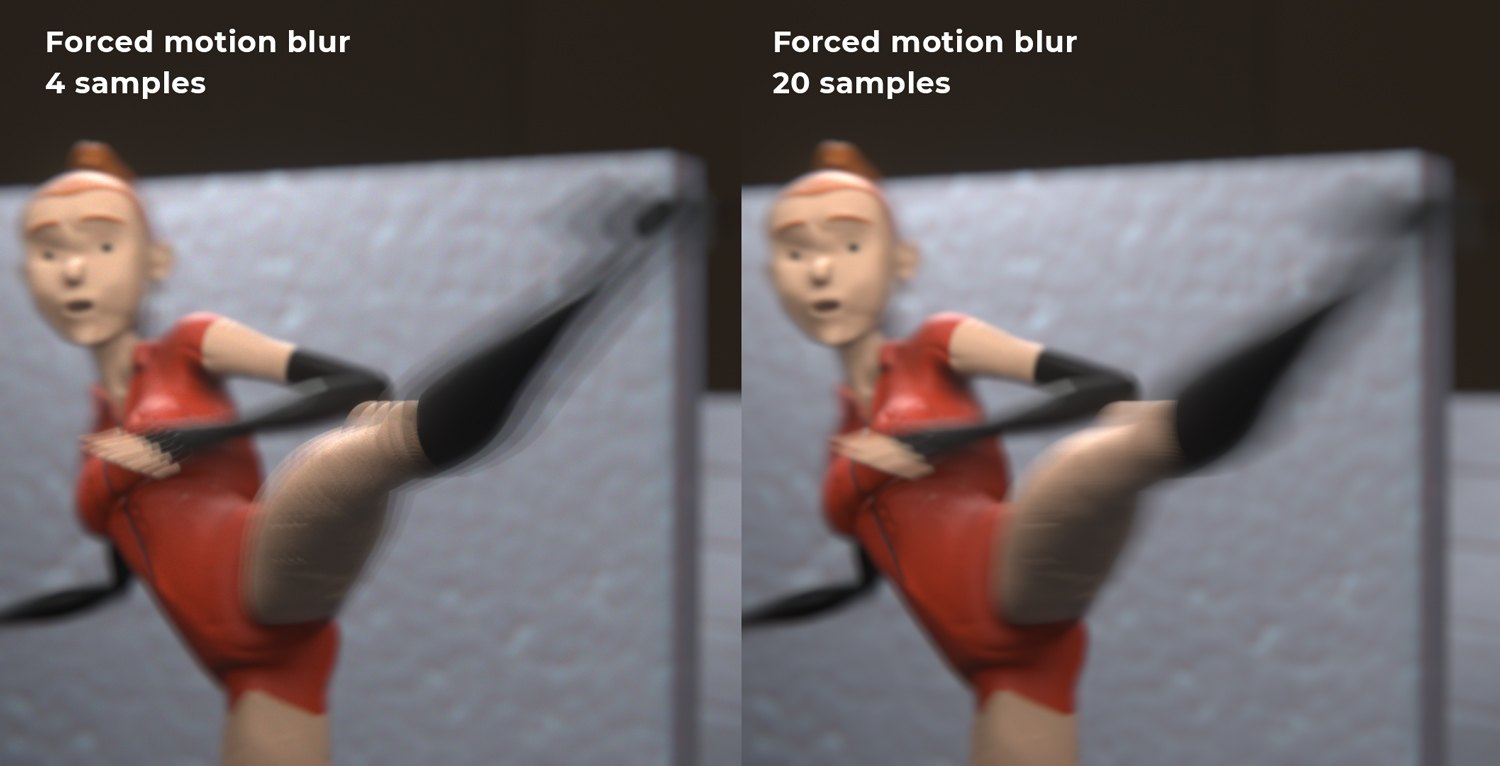
The former version used a fixed number of samples for every frame, so in frames with little motion 4 sample frames were maybe enough, or even too much, but in faster moving frames 4 samples becomes noticeable (see image). Cranking up the samples solved the problem, but at a high cost in render times.
Now adaptive sampling estimate the amount of motion in each frame and calculate the samples needed to render smoothly, with a tolerance measure by the "pixel tolerance" to tweak the samples needed per distance.
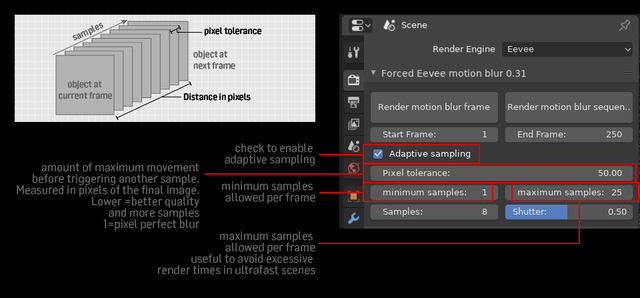
This way the render resources are allocated more efficiently There’s a minimum and maximum samples override, to avoid rendertime-crushing peaks. I got over 500 frames in some tests, and thousands even. When an object gets too close to the camera the pixel speed can go up like crazy), there's a math reason for that, the speed go up to infinity as the object approach the pinhole camera. So it's key to limit that. Infinity is very unhealthy inside a python loop. The minimum samples option is to compensate for some special cases (like particles) that doesn’t get calculated for speed (still), and whatever. Just in case.
Tell me what you think!
Issues/caveats:
- Particles are NOT taken into account yet. I’ll try to solve that, in the meanwhile if there’s particles in your render, set the minimum to, say 4 or 8 and you should be covered.
- The movement is calculated using just a couple vertices of the bounding box, for speed, so the estimate is very approximate. Speed readings may not be always accurate, and may be rediculously high when objects cross the camera plane. Something to solve.
12 Comments
There's been lots of little improvements these days (like saving the images in the format chosen in the output settings), I'm fixing bugs and details almost daily. Later I'll take some time to post an update here. In the meanwhile you can redownload and test again. The link is always the same. Thanks for your interest everybody and feel free to report any annoyances you find so we can fix it together
* @Pablo Gentile * Thank you so much for the work! It would be great if you incorporated your work into the official Blender assembly.
* @evil_voland * This is a sort of dirty workaround as a python addon. To put something like this inside Blender core we need a real developer familiar with C and Blender's code. I can't do that... but maybe some developer can
Amazing! Thank you very much!
Did some experiments and I'm having issue with colour/gamma. Why are there inconsistencies?
(Also, why does bloom add up on layers? Should I do bloom in post now?)
{attachment PureRef_2020-01-01_15-29-58png}
Did some more experiments with animated cubes on default lighting, RGB at 1.000. Filmic at Medium (base) Contrast was used.
I then did tests with different MB corrective gamma settings compared to an image with no MB. I sampled the same pixel every render using DJV. The default 0.45 is not good.
{attachment explorer_2020-01-01_17-32-44png}
I found the closest grey to match to re default reference is on 0.43, but even then the colours are still off. I tried going on a 0.005 increments also, and still the colors go off or the grey goes off.
{attachment ONENOTE_2020-01-01_17-31-56png}
I would like to only need to tune one color management system at a time and not need to do this in post. Why are colours needing to be gamma corrected when using the addon?
* @AnubisMaster * Found out what was the problem. It renders in Standard RGB instead of Filmic, even if Filmic is set in color management.
* @Andres Stephens - Trinumedia * hi there, sorry for the delay. I've been real busy lately, no space in my mind to check this, or atted the development of the addon. Thank you for your tests, I'll try to understand what's happening. I'm using just the blender API to render, that takes very few parameters, not much to adjust there. It doesn't expose the internals, so it's difficult to know what's happening with the colors. And for the Bloom issue, it's the same, maybe the bloom is meant to be applied last, after merging the frames, but I have no access to that from the Python API, so the bloom gets appied one time for each frame. I think the only real way to overcome that is that de devs accept to include at least this "brute-force" motion blur in eevee as a real feature. This addon is not a real solution, is just a crude workaround. Thanks again!
can you explain what's different from the normal Motion Blur in blender?? i'm not very knowledgeabl with motion blur
* @AnubisMaster * Motion blur in Cycles works ok. In eevee is implemented only for camera movements, not objects or everything else. And only works for pure camera movements, if the camera is parented or rigged it doesn't work. This solution works with every thing. Watch this video if you need a better explanation: youtu.be/tyE82eMdOVE
* @Pablo Gentile * that's the worst thing ever what i was searching forever is for MOTION BLUR that EXCLUDES camera ,so i get only characters blurring
Does this do that? Exclude camera from motion blur even if it moves and Only Motion Blur on characters
* @AnubisMaster * Nope. This does exactly what a regular motion blur in camera would do: "spread" the rendering over a defined timespan. Anything that moves inside that timespan gets blurred. And this is the way motion blur works in cycles too.