
Problem with open GL
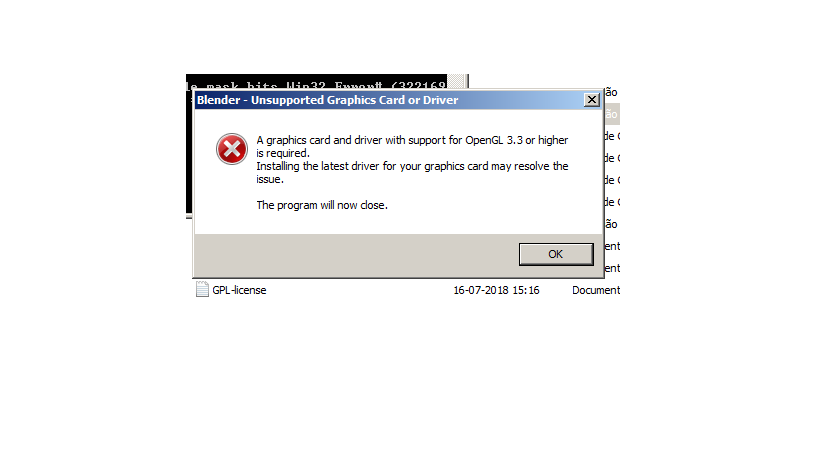
Hey guys, I am trying to start with blender but when I open the program (2.8.2) I see an error message that says that my graphic card must support open GL 3.3or higher
My graphics card is an Intel hd 3000 and supports open gl 3.1 but I have another one AMD Radeon HD 6470M that supports open GL 4.4 supposedly.
Can somebody help me with this.
Thanks
13 Comments
Unfortunately, both of your GPUs are below the minimum requirements for Blender. blender.org/download/requirements/
Installing the latest graphics driver sometimes helps to make such GPUs work, see here for more information. docs.blender.org/manual/en/dev/troubleshooting/gpu/index.html
If that doesn't help, you can use Blender 2.79: blender.org/download/previous-versions/
* @EvanAndrewWilson * Hey, Thank for your kindness. Ok, I will use the 2.79 version.
i get that message and i have Dual RTX 2080 Ti, it doesn't make sense. the only way to fix it for me was to start a new blender scene and import the scene from the project that crashes my program
* @Naseem Shanbour * Driver installed?! Games are working?
* @Christian Clavet * Driver installed and games do work, its not that Blender doesnt work, its just at some point in the project's progression this happens. and i'm forced to migrate the scene to a fresh new project file. thats how i work around it. something happens in the project file that force the crash and gives me a meesage says "A graphics card and driver with the support of OpenGL 3.3 or higher required" i suspect an Addon bug
* @Naseem Shanbour * ... Then you should report this as a bug.
IF some addons are doing this, it's making the Blender core doing something that is not designed to do. Graphic card type detection is supposed done only from the core, not from an extension (using the python API).
If your project file is doing that everytime, then if you can provide the Blender Dev the file so they can replicate the problem. They need to be able to make it happen on their end to fix it.
Meanwhile, if you can open Blender and disable OptiX and only enable it only before starting rendering.
Since Optix is related to graphic card capability detection, perhaps something to do with it. Disabling it while you work on your scenes could perhaps help. Since Optix is a brand new feature, and you have the hardware to use it, could be related to this.
If disabling Optix fix the problem, please report it also, it should not happen.
Hi, The intel GPU will only support Blender 2.79b it,s too old.
The AMD card should work, but you need to update the drivers. Be sure this PC have 4Gb ram, and that the CPU is supporting SSE2. A 32bit CPU will not run it.
* @Christian Clavet * Yeah, I did update the drivers correctly I think. But then I updated with another method and that method defines my 6470 AMD as 7400series AMD, and in that way works, but then some problems appears in computer. Now I am using 2.79 but the icons for tools and toolbars do not apears, just squares with gradient...
Thanks for your help guys
* @carlosafonso_70 * Humm... Are you sure this card is still good? Blender 2.79 should work on almost anything (OpenGL 2.1). If you see this then the driver is not working at all. Or you are running on a VM (Virtual Machine) or over remote desktop. Theses environment are not supported.
* @Christian Clavet * well, I dont know. This computer had problems with motherboard and I send it to fix. Then it works. I format it some days ago. And it look that everything is ok. I instaled driver booster to check the drivers and seems that my AMD 6470M is working correctly, but I dont know. when I try to use some programs that need graphic card it is a problem sometimes. But I have no games instaled, I dont use to play. I use corel draw and it works well, and I use sketchup and it works... of course if I make complex models it is a little bit slow... I dont know, but thanks for your help
* @carlosafonso_70 * Since you are using driver booster, it explain it all. The hardware detection is not accurate.
Get it directly from AMD and remove the one that was installed. amd.com/en/support/graphics/amd-radeon-hd/amd-radeon-hd-6000m-series/amd-radeon-hd-6470m
I think it's slow because it's only using software support for opengl (V1.2)
* @Christian Clavet * hey. It was a problem with a missing .dll mediafire.com/file/6ntvyw8v165em45/opengl32.dll/file this one. A guy helped me in portuguese forum. And now both versions work. But thw 2.82a is more slow tanh 2.79, in my computer.
So, I think I will use 2.79.
Thanks
* @carlosafonso_70 * I know. This issue was caused by driver booster. It's only installing the minimum. (Sometimes it will even happen if you let Microsoft install the video driver from the autodetect.
For the video card, if you want complete support, you need to install the manufacturer driver.