
Add Background Movie Clip with Python
Hello Everyone!
I'll have to rotoscope some movie clips with different resolution and frame rate.
I'm trying to write a script to help, but I did'nt manage to add the film in the Background Images properties of the camera data.
here's the script so far
import os import bpy import ffmpeg
#add movie clip and configure path and name variable videoFile = "/home/xxx/xxxxx/videotheque-2/videos/test_video.mp4" videoFilepath = os.path.dirname(videoFile) videoFilename = os.path.basename(videoFile)
#get metadata videoMetadata = ffmpeg.probe(videoFile) video_stream = next((stream for stream in videoMetadata['streams'] if stream['codec_type'] == 'video'), None)
videoWidth = int(video_stream['width']) videoHeight = int(video_stream['height']) videoFramerate = int(video_stream['r_frame_rate'].strip("/1")) videoTotalFrames = int(video_stream['nb_frames'])
print ("filepath: ", videoFilepath, "filename: ", videoFilename, "Resolution = ", videoWidth, "x", videoHeight, "Total Frames = ", videoFramerate, "Total Frames = ", videoTotalFrames )
#Configure Camera Background bpy.ops.object.select_camera() bpy.context.object.data.show_background_images = True bpy.context.object.data.background_images.new() bpy.context.object.data.background_images[0].source = 'MOVIE_CLIP'
bpy.ops.clip.open(directory=videoFilepath, files=[{"name":videoFilename, "name":videoFilename}], relative_path=False)
#Configure Scene #Format - Resolution bpy.context.scene.render.resolution_x = videoWidth bpy.context.scene.render.resolution_y = videoHeight #Format - Frame Rate bpy.context.scene.render.fps = videoFramerate #Frame Range bpy.context.scene.frame_end = bpy.data.scenes["Scene"].frame_start + videoTotalFrames
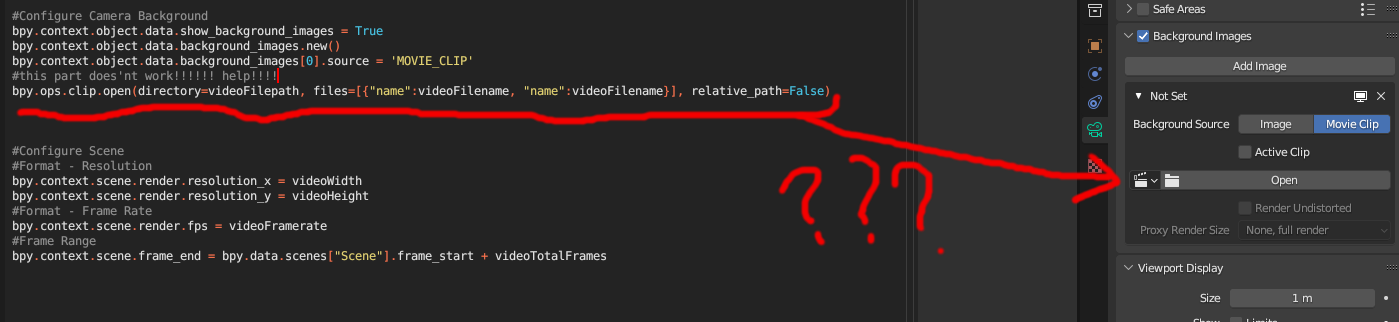
Any clues on how to find a way to make it work? (I'm not a developer, please don't beat me!)