
Blender Update [v2.82a]
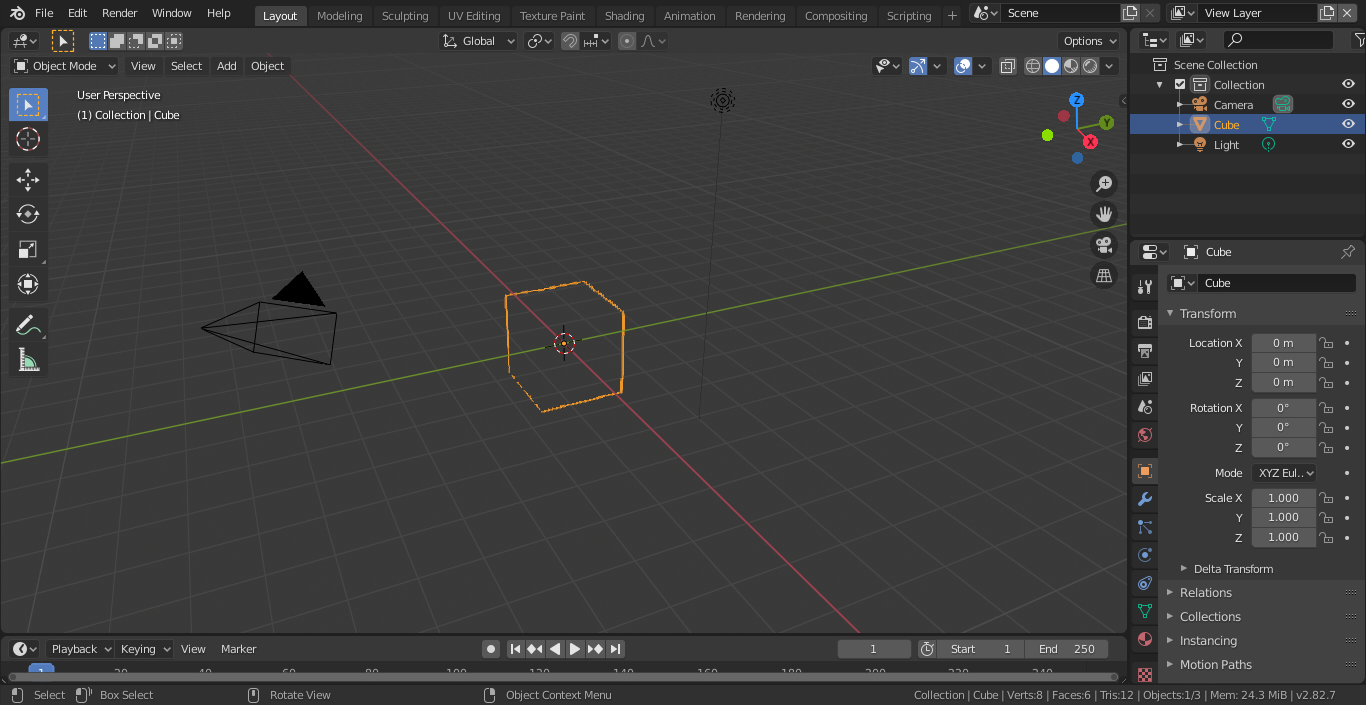
I just recently downloaded the software's latest version, 2.82a. On opening it up, the first thing that i noticed was that the default cube in the 3D viewport was not solid, i.e., it just had its edges selected. On deselecting, the object is no longer visible. How do I rectify this issue?
9 Comments
Check your Cube's color under Object properties/Viewport Display/Color. I had the same issue with older files, some object's alpha value was 0, don't ask me why.
* @onfilm * Cool. Never tought of that. 😊 Just tried it and was able to reproduce the problem.
* @onfilm * I'd tried this out already. Didn't work for me. The alpha was set to 1 by default.
2.82a will not open for me. IMO "a" should only be for "alpha"
* @othoap * Might be the case that it's a testing version. Do you have the download link to the older versions? I'm not able to find them.
Hi, You might have to reset your preferences... Could be caused by a data corruption between the versions.
* @Christian Clavet * Hi. I tried setting the preferences back to factory mode. Also installed and uninstalled the software version again. But the issue still seems to persist. Should I just revert back to the last stable version? Is it 2.79? Thanks for the response!
* @rahulgeorge2000 * Oh! 🙄You didnt upgraded Blender but did a new install... (From the post title, it seemed to me that you simply updated)
What video card type do you have? Have you updated the drivers to the latest version? The requirement for Blender 2.8x are higher than the old Blender 2.79b version.
Since version 2.8x, OpenGL 3.3 support is required. The older version can work with OpenGL 2.1.
You can double check here if your system comply with the requirements: blender.org/download/requirements/
I think a display driver update should fix this, since I don't see any other issue on your display (GUI is fine and wireframes are draw correctly). You might be stuck if you are using a MAC since the drivers are in the OS.
* @Christian Clavet * My current display driver is AMD Radeon HD 8450G. Seems like this might be the issue. Will see if it's possible for me to download the required driver. Thanks a lot!