
How do I Export My Material to Unity?
Hello Friends. So, I need your help with a little problem of mine, exporting my character material to unity. Me and my friends of university are doing a low poly cardgame and I'm using a coloring techinique which I learned in Imphenzia channel, but, I simply dont know how to export the colors (In the right place) to unity.
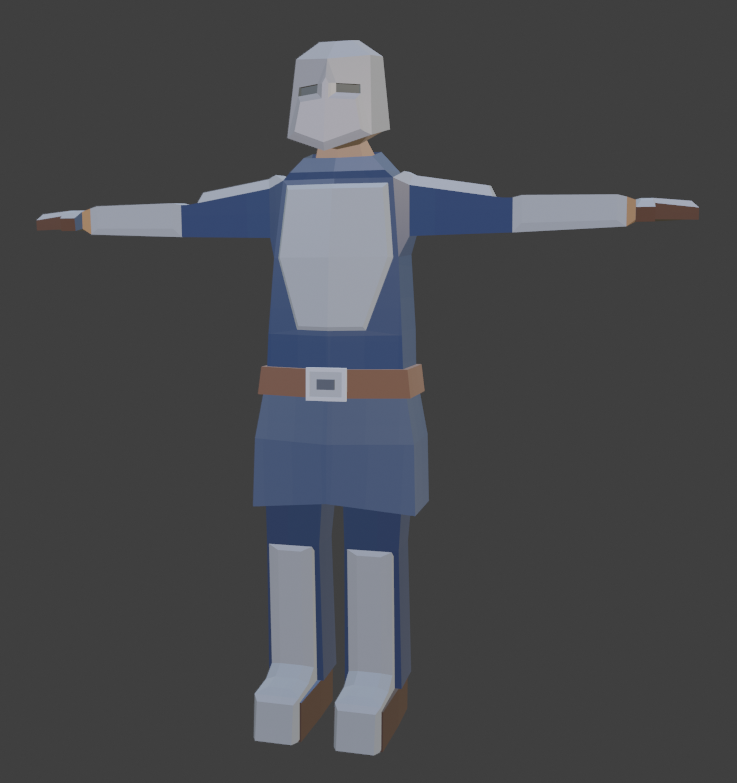
~there is a print of this little generic soldier that I'm trying to export to unity without making a mess with his colors~
12 Comments
Hi, Basically, you need to re-create the materials in Unity.
If you had a complex node setup you will need to find a way to bake it so it at least export as textures that you can re-use using the proper defined shader inside Unity.
I don't know if there is a shader in Unity that could handle the vertex colors if your are only using vertex colors on your model.
* @Christian Clavet * I'm using this technique: youtube.com/watch
And by any means, would you know how I can do this in Unity or would you know how to recreate this?
In advance, Tkx for your help.
* @Ricardo Di Sessa Genari * This is simple UV coloring. You can export your model as FBX to Unity, then define a new material using the standard shader, and put your color texture into the diffuse slot. That it.
* @Christian Clavet * Well, this was the first thing I tried to do after finishing the model and this happened: imgur.com/a/McFU366
* @Ricardo Di Sessa Genari * I'll repeat it step by step. You must be missing a step.
* @Christian Clavet * Yes, I did all this steps, but nothing changed.
Then I tried to bake the texture in blender, but, the same happens. I dont have a clue why this is happening.
* @Ricardo Di Sessa Genari * What do you mean "bake"? 🤔
From what I saw from the video link about the technique you used, the texture is PAINTED and saved. As in your video:
You only need to save the image with the color squares and load it back in Unity. Do you have an image like this?
* @Christian Clavet * I tried to do like the video shows, but you already saw what happened, then I tried to do what you said "If you had a complex node setup you will need to find a way to bake it so it at least export as textures that you can re-use using the proper defined shader inside Unity." (even though it is not a complex texture), but the same happened.
There must be something I did wrong and this is happening, but I have no idea what it is.
* @Ricardo Di Sessa Genari * Hi, I was saying that because I didnt know what type of textures you had and your node setup. If you follow the video you posted. The node setup is really basic, (no procedural), you only need the picture of the color squares and you map the UV to use the proper color. No need to bake.
The problem is only exporting the texture right now. I don't know what picture you are sending to Unity. It should be a pic like I've shown (color squares). Your's should have blue, gray and brown squares at least. Do you remember where your saved it?
* @Christian Clavet * I'm exporting to unity the picture with the color squares used to paint the model (even though it is not very well fitted as in the video), it has a 4x4 pixel count.
imgur.com/a/kxRK057
* @Ricardo Di Sessa Genari * That's good. I've opened it in GIMP and everything is there. Here your color palette for your character:
You should now have everthing you need. Just use this picture(the one you posted) as your diffuse texture in Unity and it should work.
Here what you need to do (all to be done in Unity).
Steps outlined in italics are very important.
Here is an official video from Unity on how to create materials in Unity (It's old but it will help you understand how material are created in Unity):
* @Christian Clavet * Right, thanks man for patience. I'm going to try it when I go back to my computer