
[Updated July 5 2019] Eevee Motion Blur addon new feature: Adaptive samples
(scroll down to see just the updates).
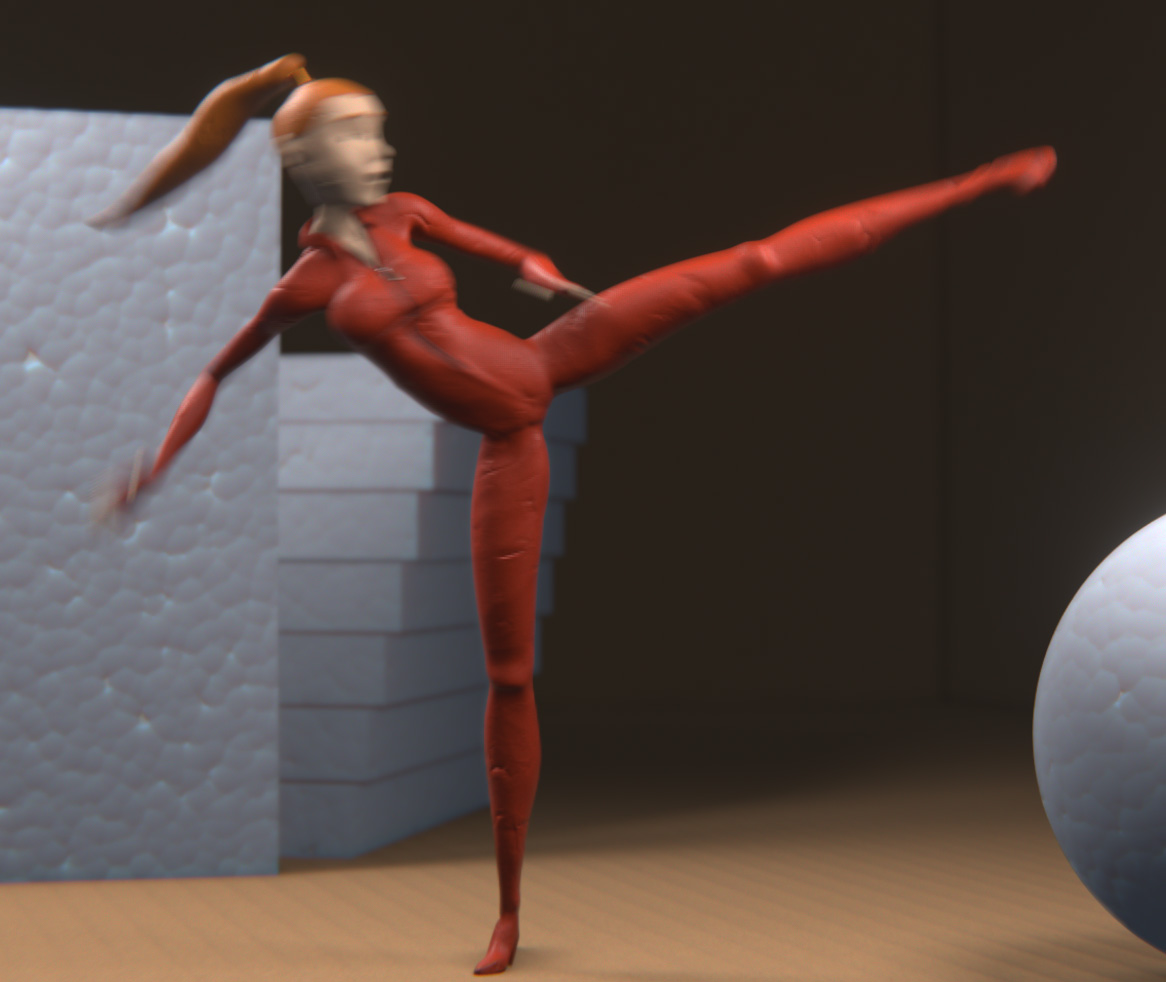
Eevee is great and fast. But it's still lacking one key feature: real motion blur. This addon implements a workaround to have real motion blur render in eevee. It supports everything: objects, particles, modifiers, everything that is interpolated in real time, because it takes a brute force approach for rendering subframes.
It works out of the box, adds a section under Properties>Render with two render buttons, one for stills and other for animations. Only caveat for now is that is can only render image sequences, so it outputs .EXRs. Maybe in the future that can be tweakable.
Download from Github and install as a regular addon.
[Edit:] you must decompress the zip, and select just the " eevee_motion_blur.py " file, not the entire zip.
[Edit 2:] 0.21 is out, now with alpha output support . Cancelling via CTL+C in console is better hanled without leaving the settings messed up. No ESC key yet though.
[Update July 5 2019] v 0.31 new feature:
Adaptive samples!
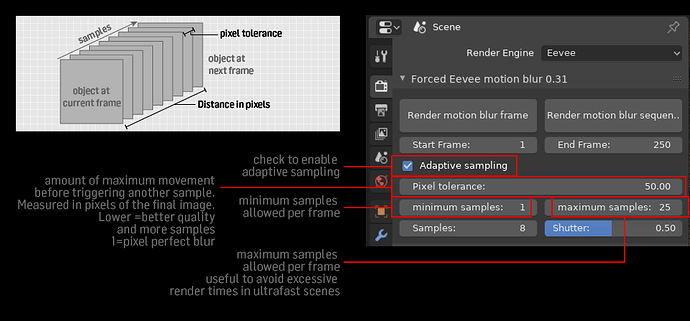 Calculates the amount of samples each frame based on the actual movement at that frame. This way frames with lots of movement get more samples, and the ones with little to none may get no subframe samples at all. This way the render resources are allocated more efficiently :+1:
There’s a minimum and maximum samples override, to avoid rendertime-crushing peaks (I got over 500 frames in some tests, especially when an object gets too close to the camera the pixel speed can go up like crazy).
The minimum samples option is to compensate for some special cases (like particles) that doesn’t get calculated for speed (still), and whatever. Just in case.
Calculates the amount of samples each frame based on the actual movement at that frame. This way frames with lots of movement get more samples, and the ones with little to none may get no subframe samples at all. This way the render resources are allocated more efficiently :+1:
There’s a minimum and maximum samples override, to avoid rendertime-crushing peaks (I got over 500 frames in some tests, especially when an object gets too close to the camera the pixel speed can go up like crazy).
The minimum samples option is to compensate for some special cases (like particles) that doesn’t get calculated for speed (still), and whatever. Just in case.
Tell me what you think/if it works ok for you.

Bugs/to do/caveats:
- May cancel hitting CTL+C in the console a few times.
- The effect relies on a Viewer node connected to the same output as the Composite. It adds the node all by itself, but first it checks if a Viewer node exists, just to avoid disrupting some fine node setup, but in that case it will render whatever is connected to the Viewer.
- This may be a bug or a feature... ;-) you can motion blur any point on the compositor, but the right thing would be to implement all inputs. To do.
26 Comments
Next steps:
* @Pablo Gentile * Looking forward to these updates.
And a huge special enormous Thank You to the developers for adding the feature. You are doing an amazing work. Give them your support. Good luck!
Just awesome, I was eagerly awaiting the team to add this, and now you've done it and it works fantastic so far in terms of results.
One note, when I hit render, the system seems to lock up while rendering (I'm on Windows) but then when I was about to shut down Blender, I saw that the rendered images in my sequence were appearing in the render folder, so I knew it was working. Viewport/application became responsive again when render was complete. Is this normal behavior? I'm running it on a recent experimental 2.81 build so it's fully possible that this is the cause.
Next question, is there a way I can send some money your way to buy you a coffee or a beer!?
* @Matt Hoecker * Thanks for your interest! Yes, that is (sadly) "normal" behaviour right now. I'm just a user with some limited scripting skills and I still couldn't find a way to send feedback to the interface (to the status bar or anything) before the whole script finishes. All the methods I know to send feedback wait for the script to finish before redrawing the blender window :-(. I'm learning more about blender API and python itself hoping to find a way to make this integrate better with blender. If you are on windows, you already have the console open, (the black cmd window) there's some feedback on the progress and some internals sent there, you can check it ;-). You can also sort of cancel the render there hitting CTL-C repeatedly on the console. And about the money, well, I appreciate it a lot, but right now I can't accept it, I'm doing this in my (little) spare time, mostly for myself –I use it a lot–, and to learn scripting too. I share it for free as a retribution to this awesome blender community and all the free resources and tuts other people share. Thank you, truly. Use that money to donate to the real Blender devs that make this awesome app even better every day! I'll keep all this communities updated if I manage to integrate this addon better. Thank you!
* @Pablo Gentile * Thank you so much my friend for your contribution. I support Blender Dev Fund as well, and I too like to give back to the community, and I especially like to bless those that don't expect anything in return (though I have nothing against people that sell their addons scripts/work.)
This is a fantastic addon so far and such a godsend. Thank you!
very helpful addon, thank you!
New version 0.31 with new feature: Adaptive samples, to render a variable number of subframe based on the actual movement inside the frame.
Hey wow, this is one of the key features that had me still in other software, like Unreal Engine for my rasterized rendering. I'll give it a go.
* @Andres Stephens - Trinumedia * Awesome, tell me how it worked! Thank you
* @Pablo Gentile * Gave it a whirl. It only renders out one View Layer at a time. I tried it on 5 at a time through the compositing, but it only composited the first view layer. Other than that, a good old cancel ability/button and the Render View feedback update of the results would make this awesome! Oh.. and file formats other than EXR?
* @Andres Stephens - Trinumedia * Yeah, you're right with everything... I'm doing this one feature at a time ;-) It's just me. The ESC issue is important I know, I couldn't find the right info on how to process it, tried many snippets out there, and none worked. Maybe something changed in 2.8 and it's still to be documented. Any help appreciated.
To process more than one View layer would be great. The big challenge here is that as this is a workaround, and the way I got to save the MB renders is very hacky, –to say the least– I don't have full access to the File Saving pipeline already there when you render, or I don't know how –yet– I'll try to find a way.
It's the same with the output in other formats, my goal is to output any format set in render properties, but I coudn't find a way to output video from python. If I can't find a way I'll make it respect the image output formats and default to EXR if there's a video format selected. Thanks for your feedback!
Will be following this. Thanks! And nice job!
Very interesting script-workaround for Eevee, congrats :)
* @Juan Gea Rodriguez * Thank you!
So, that's it. Our prayers have been heard, and motion blur in eevee is a reality now. Thanks to all of you for helping and testing this workaround. I learned a lot in the process. Welcome to the furure.
Is there a way to enable motion blur on images I import as "Images as Planes" in a 2D Animation? So far I don't get any motion blur. Thanks!
downloded the file ... installed the .py addon .. i press f12 .. no blur ... i press "render motion blur frame" .. loads for a while and nothin happens .. Any idea?
* @salahelfi * Sorry for the delay answering. To actually have the motion blurred render you have to call it from one of the addon buttons. And be patient, it may take a while to render. It gives no feedback in the UI. In the present state of the API, there's no way to do that, at least that I know. It gives feedback though, through the console, but you have to know how to start blender with the console and check it. Also, the motion blurred frame will appear in the render folder, not in the render window. This is more of a scripted workaround than a real feature. Enjoy.
Looks interesting. But if I try to install the ZIP in the "Preferences" it does not show in the list. Also no panel in properties > Render Any Idea?
* @Clemens Rudolph * just unpack it and in the addon preferencees browse for eevee_motion_blur.py and install that
Alpha transparency is not supported? I can't get it to work.
* @Marcin Twarowski * Everything is supported. Remember to enable Alpha Blend in the material. Everything renderable with F12 should work with these.
* @g3ntile * I mean transparent background. I enabled "Transparent" in film settings but EXRs are saved without alpha. Actually, world background is not rendered at all.
* @Marcin Twarowski * yeah thats one of the not finished features I mentioned above. Will make it for the 0.2. I was too excited with making this work, so I focused on that. Now I can polish the details.
* @Marcin Twarowski * Try it now, the alpha transparency should work ok. Tell me if it worked ok. Same link