
How to update vertex groups with geometry nodes?
Hello :-)
I'm very new on "geometry nodes", and I appreciate if someone could help-me.
I need apply a boolean operation adding a gap between the objects. I already know how to solve this using displace, but since I need apply this to a bunch of objects I made an solution using nodes (so far so good).
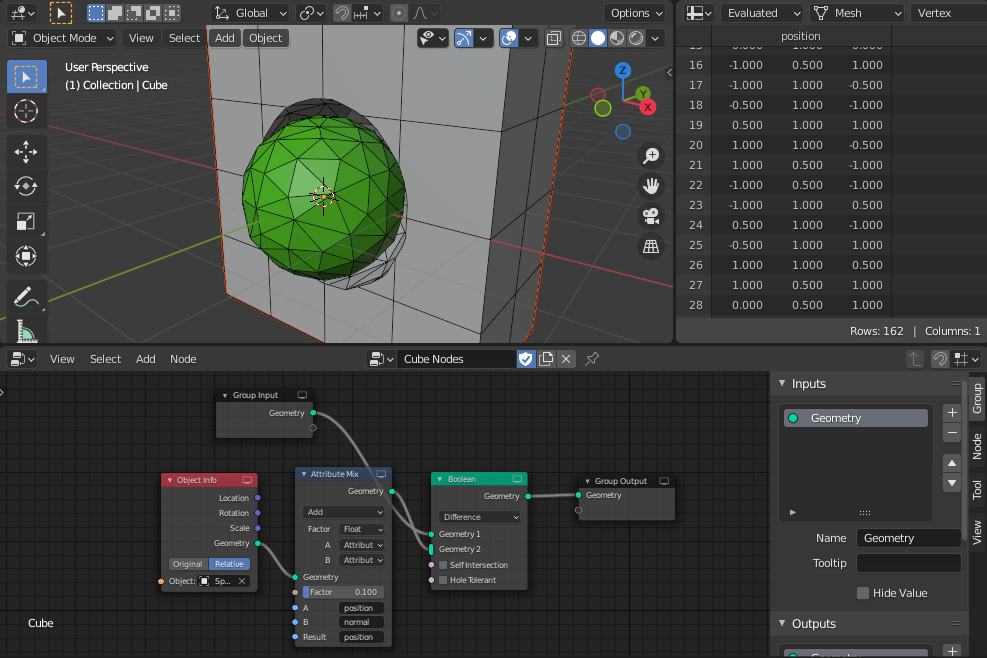 Now is the problem, I need export the resulted geometry as Wavefront (.obj) and all vertices need to be added to a vertex group, however, the resulted new verticices of the boolean operation appear null in the exported file...
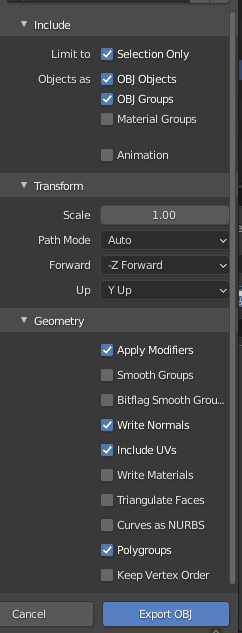
Has anybody an solution for this problem?
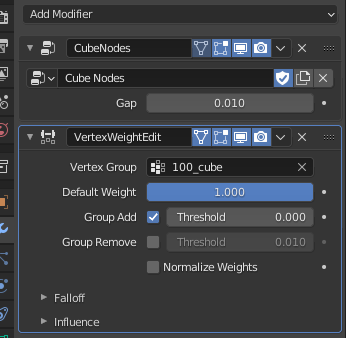
[edit:] I found a solution using the "VertexWeightEdit" modifier with [Default weight: 1.000 | Group Add, threshold: 0.000] after the geometry node modifier. However, I still looking for make this direcly on the geometry node.
Blender File: drive.google.com/file/d/1ImpADyxmHVmUJOoc1QsJkhKDttvnPTXn/view
Thanks in advance! Vagner
5 Comments
Apply geometry nodes modifier
Thanks, I already making this, however, it's very not productive, since I need apply and add manually the vertices... export and undo what I make...
Maybe I was not clearly. I don't want apply and add manually the vertices. I trying to find I way to make this using the geometry nodes, if it's possible.
I'm already using "Applying Modifiers" on exported options...
It works If I do this using the boolean modifier (the new vertices are added to the vertices group), but with nodes modifier it didn't work. Maybe it's a bug.
When I applied modifier manually, boolean shape substracted from your vertex group. I also tried to use attribute proximity node, but it doesn't work with boolean node before it
I found a solution... maybe is not the best solution, but works.
I added the "VertexWeightEdit" modifier with [Default weight: 1.000 | Group Add, threshold: 0.000] after the geometry node modifier.