
Blender 3.2 VERTEX COLOR!!!
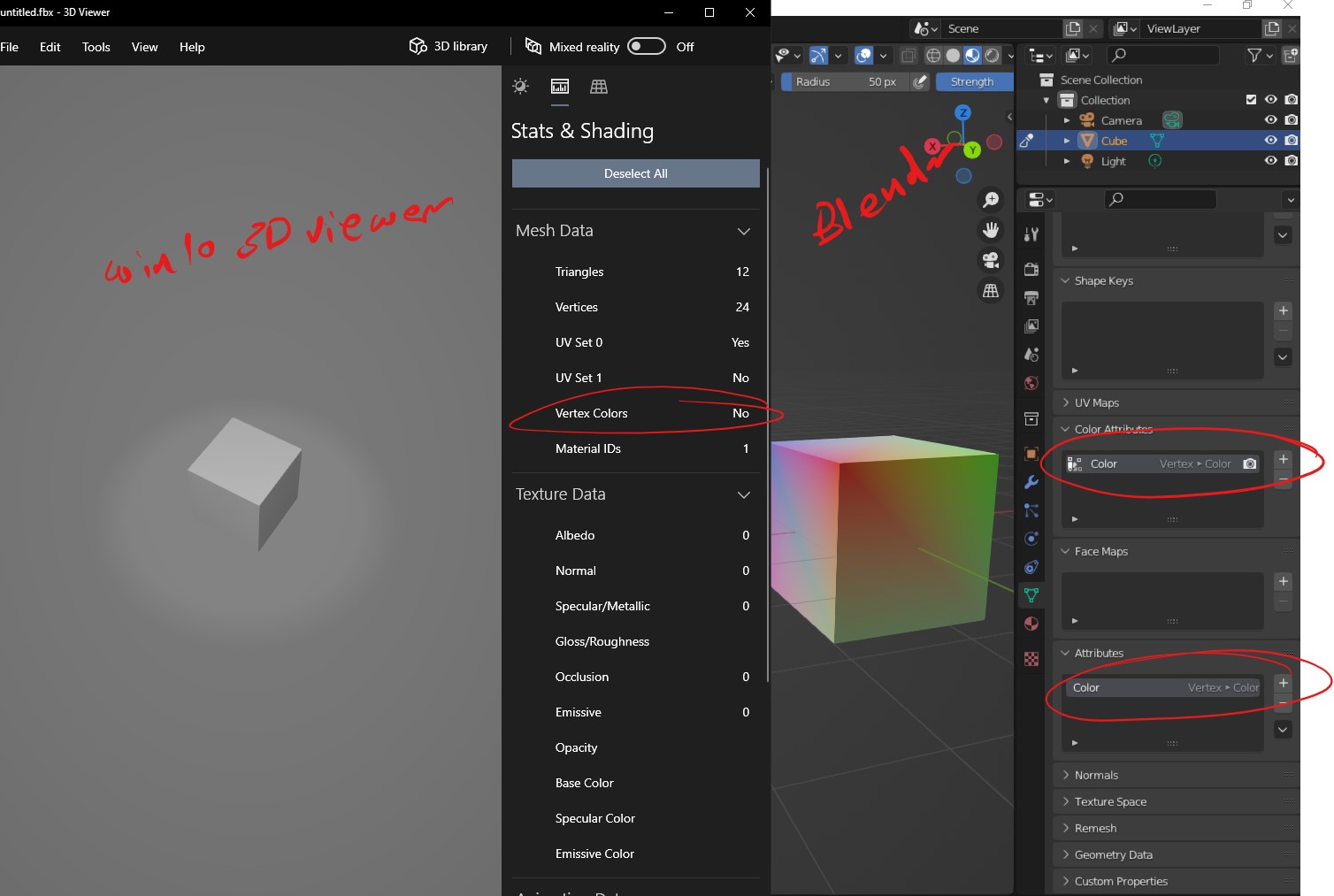
In blender 3.2 I have added vertex color to the cube but when exported to the following file format (FBX, ABC, OBJ....) vertex color is not saved within the file & when viewed in a different software it shows that there is no vertex color data!
How can the vertex color be saved to the file formats in Blender 3.2 to be viewed in other software?
11 Comments
Not sure what types of Vertex Color can that 3D viewer preview, but in that example you created Vertex (domain), full color.
Try creating a new attribute in the Face Corner domain, Byte Color data type.
You can convert existing attributes. The operator is available when you search for "Convert Attribute" when "Developer Extras" is enabled (Interface section of User Preferences):
thanks, Pablo, it worked!
I tried converting the vertex color to byte color, but is has two issues:
I will look further into this and create a bug report
edit: You are right anyway i forgot to convert to "face corner" instead of vertex
Hi Pablo, sorry to bother again, but I was curious if exporting "vertex domain" data to .fbx or any other format is planned or further investigated? Or do I get it wrong and is it an issue with the target engine... for example Unreal just does not read the vertex color data in that case?
If this is the case, Ill ask Tim Sweeney.
Because baking to vertex is a bit nicer that baking to face corner:
Anyway, have a great day!
Having the same issue here with exported fbx:es unless I convert the attribute to byte color like Pablo suggested. Seems like the fbx-exporter addon is not working with the new "color_attributes" AttributeGroup added in 3.2. Looking in " export_fbx_bin.py " line 1116, the Vcolors is gotten from me.vertex_colors which doesn't contain the new color attributes with type of "float color" and doesn't get written to the FBX file.
I am not really sure MS 3D viewer is the best tool to verify vertex color. I tested a round trip from blender to fbx and back into blender. The vertex colors were still present. I also imported the fbx to Painter and was able to bake an ID map from the vertex colors, so I think the vertex attributes carry over at export. The 3D viewer does give me the exact results you are seeing.
yes its true, MS 3D viewer deceived me :(
3.3.0 Still no Vertex color exporting. Tested in Blender (by re-importing) and with Unity.
Sitting with the exact same problem. And the problem might not be Blender. But more Unreal Engine (4.27.2) in my case has vertex colors disabled on import.
So in the mesh view Go to Details > Import settings > Set 'Vertex Import Option' to Replace. Now Reimport base mesh.. and vertex colors should show up on the mesh if enabled in the mesh viewer.
In a quick test I did this morning.. the red was orange though... soo something IS up in the FBX export.
imgur.com/clbreQA.png
Found the solution! In 3.3.0 You MUST have your color set to Face Corner AND Byte Color or FBX will not encode the colors into the verts.
Thank you so much for posting this. I have just spent hours (4?) trying to solve this but no luck until I found this comment. Thank you for sharing and helping out this stranger on the internets.