
Set User Preferences to active areas: [Ctrl][Shift][F1] or as a new workspace tab area: '[F3]prefs[Enter]'
This is a way to set a hotkey in User Preferences to enable changing the active area to User Preferences whenever needed:
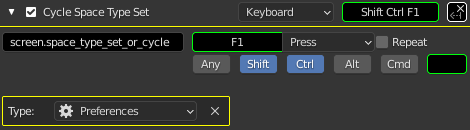
Another way User Preferences can go in the Blender window.
Note that [F3]prefs may not put this action at the top of its list.
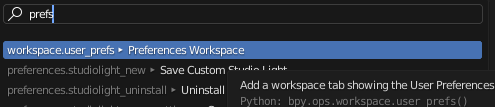
Setting Up User Preferences in its own Workspace Tab
The script sets a new Scripting workspace tab and names it (for example) User Preferences . It switches an active area_type like TEXT_EDITOR to PREFERENCES :
bl_info = {
    "name": "User Preference Workspace Tab",
    "description": "Adds a workspace tab with User Preferences. Type [F3]prefs[Enter]",
    "author": "rdmo",
    "version": "0.0.1",
    "blender": "3.0.0",
    "location": "",
    "warning": "",
    "wiki_url": "",
    "tracker_url": "",
    "support": "",
    "category": "",
}

#   "credit": "1conscience0dimension",

import bpy


class UserPrefsWorkspaceOperator(bpy.types.Operator):
    """Add a workspace tab showing the User Preferences."""
    bl_idname = "workspace.user_prefs"
    bl_label = "Preferences workspace"

    def execute(self,context):
        """
Set closes_prefs_window to 'True' if you do not want a User Preferences
window and a User Preferences workspace tab. Set it to 'False' to ignore
an open User Preferences window while making User Preferences available
in a workspace tab. Note that set to True, the User Preferences window
may momentarily flash on screen, and this may be unwanted.
"""
        closes_prefs_window = False
        # Generally superfluous and distracting.

        if closes_prefs_window:
            close_user_preference_window()

        """
The workspace doesn't have to be called "User Preferences".
        """
        ws_name = "User Preferences"

        """
If there is already a workspace tab named "User Preferences",
abort without making another.

That is, if the TEXT_EDITOR is not present in the workspace named
{ws_name}, there is likely to be a {ws_name} tab (with or without)
a USER_PREFERENCES area in place of the TEXT_EDITOR that was there
initially. That also typically means the appended, activated
workspace has the name 'User Preferences.001' so it won't get its
TEXT_AREA changed into PREFERENCES from this code as it is. So,
check if there already is a Workspace tab and drop out of this
algorithm if there is.
"""
        if ws_name in [ws.name for ws in bpy.data.workspaces[:] ]:

            print(f"""
There is already a workspace tab with the name '{ws_name}'. Abort.
If you really want more than one User Preferences workspace:
Rename the tab and rerun this 'UserPreferencesWorkspace' script.
""")
            return {'FINISHED'}

        else:
            """
Otherwise, make a list of the workspaces' names.
"""
            old_workspace_name_list = [
                ws.name for ws in bpy.data.workspaces[:] ]

            """
Add a new Scripting workspace.
"""
            bpy.ops.workspace.append_activate(idname="Scripting",
                filepath = "<startup.blend>")

            """
Get a list of the workspace names.
"""
            new_workspace_name = [
                ws.name for ws in bpy.data.workspaces[:] ]

            """
Remove the original workspace names from the list of copied names
with the new workspace name included, to leave just the new
workspace name on its own. This seems necessary because there
may be several workspaces with names like "Scripting",
"Scripting.001", "Scripting.002", and so on.
"""
            for ows in old_workspace_name_list:

                """
The reducing list of names is itself given a non-plural name to
reflect that it should end up being a list only one item long.
"""
                for ws in new_workspace_name:
                    if ws == ows:
                        """
Removes {ows} from the copy of the list of workspace names.
"""
                        new_workspace_name.remove(ows)

            """
Use the resulting one-item list to choose the newest workspace
to rename to {ws_name}.
"""
            bpy.data.workspaces[ str(
                new_workspace_name[0]) ].name = ws_name

            """
Find a TEXT_EDITOR area in the tab named {ws_name}.
"""
            parameters = get_area(bpy.context,
                                  'TEXT_EDITOR', f"{ws_name}")

            """
Retrieve the correct context for the workspace area to change to
a PREFERENCES area.
"""
            new_context = override(bpy.context, *parameters)

            """
Change the screen space to a PREFERENCES area type.
"""
            bpy.ops.screen.space_type_set_or_cycle(
                new_context,space_type='PREFERENCES')

            """
Tell the terminal from which Blender is being run the previous
name of the workspace that changed an area to PREFERENCES.
"""
            print(f"new_workspace_name: {new_workspace_name}")

            """
Tell Blender's Info window that the process is over.
"""
            return {'FINISHED'}

def get_area(context, area_type, workspace):
    for window in context.window_manager.windows:
        screen = window.screen
        for area in bpy.data.workspaces[workspace].screens[0].areas:
            if area.type != area_type:
                continue
            for region in area.regions:
                if region.type != 'WINDOW':
                    continue
                return window, screen, area, region, workspace

def override(context, *parameters):
    """
Iterate over given parameters in the application window to find
the correct context to copy and override.
"""
    override = {'window':    parameters[0],
                'screen':    parameters[1],
                'area':      parameters[2],
                'region':    parameters[3],
                'workspace': parameters[4]}
    return {
        **context.copy(),
        **override,
    }

def close_user_preference_window():
    """
This activates the User Preferences window whether it was present
or visible and closes it. It does not get called by default.
"""
    try:
        bpy.ops.screen.userpref_show()
        bpy.ops.wm.window_close()

    finally:
        print("""
Tried to close any external User Preferences window. If it was not
open then it was briefly shown to get focus (and then closed),
because I don't know how to silently detect if it is closed already.
""")

def register():
    bpy.utils.register_class(UserPrefsWorkspaceOperator)


def unregister():
    bpy.utils.unregister_class(UserPrefsWorkspaceOperator)


if __name__ == "__main__":
    register()

    #bpy.ops.workspace.user_prefs()
    """
Uncomment the line above to have the User Preferences workspace
tab appear when this script loads, rather than having to type:
     '[F3]prefs[Enter]'

In bash on my system (Linux/Debian/i3wm), running Blender with
this script as a command line parameter (-P scriptname.py)
causes Blender to crash before it displays.
"""
If two User Preferences areas are showing at the same time, it is not currently possible (Blender version 3.0.0a) to view different Preference Sections (there is only one "active section") of User Preferences in the different spaces. As the GIF shows, one User Preference section's selection actions affect the other screen space too.
2 Comments
...or just create a new workspace tab, make it a single window, set it to "User Preferences", than go back to where you want to start blender and save it as the new startup file. Done.
Indeed, yes!
There are more comments than lines of code in this User Preferences Workspace Add-on.
This example seemed a gentle way to continue to get to grips with writing code that uses the Blender Python API. This part of the API does not seem likely to change much in the near future. In projects I also prefer to keep to a Blender startup file close to the original default file, at least for the Blender version(s) and the Python version(s) in which it can be relevant. That way may make content re-use easier and could even reduce bloat.