
AnimAide (Free add-on for Blender 2.80 to manipulate keys on a fcurve)
To get the addon and more information please go to github.com/aresdevo/animaide

AnimAide is a free add-on for Blender 2.80 that has some helpful tools for animation. It gives you the ability to simultaneously manipulate a group of keys across multiple fcurves from either animated objects or animated bones in an armature.
There are some Blender options to manipulate keys, but AnimAide open the door to new possibilities. Not only has a wider range of tools but when working with a group of fcurves each one will have their local space.
Once installed, It is conveniently located on the Graph Editor's sidebar.

At the moment, Animaide has two main panels: Sliders and AnimTransform .

Sliders:

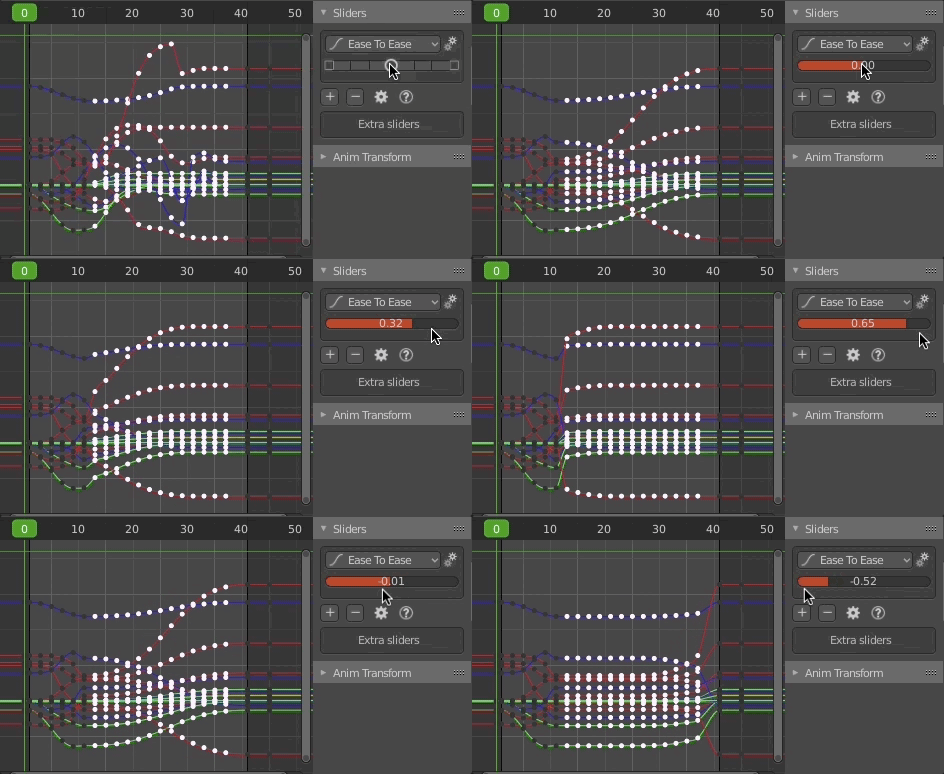
The slider is a series of buttons where the center one activates a slider mode when you click on it (you don't have to keep pressing the mouse). To accept the value of the slider you simply left-click again or right-click to cancel. The buttons at either side of the center circle apply the tool in increments of 25%
At the moment there are 14 different tools in the slider:
Ease To Ease
This fcurve adjustment it is very useful because usually, you want a nice transition between to different point in time. It does not remember how the curve was before activating the tool.

With a higher slope:

Ease
With this one, you just have either an ease-in or an ease-out, but sometimes that is just what you want. It does not remember how the curve was before activating the tool

Blend Ease
This is similar to "Ease", but it remembers how the curve was before engaging the tool.

Blend Neighbor
Progressively makes the values of the selected keys match either of the neighboring keys. it remembers how the curve was before engaging the tool.

Blend Frame
Allows you to use specific frames in the animation as reference for matching the values of the selected keys. It creates markers on the reference frames.
it remembers how the curve was before engaging the tool.

Blend Offset
Move the selected keys as a block until it reaches either neighboring key

Push-Pull
Exaggerates the values (push) or decreases the intensity of the animation (pull)

Scale Average
Scale the values of the selected keys using the average of all the values as the anchor.

Scale Left
Scale the values of the selected keys using the left neighboring key as the anchor.

Scale Right
Scale the values of the selected keys using the right neighboring key as the anchor.

Smooth
It will try to average the values of the keys to smooth out the fcurve. You might have to run the slider more than once to get a smoother result.

Noise
It adds random values to the selected keys. The more you move the slider to the right de more the intensity grows.

Time Offset
The effect is similar to sliding the keys in time, but with this option, the keys stay in the same frame. This tool works better the more keys you have.

Tween
A simple linear transition between the neighboring keys

Aside from accessing those tools using the slider on the panel, you can also use shortcuts for faster workflow (you can see the list on the question icon on the main panel). But If pie-menus are your thing, we have also provided two of them.
In case you like having the option to interact with different sliders at the same time, we have provided you with that option too. By clicking the plus icon on the main panel you can add extra sliders (with the minus you can remove them). Each extra slider can use any of the tools with the preferences adjusted independently (so you can have the same tools in different sliders with different preferences).

There is another workflow where you can jump from key to key and adjust each one just with the keyboard using shortcuts.

Changing a setting you can affect all the keys in the frame even if the fcurve is not selected.

Anim Transform:

This tool freezes time, so any transformation you do to an animated object or bones in an armature affect the entire animation equally

If you add a mask to it just that section will be affected.

The mask has the option of adding a blending border that fades the effect of the tool.

I hope you find these tools useful.
27 Comments
"Ubisoft likes this" xD - Seriously though, a smooth filter is the only thing I've been really missing in Blender since I've been working with Motionbuilder, and then there's more! These are a bunch of awesome tools I'll now be craving for in mobu/max, and I really hope my boss lets me try and implement our standard rig in blender. A big big thank you to the developer @aresdevo
* @ferran m.clar * Thanks man... Funny you mention the "smoothing" tool because I'm in the process of making that tool work better.
* @aresdevo * Life is good :D Consider giving a look at this Butterworh filter thing from Motionbuilder, as an alternative to regular smoothing (not to replace it, I actually use both in combination when processing mocap data), should you feel like investigating :) Man I can't wait to get some mocap setup at home and try this out somehow!!
YESS youre the best!, i've been missing this stuff from animbot so much!!!! you think you'll do the xForm relationship ones aswel?
* @Luciano A. Muñoz Sessarego * hmm... don't know that one.
* @aresdevo * also part of animbot, anyways, great job im playing with it now. you know what would be great, if you could setup a hotkey and when you hit that the slider that you have will appear as a floating panel under the mouse cursor in whatever view you are like 3d view or whatever
* @Luciano A. Muñoz Sessarego * Interesting... that could be implemented. I have a question though, aside from the fact that it only works in the graph editor at the moment, as it is you just need to press a shortcut and you are already on the slider mode. If I add the panel then you would have to click twice to activate the tool (the shortcut would bring the panel and then you would have to click on the slider). Is that preferable?
* @aresdevo * I think what hes aiming at, that it would be great if that tool could be accessed from the 3dviewport. So we don't need the Curve editor to be open.
This is awesome! I'm a maya animator who's become addicted to animBot, this addon has me very excited to start animating in blender. Nice work!
* @stu.howler * I'm a character animator, so I totally understand what you mean. I have gotten very interested in coding lately and to push myself to learn more and to give back to the Blender community I decided to try bringing that kind of tools to this awesome software.
I started this tools for the blender 2.79, but because the many jobs, I don't translate for the blender 2.80, good job man, if you need help, send me email, I have interest in develop more tools, edgard_caliman@yahoo.com.br or Skype (edgard.caliman)
* @Edgard Antonio Caliman oliveira * Hey... It would be great if we could collaborate. By the way, somebody in another forum asked me if I could make this tool work in 2.79. I thought maybe spending a bit of time making it compatible, but if you already have these tools for that version I think he could use them. Can you let me know how to access them so I can tell that person?
What craziness! This just catapulted the graph level to new awesome heights!
I guess I don't need to wait for animation 2020 now U R Awesome! Blender Forever :)
man, you're gorgeous!!
Thanks for what you've done! I can't wait to try it out.
Nice!
Wow, Incredible O.o So awesome that I wish it was on blender by default. xD
* @mathyfey * Thanks for the comment.
Just saw this tool on the channel of Lucianno aka Lollipopman. I was intrigued by that slider you've build. Thats looks quite cool, very intuitive approach and well done. Looks like a really helpful tool!
Hey guys. I trying to install this but its not showing up on the list. Any ideas?
This addon looks great, although It's not working correctly in 2.81
Whenever I try to use the addon I get this error u.cubeupload.com/Coverop/blenderIOwlXjkjve.png
If you had an issue installing the add-on, that was just solved thanks to the community. So, if that was the case just re-download it
* @aresdevo * hey there. Im having a bit of an issue. when I install it, it doesnt show up in the addon list.
* @aresdevo * heya, I'd love to install the tool too but I'm having the same issue when downloading from github. The animaide file is not displaying in the folder, only the individual .py scripts. Do u know why?
Thank You!
* @newyearstudios * Hope you find it useful