
Context Menu not Scrollable
Hey all,
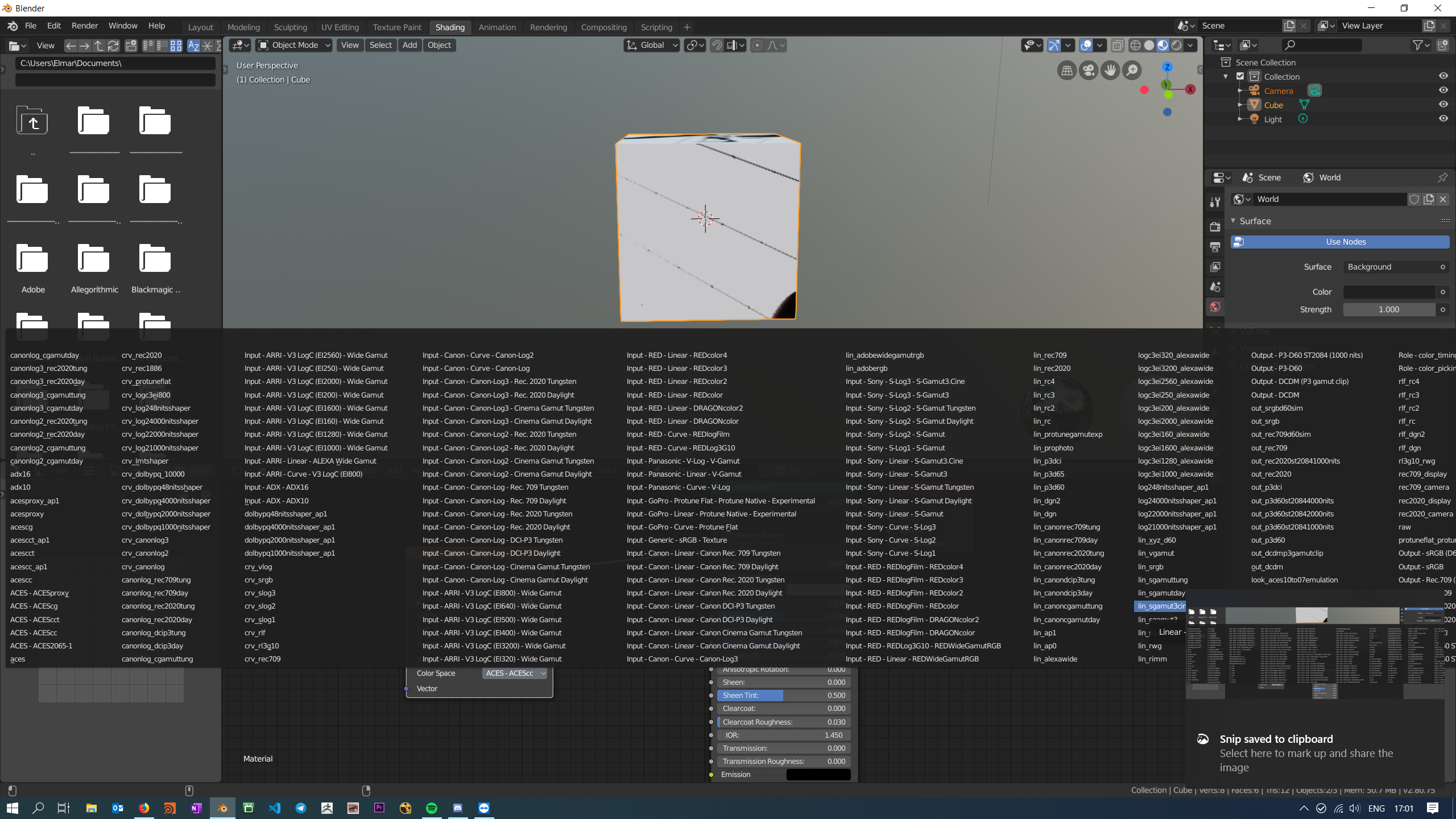
when I want to set a ColorSpace for a Texture i get quite a long list of Colorspaces to choose from. This seems right since i have ACES enabled via Environment Variable. Unfortunately the list is not fully visible and not scrollable as well. (see image attached)

Should i submit this as a bug?
Best, E
4 Comments
+1 for this, it is quite annoying because i'm using ACES too, one workaround until now is using ctrl+scroll for finding the right profile, or if it is in the node editor, you can try zooming out and the text would become smaller.
But for now, the most convenient things is to create a custom ocio config with stripped down camera IDT, and the list will become manageable.
* @Sandy Adriadi * Thanks for the Ctrl+Scroll Tip! I will try to set a custom ocio.config. Thanks!
Best, E
* @elmeier * you're welcome, and yes i would recommend customizing the default config to make ACES behaving more friendly in blender, especially the some of roles parameter, so the colour picker would not jumping around when choosing colour/value, and set the default image (node) to "utility - sRGB - texture" rather than ACEScc.
Really hope the Blender Developer updating the old ACES config, or at least let us select custom ocio config inside blender, and if they added an additional colour transform node, it would be perfect.
Happy blending!
keep the +1 coming