
Pylance Error
Hi, there!
I'v got some code issues indicated by the VSCode Pylance checker.
The first is when I was trying to rigister a sub menu to view3D add menu.
Here is the problematic code segment:
bpy.types.VIEW3D_MT_add.append(generate_item)
 In VSCode, the Pylance(the python checker) deems the variable "VIEW3D_MT_add" to be not a member of bpy.types. However, in my opinion, it may be dynamically created after Blender initiates. Although, the script can run without any issue, the error prompts indicated by the editor are somewhat annoying.
The other one is the property statement in operators, the Pylance regards it as an illegal annotation. The code is as below:
f_length : bpy.props.FloatProperty(name = "length", default = 0)
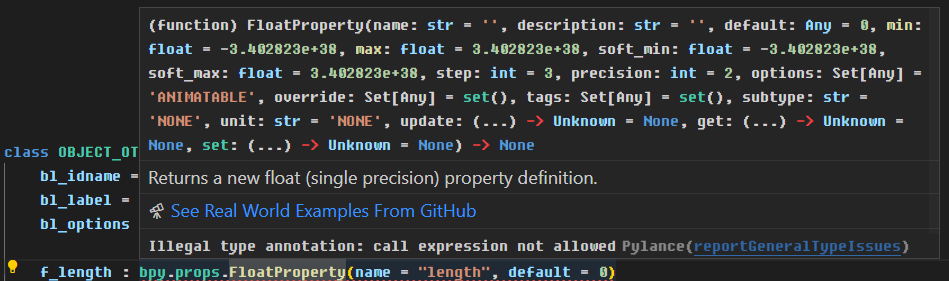
I am wondering if anyone had encountered the same issues before, or there are some python type hint rules to get around this.
And by the way, I am not an English native speaker. If there is any grammar error, or unorthodox usage of English in this post, feel free to point out that for me, I will really appreciate it.
4 Comments
I have figured out one of the problems. Here I share the solution for the first one: Use the "getattr" function to get the dynamically created member.
The other problem is still not solved by me. Hope someone could.
Pylance checking and VSCode Autocompletion are not official features and probably, there are multiple ways to add that support to VSCode. What tool are you using for the Pylance checking? Does the code work in Blender itself?
Firstly, grateful for your attention.
The tool I am using is just the Pylance extention for VSCode. The older version of it was fine. But after I updated to the new version, the python grammar check is very strict.
The code works fine in Blender. I think maybe the danamically created variables and special usage of variable statements are the keys to cause the problem.
Well, using only Pylance and nothing else, VS Code shouldn't recognize the
bpymodule. Strange. I use Blender Autocomplete with VS Code and Pycharm and I haven't had any errors with it so far.