
Blender 2.81 Sculpt Test
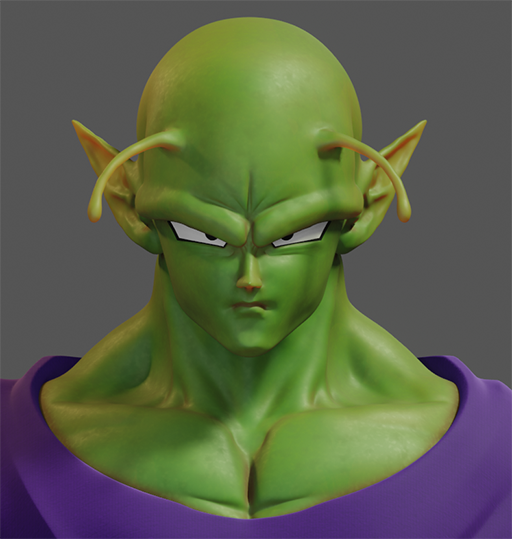
Greetings! Last week I started to test the Blender sculpt tool more seriously since we finally have 2.81 and I wanted to comment my impressions and doubts. This is the model I did in a kind of 3h speed sculpt.

I liked the performance of the brushes, for someone like me who came from sculpting in Zbrush I found it quite successful, they have quite similarity and they feel similar. Of course, remember to restart the brushes if you drag the 2.80 config. The control in blender to move, rotate, scale extra elements of the model, as always it’s more practical than in Zbrush as you can already use the full potential of Blender to model some details such as clothing or the black edge of the eyes that in Z you would have to be dealing with masks and cleaning or suffering with zmodeller.
I am glad to see that now with the remesher we have a workflow similar to zbrush in Blender, in which you can quickly do a blocking with low resolution and add details little by little and upload resolution, the truth is that the dyntopo system I didn't like it very much, since I felt that geometry was out of control.The only thing that I did not like much about Remesher is the resolution slider, I understand how it works, less distance more resolution ok, but it seems to me for an artist, it is a bit confusing that less is more, besides that it was difficult for me to adjust the resolution when I was detailing at the end. I also had some problem using Remesher with some cavities of the model, detail was lost and I had to be reviewing the area every time I recalculated.
I would like to pass the model through the QuadriFlow but I have not managed to make certain areas of the geometry not broken.
Another thing that I notice is that Blender still lacks a little more independence from the keyboard to sculpt, going through the movement that forces you to press a button on the pencil and is a bit awkward when it takes a long time (even that I think this is is solving) or things like inverting a mask you have to press the Ctrl + i of a lifetime but it forces me to lift the pencil to the keyboard and for me all that type of operation is slow to sculpt.
Even if it is a bit offtopic, Blender needs a good manager of favorites, it is very good that it is contextual and in sculpt mode only the ones to sculpt are added but you add them in the correct order or there is no simple way to reposition them.
I am also very happy with being able to have several views while sculpting, it is not something that I usually use but being inside Blender you have that advantage that is not small, of course seeing the materials while sculpting is also a very good point even though with high amounts of polygons the thing gets complicated.
My friend Álvaro Villegas, who participated in Alike, created the leather and clothing materials, but from what he told me before, I could make a subsurface mask with vertex paint and now it seems that it is not, so that I had to do it in 3Dcoat .
In summary, very well to have this potential of sculpt in blender and wanting to continue seeing how it evolves, infinite thanks to the blender team and especially to Pablo Dobarro for giving it a different approach and improving the sculpt in such a short time.
Bye!
5 Comments
please continue with the body
I love it!!!!!!!!!!!!!!!!!!!!!!!!!!!!!!!!!!!!!!!!!!!!!!!!!!!!!!!!!!!!!!!!!!!!!!!!!!!!!!!!!!!!!!!!!!!!!!!!!!!!!!!!!!!!!!!!!!!!!
you can press a in sculpt mode for mask operations including invert
Yeeee!
excellent ! :)