
Don't automatically use render region when running a full render
I often use render regions to visualize details in the viewport, but when I run the Render command I pretty much always want to render the whole scene. But if a render region is present, the Render Region checkbox in Output Properties gets checked automatically:
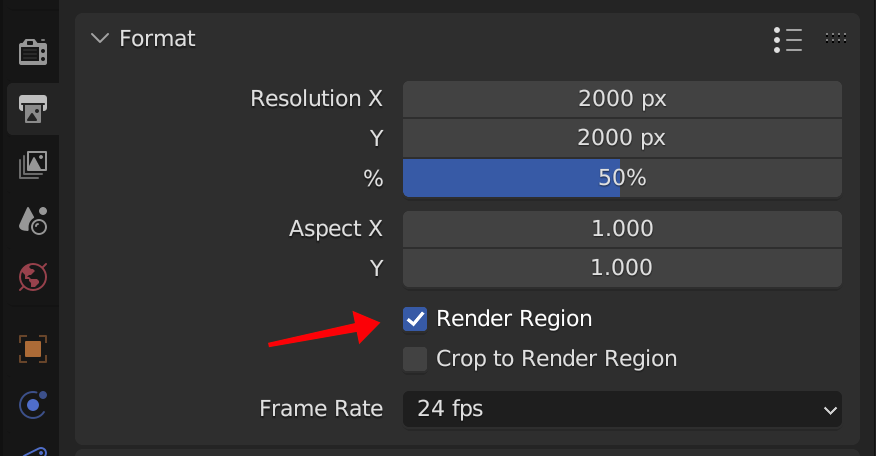
I start a big final render, walk away, and come back to a tiny partial render because I forgot to uncheck that box.

This checkbox is a useful feature, but I'd like to control it manually, rather than having it check itself when I create a render region.
5 Comments
Personally, I always have a render region, at least around the camera, to avoid rendering outside frustrum in the viewport. Keeps the hardware focused on what actually matters.
I guess we could have a set of render region settings for both viewport and render, though it sounds a bit overkill IMHO.
If you change passepartout in camera from 0.5 to 1.0 that will stop out of frame rendering too.
Which is less accessible than just hitting Alt B and draw the render region around the camera.
And once these kinds of things are made possible (which are common in other DCCs and duly needed if you ask me), using passepartout as replacement for render region will be definitely a downgrade.
I do the same, but it's slightly annoying to have to manually create a region around the camera. Or is there an automatic way to do that?
Edit: This addon by the esteemed Pablo Vazquez promises to do it, but the command is disabled and I don't know why
You can always hit Ctrl Alt B if you want to remove your render region.
Which addon?