
Orthographic constraints and floating input
After 20 years of AutoCAD and more than 10 years of Sketchup it's very hard to transition to blender for architectural modeling (although i'm really doing). I understand blender is not an architectural drafting software but a lot of architects use it for it's powerfull tools and great rendering quality.
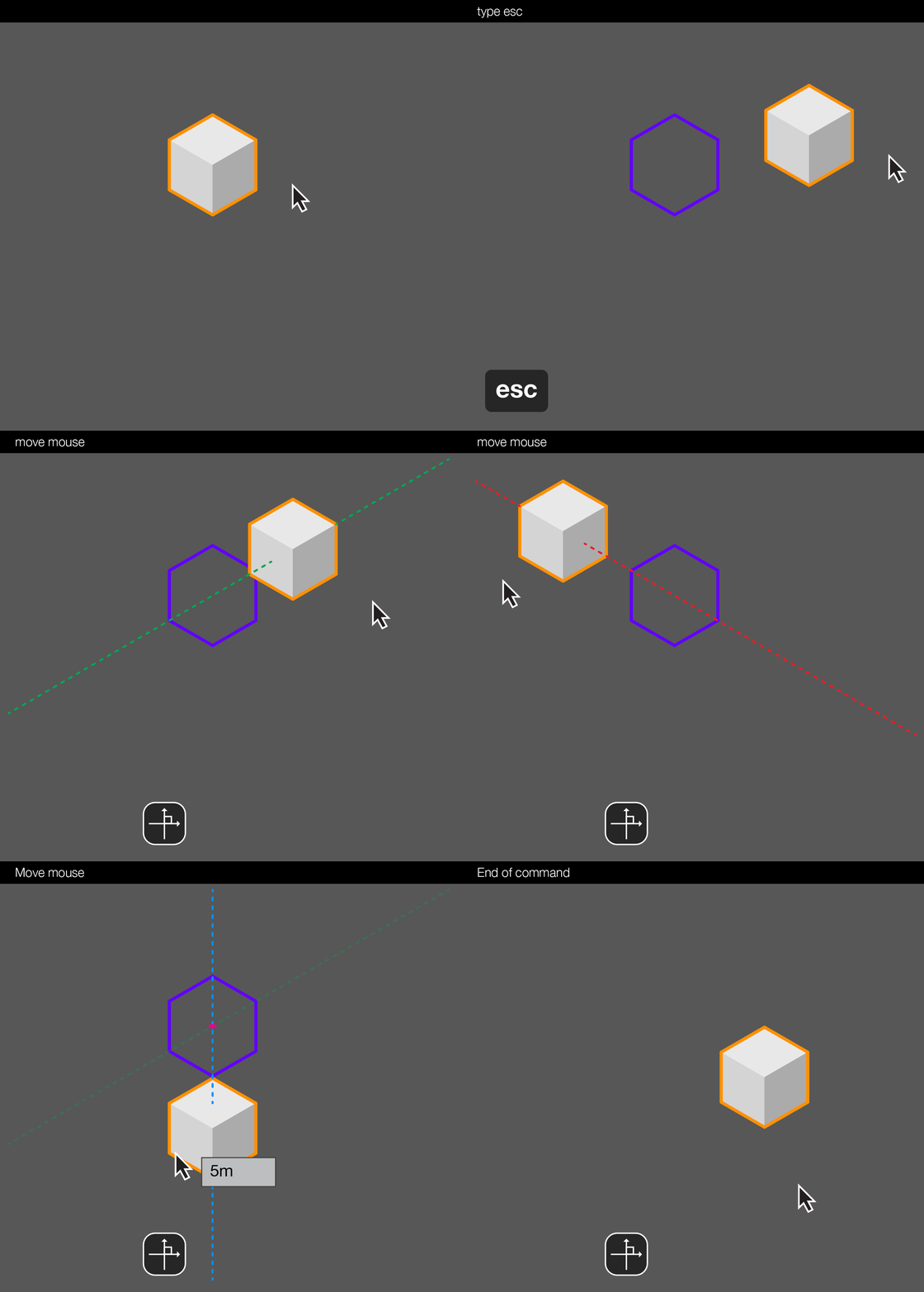
Precision modeling is imperative for architects. It would be great if we could have an option to turn on an orthographic constraint to facilitate architectural modelling (ORTHO on AutoCAD nomenclature). Another important thing is that the floating input could accept positive values and choose the direction by the position of the mouse (not typing -X).
12 Comments
I updated the post with a link for little gif animation I did describing the option.
(although i didn't find out how to insert the image itself on the post...)
Thanks everyone for the answers! And sorry for the vagueness of the proposal. We really can do everything in blender. Everything you guys said are great suggestions and I already knew them. After reading your comments, maybe I didn't made myself clear enough. As Josephbburg said a lot of people want more CAD precision and I'm one of them. Certainly, the features can't be implemented in blender as it is in other apps.
I will try to explain me better as Frederico asked. And maybe you can help me achieve in a way that I don't know... Architects need orthogonal drawing and precision. That being said let me say how I do what I want:
AutoCAD : With ORTHO turned on, I select the object call the command move, move my mouse around, type a distance and enter. Differences between blender and AutoCAD here are: AutoCAD let me turn on ORTHO and it stays turned on until I want to turn off; AutoCAD automatically choose the closest axis from the cursor; even if I move my mouse down or left, the distance is given as a positive number (not -X). This gives speed since we just keep moving the mouse and giving distances repeatedly. The floating input is helpful because it's close to what we are doing and not in the corner of the screen. As an specific proposal, it's great if we could have an option to enable this dynamic input but also a toggle for an ORTHO option (that keeps turned on). This option could be in the snap drop down icon/menu.
If you guys have any suggestions, just say it!
This is a good clarification, but what do you mean by ORTHO? I looked it up and it seems like it's an option to keep transforms constrained to one axis automatically... It's still unclear to me (not from an architecture background). As for the option to create floating input boxes, I'm OK with it as long as I can turn it off. Of course I agree the input amount should be more visible, perhaps it could be set to display in a large font near the cursor?
At any rate, I think it's best to keep the forum focused and not have duplicate proposals, so I think you should edit your main content to describe your idea about ORTHO and automatic axis constraints. I think that THAT might be a good idea, especially if it is presented as an option that artists can turn on/off. Thanks for reading my other comment.
Hi,
Well ORTHO is an axis constraint option in AutoCAD that can be turned on/off by hit the F8 button. Even the floating input I wanted as an option.
Thanks again!
* @Josephbburg *
Hi * @Josephbburg *
I changed the post. I hope it is clearer now. I understand that there are many precision posts, but I don't know can we organize them all...
* @ugosantana * The problem I was trying to clarify is that artists that HAVEN'T done architecure/CAD (most of Blender's users) don't know what ORTHO in AutoCAD is. Perhaps you could add a gif of the feature's behaviour? Anyways, I changed my vote to UP.
while any action in blender (scale,move,rotate) u may manually print value and hit enter. blender has this feature, only without floater, but it shows in screen corner
u may set hotkey to toggle perspective/orto. u may define axis with hold mmb
HI! Thanks for the comment.
I know. But I'm not talking about orthographic view. Architects need orthogonal constraints.
I know about MMB, and the specific XYZ (shift) axis constraints. What I need is a toggle to keep orthogonal continuously in every command. But the ability to turn on and off anytime. For instance: turn on the orthogonal, and everything I do is parallel to the axis without needing XYZ or MMB constraints.
* @impacman *
This proposal is too vague. Looks like a duplicate of this thread . There are a lot of people that want more CAD/precision, but it won't happen if there's no specific proposal about how to improve things, maintaining consistency with the rest of the software.
Also, most of what you ask is already implemented. For instance, if you use pie menus, you can choose your coordinates/orientation from a list of choices with a single keystroke and a mouse gesture. Extremely quick. It's also possible to constrain to X, Y, or Z by hitting x, Y, or Z, or to constrain to the XY plane (for instance) by pressing SHIFT-Z (shift removes, z is the axis you don't want to constrain). You can get automatic constraints by holding the MMB while using an operator. And of course, you can always use metric units with any operator simply by typing the numbers in while the tool is in operation. 1 Blender unit == 1 meter.
This is already possible in Blender.
2.81..
I dont use much precision when modelling, so I dont know what do you mean exactly but I do am curious. not only for me, but probably helpful for the developers that might not know what you mean, can you explain how do you think this should work? I can input values in blender right now when im grabbing, constrain to axis with keys etc, what would be the difference?