
Target Camera
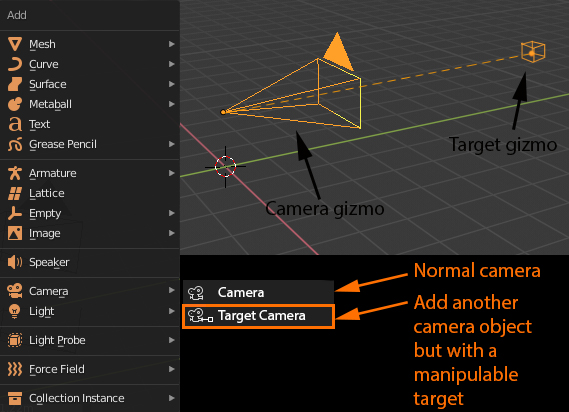
The actual camera is not very easy to orient. I propose to have another camera object but with a target, for those who prefer to manipulate the camera this way.
For transform manipulations, we could select either the camera gizmo alone or the target gizmo alone or both together from the 3d scene or from the outliner (where the target could be a child of the camera).
Bonus points if the camera comes into the scene straight, at the moment of creation (oriented parallel to X or Y axis and camera gizmo and target gizmo are on the same height on Z axis).
17 Comments
That's exactly the hassle I want to avoid each time I place a camera.
@Ryxx: In an outliner. Select your camera. On a 3D view press CTRL+ALT+ZERO (numpad) to make current view your camera, press then: HOME (this zooms to view and aligns automatically to whatever you were watching in perspective view) and press N. On the VIEW tab from your Number side bar, go to camera, and choose: LOCK CAMERA TO VIEW. Pan, zoom, dolly with your mouse buttons, camera will do the same. So no need to setup extra "look at constraints". Unless you really need to. Also: Activate from the addons: CAMERA RIGS from the user preference menu. Then, on viewport SHIFT+A> Camera > Camera rig. You get all your cameras with realistic movement controllers. Happy blending.
Everybody knows it's possible to create such camera. The proposal is to have it ready to go from the add menu.
@Ryxx: There is build in camera rig addon "Add Camera Rigs"
With this aproach you miss an Up Vector so you can control the camera roll rotation, otherwise in some situation you get a crazy rotation.
You can use my free BsMax add-on and by one click switch free camera to target camera and reverse. even single click to bind marker to camera. plus lots of free tools such as editable primitive Geometry and Shapes.
Download it from here: nevilart.blogspot.com/2019/02/bsmax.html
This is a good UX proposal. Many parts of blender seem like an unfinished student project or a proof of concept at best. Modifiers like SimpleDeform, Array, Lattice, Mirror can have automated the steps where you create and parent emptys, frames or delete half of object. Using tens of addons for basic functions is an inelegant and slow solution when all you need is a time saver. Excuse my rant and I hope it will get better with the new version and development approach.
Why is this request still open and are people voting for this? This LITERALLY already exists.
It's reachable from the Shift+A menu and is called 'Camera And Empty Target'.
To have this in the shift+a menu you only need to turn on the internal 'Add Camera Rigs' addon in preferences and you're done.
Than you don't only have 'Camera and Empty Target', but also all other kinds of camera rigs in the shift+A menu. Like dolly rig, cran rig, fly through cam etc.
This is the post and there are some nice idea's and script to do this by Testure Link
I suggested this ( target cams and lights) months ago but was shot down quite hard. I still plan on getting behind this and 2 helpfull users (will look them up in my post) helped a lot as one of them even wrote me a working script to add to my own blender ! That was awesome. Still i think this is a great feature to be able to put a target somewhere and then just animate the camera and keep the shot aimed perfectly (same for lights). Thumbs up!
What would the default position be? Add Camera then add target X units away?
This seems like an idea ripe for an add-on.
Would be a nice time saver.
The current approach (target constraint) makes it possible to have multiple constraints over time, so it's more flexible
it would be convenient to have built in for sure, but plenty of addons already do this