
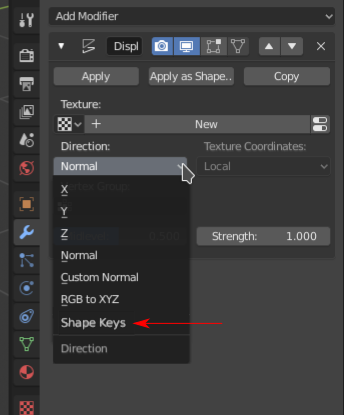
Accessing Shape Key as deformation direction in Displace Modifier
Since Displace Modifier can access dynamic painted vertex weight, if the displace direction can also be defined in shape key, it would be much easier for modeling / animating if one object is being squeezed or stretched by another object. Currently we can define RGB texture as XYZ in displace modifier, which is doable, but not easy, and not intuitive.
It might be hard to implement though.
EDIT: * @yasharjk * also proposed a similar idea. Here's his proposal: B6dbbc
11 Comments
I'm going to find a way to get shapekeys as modifier deformation in order to animate shapekeys of linked objects separately. I use multiple scenes in one file with instanced characters, everything is good but shapekey animation is the bottle neck for instancing. A good workaround could be baking shapekey offset vector to vertex color layers and use them in displace modifier as RGB to XYZ vector displacement, but unfortunately vertex colors are bound to 1-0 values and doesn't accept above 1. On the other hand displace modifier doesn't accept vertex color! Currently the only possible way is to bake shapekey vectors to a float image and use that image in displace modifier. This method needs UV unwrapping. I wish someone add this feature to blender like your proposal and mine.
* @yasharjk * This makes sense, thanks. This is an actual reason to have a real modifier. One question left: what do
MidlevelandStrengthdo in shapekey mode? Remember the problem, that this needs to be the first modifier, which is a no go for modifiers.* @weasel * Yes it is better to have a dedicated modifier but can be implemented in displace too. There is no real use for midlevel in shapekey vector. Strength can be used for shapekey value if the modifier reads only one shapekey... and if there were multiple shapekeys, they should have separate values and strength will be useless. This doesn't need to be the first modifier, can be used after mirror and can take advantage of mirrored vertex groups to mask left/right for a single shapekey. There are already some modifiers which warns about and doesn't work with topology changes by other modifiers, This can also behave the same.
It's not very clear what you're asking here, maybe a mockup would help.
Unrelated: I wrote a script a while back that bakes vector displacement to vertex colors, which can then be set up in a Cycles material and baked to a texture. It's not documented so you'll have to figure out how to use it yourself, but here's the link: devtalk.blender.org/t/using-python-to-bake-displacement-for-cycles-how-does-cycles-displace-a-point/7500 This might help you, since it does something similar to what you're asking.
* @Josephbburg * Hey sorry for didn't describe it clearly. I've uploaded a image to elaborate my suggestion. I saw you also replied in B6dbbc , basically my idea is just like his, except I merged it into displace modifier.
I'll take a look at your script. Thanks for your input.
* @windwalker129 * No need to appologize, but you'll get more votes if people know what you're trying to say!
* @Josephbburg * Oh man this is so nice i will try it as baked to texture and use it with displace modifier.Thanks for sharing.
might be better to add a checkbox for the vertex group box in the shape key menu to use dynamic vertex weights. That would be the most intuitive
* @hbchenni * That would work too. But sadly I've heard that modifiers always work after shape keys, so shape keys cannot access dynamic painted vertex data. I don't know, maybe my idea also contradicts the current Blender pipeline.
You could connect an object to a lot of parameters by using a driver. How about this? You can use it to control the displacement texture channels and other things e.g.
* @Christoph Werner * I'm not sure, 'cause it sounds like a lot of work. Might be so lot that I would rather animate every single frame.