
🦴Bones' Axes displaying are too small, and there is nothing to do about it! 😿
Hey, Blenderfolks!
So, here is a little UI problem for Rigging.
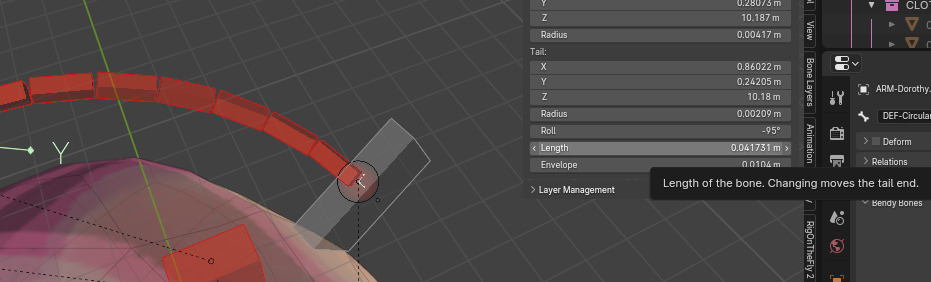
The Bones' Axes displaying Sizes are determined only by the Bone Length property (and Scaling of the Bone). I believe this is a limitation, it becomes very hard to understand the displaying Axes because they're too small. Zooming helps, but it's not really efficient in certain cases.
If you have ever come to a situation where Bone Lenghts must be pretty small, it can become a real problem in more complex Rigs. For example, plz, look at the first screenshot. We can barely understand the displaying Axes (and it can get worse!); note that with a Bone Length around that perfectly plausible value for a Bone, (0.04 m), it becomes really problematic for reading displaying Axes; imagine if we are dealing with tons of these in a more complex Rig. To contextualize, in that example, I'm using Bendy Bones, and making Bendy Bone Splines; I often want the Handle Bones to be very short (have very small Bone Lengths). But then, we might have to be dealing with dozens of BB (Bendy Bone) Splines with exactly the same Axes displaing problem.
⁕ ⁕ ⁕
I have thought of 2, more readily accessible UI solutions; if developed as simple, readily accessible and dynamic implementations to the Viewport Display for Object Properties Tab; please, refer to the second screenshot.
We could opt to Enable/Disable generate customized "Size" for the default Axes displaying Size --just as customized Axes Position. In such case, I don't know if the Slider Button ("Size") should have "0.0" --probably not: it might have instead some % variation, in relation to the default Axes displaying Size (which I don't know the exact, dinamic value; this is why I just left it at "0.0", but this would make little sense (unless a 0.0 value would mean "default" Size, but still odd); I hope you get the idea).
Then, I've also considered an additional Viewport Display Option ("BB Scale Size") for the Bone Axes, in that, if that Option is Enabled (it might be Disabled by default?), then the Size of the Bone Axes would ALSO take input, dynamically, from the Bendy Bone Scale property (you know, changeable through the Tool named after "Bone Envelope" or "Bone Size", when the Armature's Bones are Displayed As "B-Bone"... in Blender 3.6.4 LTS I was just using [ Ctrl+Alt+S ] as the Shortcut, on both Edit & Pose Modes (I'm not sure on other versions, but it doesn't matter). So, the idea here, would be to manually adjust the Axes Size, if we are operating with that handy BB Scale feature; remembering, the Bone Axes Size would already be adapting by default Bone Length; but it will 'mix' Axes Size data with Bendy Bone Scale feature as well.
Cheers!
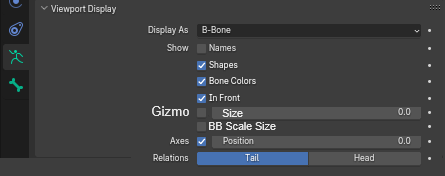
PS: There was a term mistake, in which I was previously calling Bone's displaying Axes as Bone's Axes "Gizmo" --but it just ain't a Gizmo, since it's not manipulatable as a Tool. I've fixed the words in the post, except for the 2º screenshot, which requires retake (it still holds older, incorrect "Gizmo" term).
16 Comments
"Bone Gizmo sizes are determined only by the Bone Length property" - Can't remember if that ever has been a problem for me - but hey / this definitely should be a user controlled thing.
Inversely, bone "diamond" shape is equally problematic - bone length defines how thick the bone is - but why? Sometimes I need thin bones, sometimes thick. It is not always based on bone length. This is why I personally only use Bendy Bones display mode for armatures.
Not many 3D software do this, bone width/depth should be user controlled. Like this thing you suggested.
Although it wouldn't be ideal in my opinion, I thought maybe Preferences would have an Option for Bone' Axes Gizmo... it actually has something closely related, but only affects the Tools' Gizmos; even if it had (which would would be an ok alternative), it would not be as dynamic and accessible as my propositions.
What would be the "diamond" shape of Bones? Is this Octahedral Bone Display? I think yes. I agree: I don't really understand, why Octahedral Bones cannot benefit visually from B-Bone Scale Tool. This would solve this issue you mentioned. If you create a request for this feature, I would certainly vote in favor.
Thanks for the feedback and thoughts!
Meant octahedral shape. For me it is pretty much useless, can't stand how much it blocks / occludes parts of models. No other software I've used had such nasty way of automatically scaling bones. Bones are basically transforms, and a link to other bone (usually) so it shouldn't be visualized IMO like this (I know Blender conceptually uses bones that have length, instead of linked joints, but that doesn't matter). I think I asked about octahedral bone scaling years ago in one of these Blender official forums (can't remember which) and the response was something like why should it be changed.
Interesting. Well, the only feature about Octahedral Bone Display that I find actually very fundamental (and unfortunately it lacks on every other Bone Display) is the visual direction of the Bone.
It is not a good thing to depend on memory or the Bone's Axes Gizmo, to know the direction of a Bone in a Rig (it gets even more important when dealing with lots of Bendy Bone Splines, and Sequences of them).
Yesterday, even, I took a Start Handle for the End Handle, in a Bendy Bone Spline, because Bone Display was on B-Bone. It would never have happened, if it had some sort of visual directional feature equivalent to Octahedral Bone Display. ☹️
Let me mention another thing -"other 3D software" had an option to enable "fins" for any bone user wants, so user could add front or back fins, so even if you had boxy bones, you can identify which is root end of a bone, and how it is rotated around its length axis. Fin height could be adjusted (per bone) and it is not located in the middle of the bone, so you see where the bone is facing (it is literally like a fish dorsal fin). None of the Blender's bone display modes show this kind of information, without extra visual clutter (of course you could consider fin itself clutter but anyway).
AFAIK there is only one "official" Blender forum, and it's still devtalk.blender.org
The small dev team have enough things on their to-do-list for the next decade, so you will always be asked to justify any request, even one that can seem small.
Yeah, I simply wonder if they are going for too many things. Like what percentage of users actually use grease pencil or whatever else that ain't core 3D content creation related. I often wonder how many more professional people would actually adopt Blender, if FBX import/export and skeletons (for example) related stuff would work smoothly, so that there was proper interoperability between current industry leading software and Blender. I personally don't expect them to add things I just mentioned above, simply pointed those out that these things have already been solved in many cases.
I am also frustrated by B-Bone head ball and tail ball. In order to edit bones I need to see it as Stick display mode because long bone's B-Bone balls hide everything. Why we can't change that size.
This is very interesting. 🧐 And I've also seen that before.
It's a similar problematic: we also do not have any control over the Size of the Head & Tail of the Bones.
Maybe, there should be also an Option in that same Viewport Display Panel, to adjust the Size of those Bones' balls/circles/spheres separately? What would be your take?
In any case --just as the one for the Bone's Axes Gizmo-- I think it must be a 'relative' Size system: that means, maintains the fact it keeps working in relation to the current Bone's Length. Although, maybe there should be, at least, some minimum, absolute Size (for Head & Tail); otherwise, they might easily vanish in certain conditions.
Would you mind creating this request? You'd get my vote. Thanks for the insight.
OK. I am gonna request about bone head and tail size thing.
I also made a rather reasonable request related to octahedral bone shapes - I know it ain't gonna happen, but anyway :D blender.community/c/rightclickselect/89XW/
I don't like octahedral bones shapes but it needs update too. upvoted.
When you say "bone gizmo", do you mean the bone "axes"?
Yes. But, to me more precise: the "Bone's Axes Gizmo".
The one that appears on every single Bone, when "Axes" Option is Enabled < Viewport Display Panel < Object Properties Tab < Properties Editor; for Armature Object.
Thanks for help in clarifying the subject.
-L0Lock- clarified that because a "Gizmo" is something that the user uses to manipulate something else. When you select a bone and the blue, green and red thing with arrows pops up that lets you move the bone by dragging on it, that's a gizmo. The thing that shows up in your viewport when you enable the "Axes" option is not a gizmo because you don't use it to manipulate the bone. It's just a visual thing. It's not the "Bone's Axes Gizmo". I'd call it the bones axes display.
I had no idea about that concept regarding Gizmos.
For me, "Gizmo" was any kind of floating information floating over whichever element in the 3D Viewport Editor.
I'll fix the words soon. Thanks for explaining the concept in its special category. There should be a technical term for those 'Non-Gizmo floating information' though.