
Breadcrumb navigation for nodetree context paths
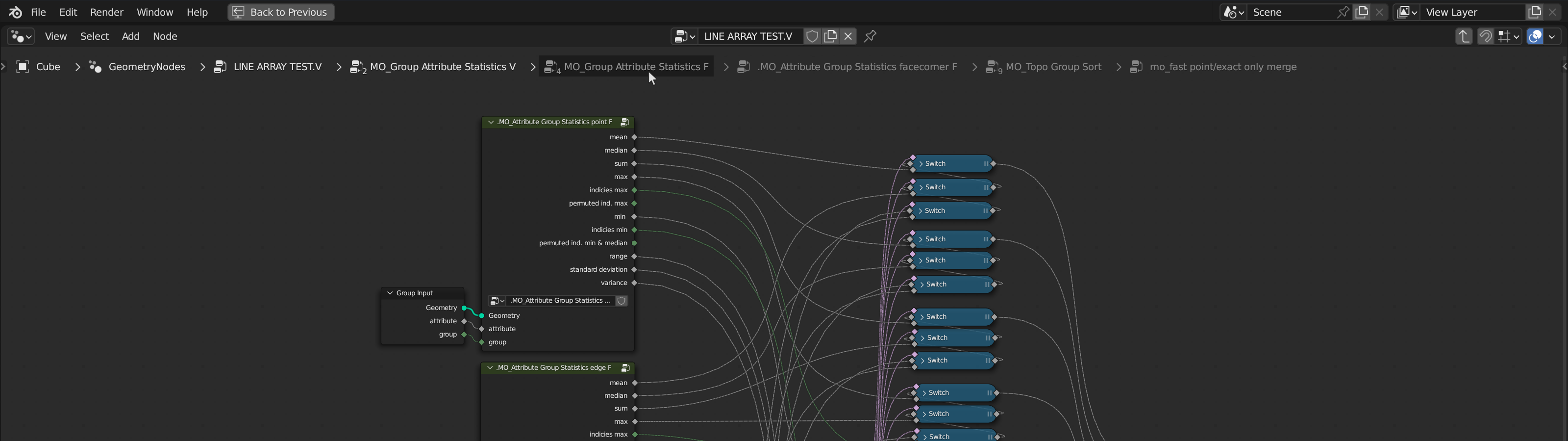
I would like to see the Context Path overlays in node tree editors like Geometry Nodes become clickable to allow easier navigation .
Currently, to go back up in the hierarchy, you need to seek out the Group Input node of your current level, select that, and press Tab . This can quickly become tedious and slow with larger node setups with multiple levels. Even when you assign a shortcut to the "back out" action, you need to go back one level at a time, so it's not easy to do back-and-forth editing of nodes at different depths.
I tried to show one additional little quality-of-life detail we would ideally have in the breadcrumb system: when you click on and go to one of the higher levels in our hiearchy, lower levels would still be shown, just in a lighter tone, so we can quickly switch beetween two specific levels. The particular address path would not change until we deviated from it by opening another node group at a certain depth.
8 Comments
Had the same I dea, I almost made a duplicate post, and visually the back button is so far removed from the context of the the nodes. And because of a lack of visual cues linking it to the nodes naviagtion (other than it being in the node panel and the tool tip) it doesn't tell the users where they can navigate. While breadcrumbs would be the best option maybe adding the back button next to the node context path could already help since the users attention when working on the nodes would be more in the center (on average) of the panel so it also would not take on a treasure hunt for a button. Of course hotkeys are also the way but for new blender users this could help.
Yes, this would be great! Regarding the other comment: in the 3D viewport, we have buttons in the Tool Settings area (the long area right below the header). UI-wise we could use this to give the breadcrumbs a home.
As I wrote a little earlier, this has one problem.
Let me explain: The path can be made clickable. But if you need to open a list of nodes in order to get into it, then you need to create a search menu. And as you probably know, the usual search menu doesn't go well with the style of this one.
But other than that, yeah, sounds reasonable. I started experimenting with it, but so far nothing serious.
blender.chat/file-upload/5MdJjRETQvQ4zKX3h/2023-01-04%2016-44-21.mp4
(Sorry about posting this again, I think there's a bug with the system—when I edit a post it disappears completely from both the timeline and my profile—so I had to open a new one. I reported the bug on github in the meantime)
I don't know anything about the technical repercussions unfortunately, I'm not a developer at all. I'm sure there are challenges that comes with it, but I feel it would be a nice addition to the workflow. Are you apprehensive because you think it'd be a substantial amount of work for an entirely new navigation item that would only ever be used in this specific place? Thanks for looking into it anyways!
I was told about an even more important issue. In a blender, the buttons should not hang in the air. And since it's not a panel, it would have to be made.
Sure, but that doesn't sound like some insurmountable obstacle to me. If the functionality is desirable enough, I'm sure we could come up with a design that addresses those questions. For instance, what about making the clickable text underlined? :
"We can't, because we had never done it before" doesn't strike me as a productive objection; there's a first for everything—and it's not like clickable breadcrumbs are some radical invention, all OSes from Windows to Linux use them, it's well established behaviour. But if the real objection is "It's too much work for little, one-off gain", then that's obviously valid—I'm not the one doing the work so I can't have a say in that really. I can only say that I keep wanting to click the damn things so as a user I hope we can have sth like this in the future.
Rather, the problem is that this has a low priority at a very high cost: creating a new interface component (only for one editor)
Yeah, that's understandable. Maybe it'll become more relevant as we get more everything-nodes things in the future. Thanks for the dialogue still.