
Click on Node Path to go back from Node Groups
If you spend a lot of time in Node Editors like Geometry Nodes, entering and exiting node groups is something you will have to do very often, especially if you create complex node systems with many node groups layers.
It is fairly easy to get into a node group: Press TAB But to exit a node group, you have to press CTRL+TAB
To be honest, it is very good this way! But if you're in a lot of sub-nodegroups, it can be slightly disturbing to press CTRL+TAB many times
Here's my small UX improvement: Be able to click on those node icons in the Node path (I don't know if it's called this way) on the top left of every node editor! Since we can already click on the same icon for regular node groups, it makes sense to me that we can get a new utility to that node path in the top left corner!
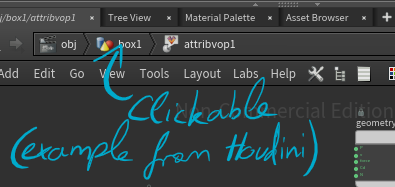
To give more credits to my idea: Most file path work this way, for example in the Windows File Explorer, you can click anywhere in the path to get to it, and same in Houdini to rewind multiple node networks

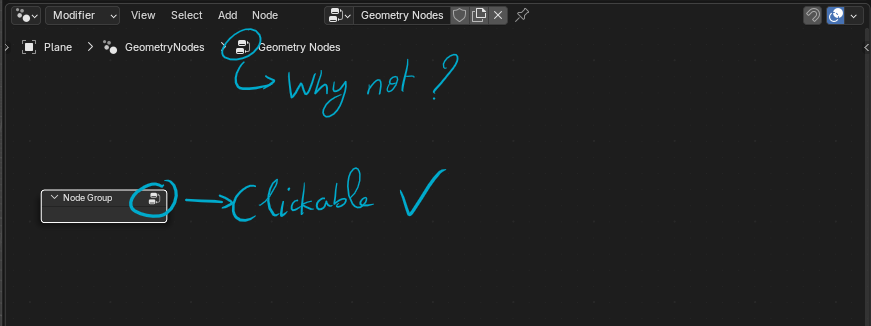
Here are 2 examples from Windows and Houdini (I don't want to compare Blender to Houdini!! just showing examples of where the same system is used and why it is relevant and can be an inuitive way to navigate node groups)

7 Comments
basically breadcrumbs functionality for the node editor, very useful
It's being worked on: projects.blender.org/blender/blender/pulls/141292
Never thought about it but would definitely use👍
👍👍
Marking as DONE! :)
This is why not: blender.community/c/rightclickselect/699N/
in Houdini is Defaul Feature Why Blender Not???