
Additions to the group node like checkboxes
I have been using blender for close to 12 years now. I absolutely love it. But one area where I think it really lacks is ease of workflow. I could go on about how it's nice that maya has all of its important hotkeys close together but that is easily fixed in blender by going back and re-keymapping and others have already contributed their keymaps to the community. One area, as a look developer, that I would love to see improvement is the group node. I really love the group node but it can make certain applications just a bit more exhausting than they need to be in my opinion and even though it is still "easy" enough to work around, it can really break the momentum when you are on a roll.
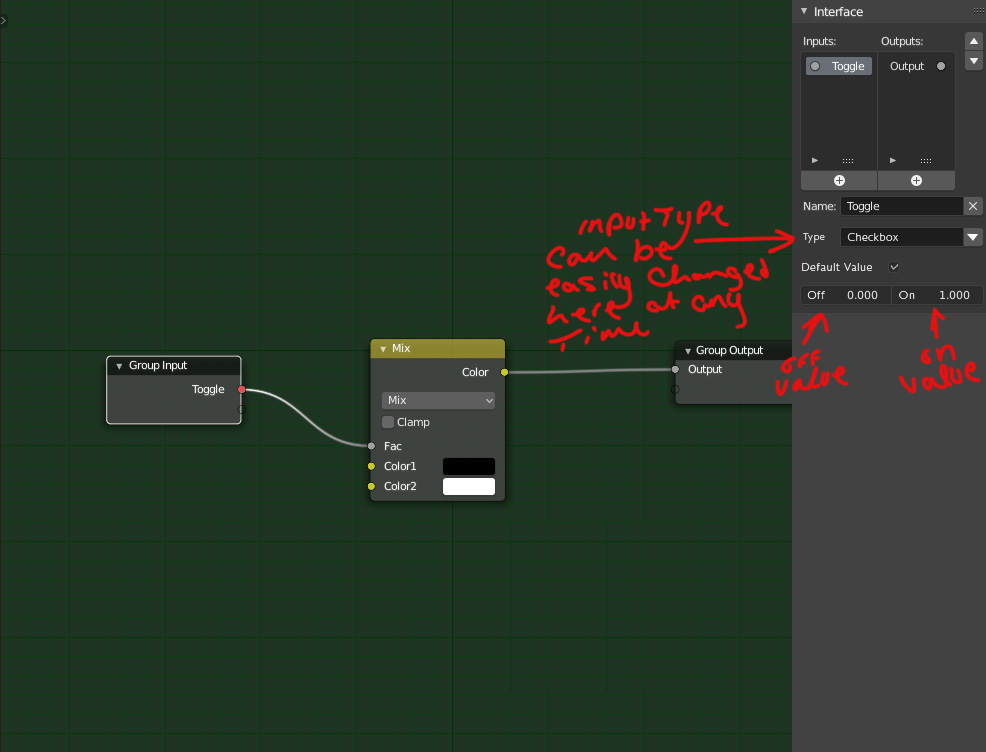
My proposals are: The ability to change the input type without having to delete it and input a new node. Sometimes I want a color input to plugin to the factor slide on a node, or maybe I want a slider to control an RGB value. It would be nice in the group node side panel to be able to specify what type of input it is. For example, with the way things are currently if I want a color to control a slider, I have to create a node with an RGB input, plug that into an input, delete it, then plug the RGB input from the group node into the slider on the grouped node. It would be nice to instead be able to have a dropdown perhaps where after plugging in the slider to the input I can specify that it is actually a color input. Then later if I change my mind and say, no I wat it to be a slider again, instead of deleting the input and adding a new one I can just select slider from the drop-down.
My next suggestion is one that I know has in the past been contested by some individuals in the development community in the past, and that is the ability to have a checkbox input. A binary 1 or 0. I know that you could use a slider plugged into a greater than but when you are dealing with 20+ materials it can be frustrating trying to remember the context of what that slider does when you need a node tree to either be completely engaged or not at all. Sometimes I have a material with a property that to be physically accurate can only be on or off. Outside of remembering, clicking and dragging is less efficient than just clicking a checkbox connected to a mix factor which is comparatively more efficient for the same reason maya having W, E, and R as the translation, rotation, and scale is more efficient by keeping your hand close together. You can spend less of your attention thinking about what button does what because its all quick and close together and spend more time on the art. Having a checkbox to toggle 1 or 0 can help artists stay connected with the art and not as focussed on which value is populating a field which in the end can only be 1 or 0 anyway in the application I used as an example, and many others I am sure.
5 Comments
yes, upvoted
but... blender.community/c/rightclickselect/Vfbbbc/
* @ Lsscpp * I actually already +1d it. But being that it hasn’t gotten much love since it’s proposal in 2016, I thought I would revisit it now. 4 years later. Everything said in the link you posted is 110% on point and I hope we can get this added.
long text, but I agree a with a short yes and upvote, a checkbox input would be nice, especially i think for reroute in complex materials to enable parts of a shader.
* @peter.boos * thats exactly my thinking. I recently worked with some others to make a more physically accurate clear coat shader with absorption and everything like that but it basically cant work as a single node added on to an existing tree, and being physically accurate it can't be half on or half off. Yes, it is easy enough to just drag it to one, but it kills the momentum. It feels like unnecessary work when a checkbox to turn the clear coat on or off could be enough.
blender.community/c/rightclickselect/65dbbc/