
Please, add the ability to apply graph editor curve modifiers to multiple curves
Ok, so I'm a blender user since 2014. I love blender. But when i worked on a production and animated in maya, i figured out that the animation department did not get any love at all. And It really needs it.
I've got many issues on that topic but i want to stress on something that litterally adds hours to my workflow. So I'm working on a game right now and doing animations for characters. In games or even in movies/shows production, cycle animations are everywhere and I too need to do quite a lot.
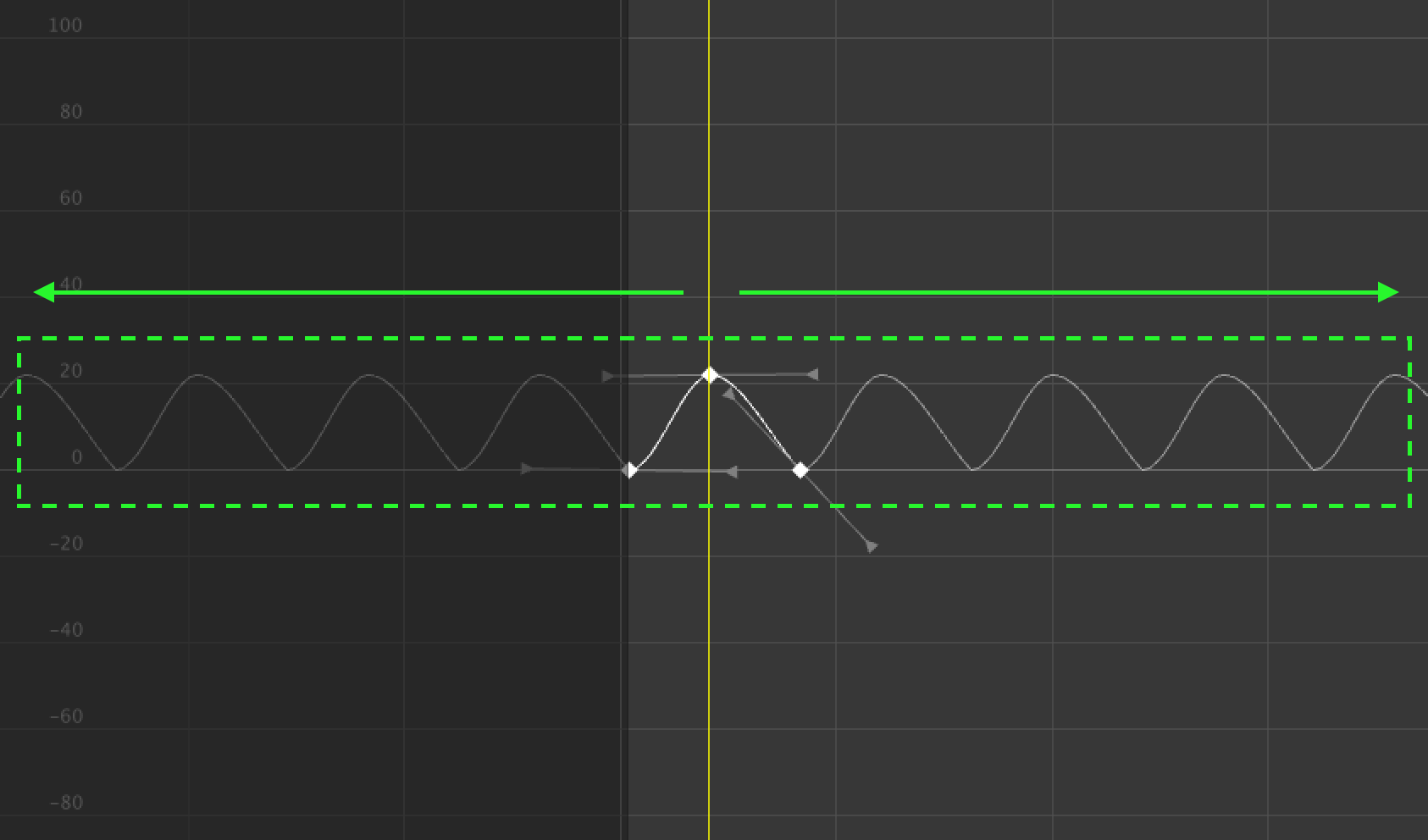
When i wanted to do a cycle animation in maya, i used the post extrapolation cycle feature a lot, which is basically working exactly as the cycle modifier in blenders graph editor. It helped me because i could block some simple keyframes, make the animation loop, toggle a cycle on the curves i wanted and then i could easily offest the cycle of any curve i wanted, very usefull to make more believable cycles easily.
But when i tried this on Blender, I was shocked that i couldn't apply the cycle modifier to multiple curves. This means instead of selecting my curves and choosing an option, I have to go through EACH curve separatly and copy paste the modifier. And I have to do that to EVERY transform curve of EVERY bone i want a cycle on. This is litteraly hours of tiresome, boring work, where blender is so fun and conveniant in every other aspect.
SO HERE IS MY REQUEST:
Please, add a way to apply a modifier to all selected curves in the graph editor.
Maybe this feature is missing because the graph modifiers work like the object modifiers or something but i think, while i am not a coder, this could be an easy fix and help a lot of animators. I'm really pissed off that this feature doesn't exist, but i don't blame anyone for it, I think it might be a sign that up until now, blender was not used a lot for animation. I want that to change, I want blender to shine in every aspect and this feature, which might be a drop in an ocean, could help. Please, someone, hear my request and make it at least go to the blender foundation's ears. Please, show that people are actually animating in a professional context with blender and need a few basic features. Thanks for reading my way too verbose request and GG to the blender team for doing such an amazing work (Except for animation features i guess haha).
14 Comments
I found a way. Select all the curves, Press CTRL+SHIFT+M, select cycle
* @naman.khare * You Sir, are a God!
I've recently posted a similar proposal regarding every animation curve modifier, not just the cycle one. I come from softimage XSI and with that good old software was so easy to loop animations.
I agree with you, this tool is a must have for an animator and, in general, for an animation program. Please, developers, let us massive add animation curve modifiers :)
* @alessandro.mocchetti * yeah i also want it to massivly add f curve modifiers, it really pains me to see that blender is decades late in the animatin department which is odd considering how important to a software this section is. I don't want to throw the stone to the blender foundation but like, it's great that we get a new video editor in blender 2.82, but how is it higher priority than animation?
it is a great feature and a welcome addition but i don't get why since 2.7 pretty much no changes were made to the animation. I just think they don't have a dev that is good enough in animation or maybe animation is a horrible thing to program for (which i'm sure it is) but this clearly needs improvements.
I found a way of using code to do the job, run this code to add 'cycles' modifier to selected curves:
Hope this helps.
This would be great. I've been trying to find a solution on this for a while.
Yes, I want this! You can group channels, but I was surprised to find that I could NOT add a modifier to a group. This would be super helpful.
So how, in Blender's interface, would you suggest users have this capability? Should f-curve modifiers be proper datablocks that can be shared among curves? How would the user know which f-curve modifiers are shared and which aren't? Can shared modifiers be located at different places in the stack? Should the whole things be replaced with a node graph?
I like the idea of sharing f-curve modifiers, but it would be really nice if your proposal thought through more of how such a system would work from the user's perspective.
* @Jason van Gumster *
I can link here the link to my Full multi editing capabilities proposal that basically suggest a way to implement the solution. I hope it could help...
I often find myself needing this...
Curve modifiers need love, this is seems like the simplest to implement. In addition I think it also needs to have a stacked approach, currently the order seem to have no impact, for example adding a noise modifier after Cycles has the reverse order, I suspect this is why they can't be re-ordered, would be be great if it worked more like the mesh modifier stack.
I may be reading this wrong but isn't cycling actions a job for the NLA Editor?
* @ammusionist * it might work that way, but what if i want only a few F curves cycling having the same noise modifier? what about export for UE4? what about the fact that it would be a huge mess with a blend with multiple animations?
Still if it works and isn't too much of a mess, would you mind linking me some videos showcasing that? or explain it to me? still i don't think i should have to go through the trouble of going to the nla editor for such a basic task, it is very unintuitive if it actually works.
* @antotooliver * I completely agree we need the option to add F-curve modifiers to multiple curves in the Graph Editor in one operation. You're 100% correct that manually adding them to, even to just each channel of an object, is extremely tedious and feels unnecessary. You can copy and paste them as you mention but that's not so useful if you have a large number of curves you want to apply a particular modifier to.
Regarding the ability to apply a modifier "globally" though you can use the NLA editor to do that even if you have unique F-Curve modifiers assigned to various channels in the Graph Editor. You just have to hit the "Push Down" button in the Action Editor to convert the animation to an NLA action clip. You can then apply something like a noise modifier to the clip in the NLA editor's properties panel and it will effect ALL keyframed channels within the clip.
One caveat to note is that when pushing down your keyframes the default action clip length will be trimmed to your keyframes though, so if you have cycles modifiers applied in the Graph Editor you will need to set the End Frame of the clip manually in the NLA Editor (in the Action Clip drop down). It's all a bit convoluted to be honest and I think this area of Blender definitely needs more work.