
1. Lists menus not friendly to tablet users / 2. Be able to change manually size of SCENES popup list
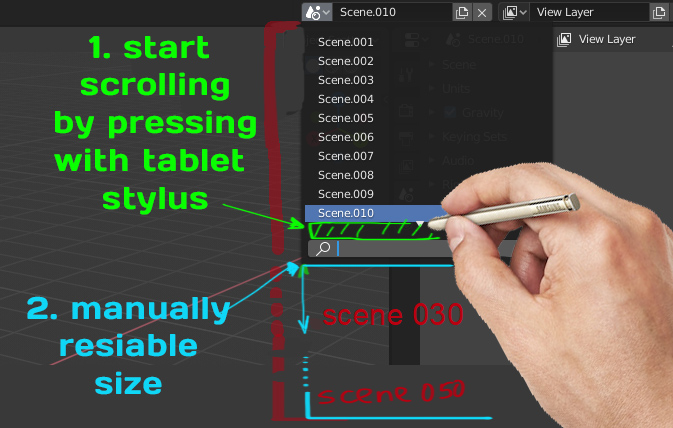
Hi guys! I'm tablet (stylus) user. I use mouse really reraly (maybe a few times in whole year when need to do something that need mouse) (and I think same with a lot artists will be) and I fing that menus where you need to scroll to find something like SCENES menu at the top not work with styus by clicking on it. And always need to do it by keyboard. Will be better if we can just press those small arrow area to start scrolling by stylus.
And here another one issue at once. Menu SCENES better be able to resize possibility, because when you work with stylus and have 20 scenes... it not so easy to navigate from there. And need to construct another solutions to avoid it, like open additional windows with SCENES outliner... But will be much more better if user can be able just simply resize those(SCENES) list window
2 Comments
I use a stylus, too. The outliner has the ability to watch scenes. I made a pie-menu for the outliner: imgur.com/9xegMsf Still, the difficulties don't end because at 2.8 a.m. there's a thin scroll bar. Vote too, tablet users a lot, the problem must be solved.: blender.community/c/rightclickselect/9Wcbbc/
* @4dezigner * Yeah, I agree here too (about thin scroll bar). To : "The outliner has the ability to watch scenes." - I know, and sometimes use it. But it will be more usefull I think to improve those particular SCENE menu because it "at hand", and we have fast acces to it. (P.S: I turned on Preference>Interface>Menus>Open on Mouse Over - to faster working with those(SCENES) pannel and avoid useles clicking on it)