
(UX) Set active camera from outliner's context menu
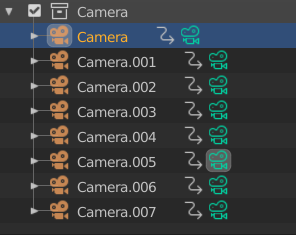
Add a "Set as Active Camera" entry to the outliner's context menu when right clicking on a camera object. Specially without a proper numpad it's still too slow to switch between cameras. Let's use the outliner for this!
5 Comments
Neat idea. You should write your suggestion in the devtalk thread about outliner improvements for GSoC. I'm sure he will appreciate it. :)
devtalk.blender.org/t/outliner-improvements-ideas/7185/112
Marking this as done since now you can simply click on the camera icon to set as active, even faster than the right click menu.
* @Pablo Vazquez * how can i download it pls help blender.community/c/rightclickselect/Fbfbbc/
* @Pablo Vazquez * Hi Pablo, the thing is, as far as I know, the changes that Nathan is making on the outliner for the GSoC implied getting rid of this functionality: now in his outliner branch, due to properties sync, clicking on the green camera icon activates the camera properties panel, while setting the active camera was supposed to be done with the new left column (now he got rid of it). So actually what you're describing is something that could be outdated very soon, making this request open again.
Most times lights and camera are not in your cropped viewport and if your like me you've hidden them. It's a pain to find the camera and lights just to select them to get to there control settings. In 2.97 I dedicate a panel viewport just to activate the camera. 3dsMax as a popup called Light Listner that you can find select and change setting with.