
Select similar isolated color
Want suggest new function as Select similar isolated color. Want select similar isolated white color as only blue annotate are as whtie squares, not red anotated areas as similar white.
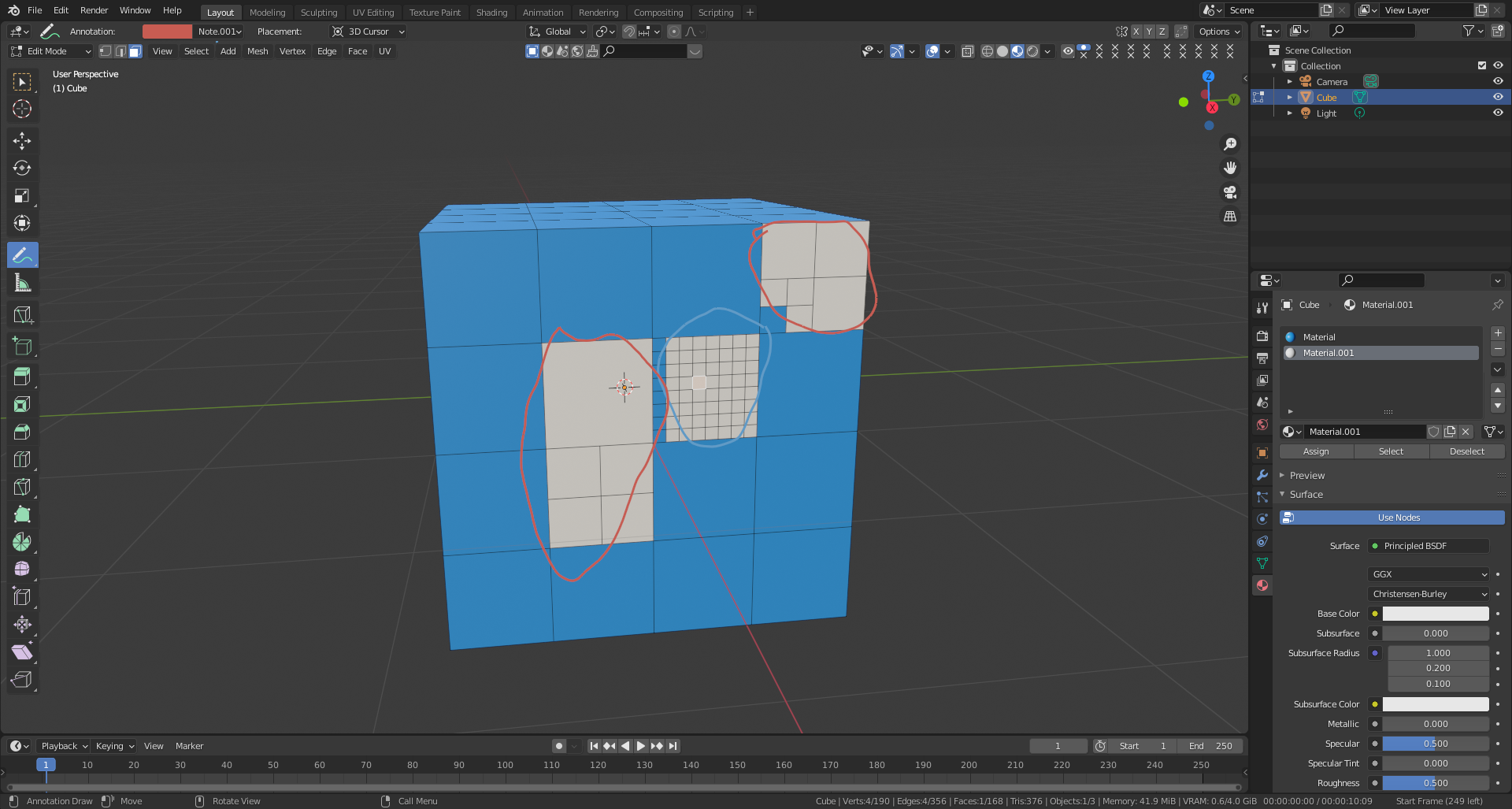
Want suggest new function as Select similar isolated color. Want select similar isolated white color as only blue annotate are as whtie squares, not red anotated areas as similar white.
14 Comments
select linked already does this with the "material" delimiter. docs.blender.org/manual/en/latest/modeling/meshes/selecting/linked.html
* @testure * but it's not the same as material, note that: "isolated", thats mind on image we have 3 white fields, 2 are in red are, 3th is blue area of anotation. And want select white only linked by colour in blue area. Link you provided not explain this.
yes. use the material delimiter as I mentioned. that's what it's for: media.giphy.com/media/VoV4cBI2JH0Orpru0u/giphy.mp4
* @testure * Can you provide higher gif resolution? Not seeing there details.
* @ManBlender * don't have anywhere I can host the video or I would. just try it for yourself- hover your mouse over the white area, press L then change "Normal" to "Material"
* @ManBlender * At some point you need to check the manual docs.blender.org/manual/en/latest/modeling/meshes/selecting/similar.html
* @testure *
Ok, what next after "L" and "Normal" to "Material"? We have Similar > 10 positions.. For me not working any of all in version: 2.91.2, branch: master, commit date: 2021-01-19 16:15, hash:
rB5be9ef417703file.io/download/WjDW7GXWbpGJ* @-L0Lock- * exactly. this is basic blender stuff, RCS isn't really the place for this conversation- this is a better topic to post in the beginner section of blenderartists.org
* @testure * ok, I will go there, but why this all can't be done by simple way as for child.. as I described with other? blender.community/c/rightclickselect/Fshbbc/
Las time I see that phabricaon doing fearures from bugs, RCS is not for discus about details, blenderartis blocking if stuff is not like admin wants.. open source going to hermetic.. and internet failed :D ..now RCS blocking posts:
Good intention is like bad..
* @ManBlender * you can also use this: {attachment 2021-05-04_71jpg}
RCS is a place only to propose new features/ideas for Blender and debate on them; it's not about being hermetic but keeping things organized. If you think you encounter a bug, you can use the menu Help → report a bug in Blender and follow the lead. But that is for reporting a bug for the developers to fix it, not getting help and support.
If you need answers about how to do stuff, support, feedback, open discussion or anything, it's most likely better on blenderartists.org which is a general purpose forum.
* @testure * By the way, " Select Linked " really is about selecting "linked" stuff. I.E. in this example case, running a "select linked material" it means selecting the linked mesh from selection/hover having the same material, so here it will select a patch of the mesh having the same material but not all the patches with this material.
If you want to select every possible mesh part with this material, you can either use the " select similar " with the material option, or use the select button below the object's material slots list.
* @-L0Lock- *
Dam.. it's working after I create new .blend file for test. But it was 100% some bug, coz I made all steps and now working but on old file not (It was overwrited, and uploaded can't be downloaded : ).
* @-L0Lock- * right- but isn't that exactly what he was asking for? i honestly don't know at this point, there's clearly a language gap but I was pretty certain he was asking how to select one of the white areas without crossing over the blue material (the usage of "isolated" seemed to indicate that to me anyway), if that's the case, that's what select linked is for.
* @testure * Dunno, that's why I elaborated a bit just in case.