
Make Grease Pencil Stroke Placement Offset in World Space
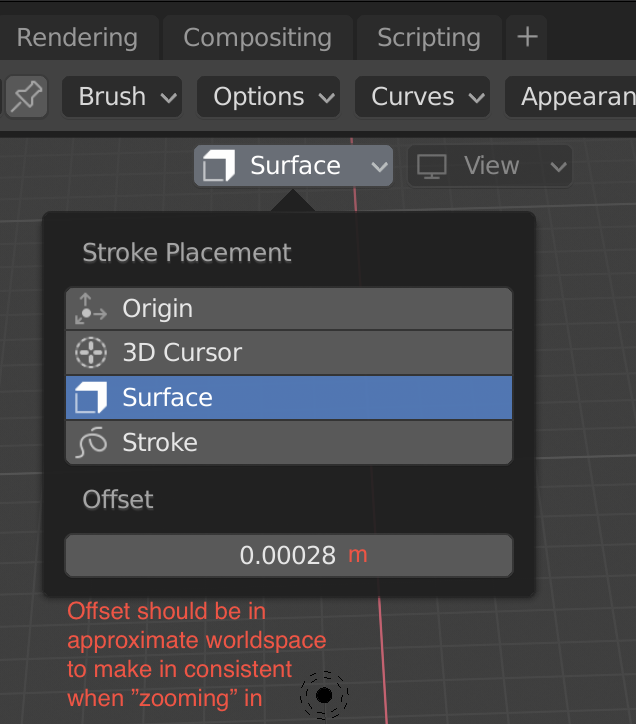
Today, when using the Grease Pencil with stroke placement set to surface, the offset is relative to the distance between the surface and the camera. (I think it uses the Z-depth buffer to find it.) The closer you are with the camera, the closer the stroke gets drawn.
I think it would be great if this was made more consistent.
The world space offset should be possible to calculate based on the near and far clipping distances. It wont be perfect since it is a screen based placement but better then now.
2 Comments
I'm thinking rather than any offset, we could set it to 0 ( even better zero as default) but there would be no clipping by the overlapping geometry by default.
The onscreen display should show grease pencil lines as a priority to other geometry so that a clean display is guaranteed by default ( toggle off) .
Blender should always default to the most commonly advantageous rather than the glitchiest but most mathematically unadulterated.
User first.
The only official mention of this issue that I could find is a bug report from 2019: developer.blender.org/T61854
Here the issue is demonstrated very well.
The developers at the time believed that the proper solution would be a shrinkwrap modifier for grease pencil. For reference there is another proposal for exactly that here: blender.community/c/rightclickselect/WTbbbc/ so I recommend to upvote that as well.
For now - to draw on mesh surface there is a bit of a hacky workaround thanks to Sophie Jantak: youtube.com/watch
Essentially it is this:
Now the stroke will be placed uniformly against the mesh regardless of zoom level, the only real issue being that while working the strokes are still slightly clipped by the mesh - you can toggle the modifier in viewport on/off to see it more clearly if needed.
Hopefully we will see a nicer official solution soon :)