
Improved node groups
<h1> Node Group Improvements </h1>
<h2> GENERAL IDEA </h2>
Node groups allow artists to build reusable node components as well as structuring large node setups into smaller and better manageable sections. The current implementation lacks of a few, quite important implementations that get addresses in this document.
Those include:
<ul> <li> Supporting more input types </li> <li> Have “plug through” nodes </li> <li> Ability to add presets for values/colors… </li> <li> Wifi nodes to clean up large node graphs </li> </ul>

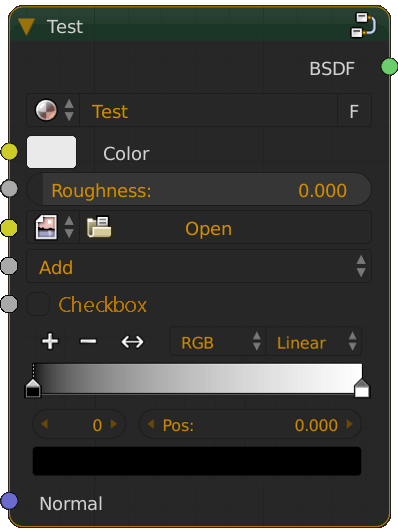
Here a quick mockup of how some of the new inputs could look like.
<h2> Inputs </h2>
Artists should be able to expose more types node inputs to the outside of the node group. Inputs like image path, dropdown, checkbox, color ramp, curves should be exposable to the outside of the group. This allows node groups to be much more flexible, allowing the artist to work faster and not having to tweak groups as often.
<h3> Color Ramp </h3>
A good example would be an input for color ramps. One might create a node group, that mixes some sort of dirt texture based on the pointiness attribute that then drives the roughness and diffuse of the principled BSDF. As you might know, the pointiness output depends on the geometry of the input mesh and therefore needs to be adjusted with e.g. a color ramp to increase the contrast. Currently the artist would need to enter the node group, tweak the color ramp as needed and then leave the group. If the color ramp would be accessible from the outside of the group, the artist could simply tweak the sliders as needed, without ever having to enter the group, search for the right node and then leave the group again.
Look at “Plug Through Nodes” to see how an interaction with a color ramp could look like.
<h3> Checkboxes </h3>
A checkbox simply outputs 0 or 1, depending if it is checked or not. This can be achieved with a slider as well, but in some cases you want to have only input A or B and not a mix of both somewhere in between. Also options like the “invert” on the normal map node could get accessed and altered this way without having to go inside the group.
<h3> Dropdowns </h3>
The basic idea is the same like the one with checkboxes. Allowing the user to access dropdown options like the one from the math node outside the group.

But with the drop down we might go a step further by allowing the user to specify predefined values that the user then can select. An example would be the IOR value of different materials. The user can select e.g “Water” from the dropdown and inside of the group this gets handled as the value 1.33, or whatever the user specified for that menu entry.

<h3> Curves </h3>
Curves like the one from the RGB curves node may be another type of input we want to have. Those would probably use in a “plug through” style, as descripted below.
<h3> Additional thoughts in regard to inputs </h3>
One thing I’m not sure about is whether image inputs and dropdowns should have an input socket outside of the group. For images I think this is definitely the case, as we can simply use a color socket. For dropdowns we could use a simple value socket that targets the index of an element of the list, where 1 represents the first option, 2 the second and so on. But what happens if the user plugs in an invalid value. Let’s say there are 3 dropdown items and the user inputs a value >3. One solution could be that the first item gets used if the value is <0 and the last item if the value is greater than the amount of items. Another option would be that one of the dropdown items is specified as the default fallback.
<h2> Plug Through Nodes </h2>
While simple float/integer or color values can be driven from the outside by plugging in a connection from the group input, this can not be done with color ramps or curves. Therefore we need a new way to interact with such nodes within a group. “Plug through nodes”.
In general those nodes behave exactly the same as regular nodes. It accept regular inputs and would give a regular output.
The only difference is, that once the node is driven by the inputs of the node group, the controlers like the sliders
for the color ramp can only be edited from the outside of the group. The controls exposed on the outside of the group
don’t accept inputs, a those are wired up inside of the group, like the “Fac” input in the image below.


This is how the group could look like on the outside. Note that there is no input for the color ramp controls like for the color or roughness.
<h2> PRESETS </h2>
<h3> Problem </h3>
Presets would allow artists to specify predefined values for certain nodes within the group, that can easily be changed to represent an other material, texture or just a simple variation of the current output. Currently you would need to copy the node for each variation, like Jim Morren did in the image below to create a light presets.

Image by @JimMorren
In this image you see the same node group copied 45 times so Jim Morren was able to create different light presets. Not only we now have the same node setup copied 45 times, but we also have 45 different groups, which differentiate in only one or two small settings inside. Not speaking of the mess you get when saying "Shift+A-> Group" of course..
Also it is quite often the case that you need to add some extra functionality to an existing shader setup, but you already created those 45 different variations. This means a whole lot of extra work to type in all those custom values again, as it happened to Jim Morren in the example above.
<h3> Solution </h3>
The solution to all these problems are presets.


A quick mockup of the dropdown with the presets. The idea here is that we now only have one node group instead of the 45. The variation needed to create the different lights is stored inside the presets. If the node group has no presets, then this dropdown simply isn’t visible as this is like a normal group.
Jim’s problem also gets solved with this solution, as he only has one node group. He can add a new node, remove an existing one or simply change a setting. No problem, do it once and all presets are kept, no need to redo anything.
<h3> Implementation </h3>
With the option to create presets we have to think about what actually gets stored inside a preset. Do we want to store each value of each node inside the group or only a few specific ones the user specifies.
The first solution gives the user more flexibility as he doesn’t need to bother what he tweaks. For example for preset 1 he tweaks node A and B, for preset 2 he tweaks node A and B but also C and for preset 3 he only needs D.
Problem with this could be that
<ol> <li> the presets can get huge when talking about node groups with hundreds of nodes. </li> <li> the user wants to change a value permanently for all presets and not only for this preset. However, the value would be stored only within the current preset. </li> </ol>
Therefore I’m in favour of the second approach. Only store what the user specifies. In my opinion this solution is more reliable in the long run. Inside the group the user can right click over every setting/value of a node and say “Add to preset” or something similar. In the panel on the right then a ui list with all the presets get displayed and what values/nodes are stored inside of it. The user can add new presets there, tweak the stored values/curves/color ramps/dropdowns and checkboxes that he beforehand specified.

A small part of the light setup I rebuild.
In this example only the changes that happen to the two nodes highlighted in orange get stored in the preset. If I for example would change one of the operation types of the math nodes this would apply to all presets, as it doesn’t get stored per preset. And with this approach we solved the two problems from above. Of course this solution only works out well if you only need to tweak the same nodes and not like in the example above each time different nodes. But the same result still can be achieved by simply adding node A, B, C and D to the preset.
<h1 id="wifi">
Wifi nodes
</h1>
I stole this little idea from the Sverchok addon. Wifi nodes would allow for cleaner and better structured node graphs,
as you sometimes have to make connections that are quite far apart. A Wifi component always consists out of two components.
An input node that gets the data and an output node that receives the data.

Twitter: @_3Descape
7 Comments
Rather than just linking to an external document, do you think you could at least provide a summation/abstract of it in the proposal text here?
@Jason van Gumster:
I think he is suggesting that node groups should support adding node controls and widgets and not just the inputs and outputs. This would be very useful indeed!
@mistajolly: No doubts. I just wish the whole proposal was encapsulated here rather than on an external document. :)
@Jason van Gumster: sorry, forgot to..now it should be better. Could you allow for html or markdown tables? would make layout of images a bit easier..
@michael lackner: That would probably be best as a Meta request. Though with the site's current layout, I'd be concerned that tables might present more of a problem than a benefit. Also not a huge fan of tables as a layout tool. But worth proposing for Francesco and Pablo.
@Jason van Gumster: or allow for div and inline styles to be able to use flexbox..would be another solution..
blender.community/c/rightclickselect/65dbbc/