
Easy draw-cutout and slice tool
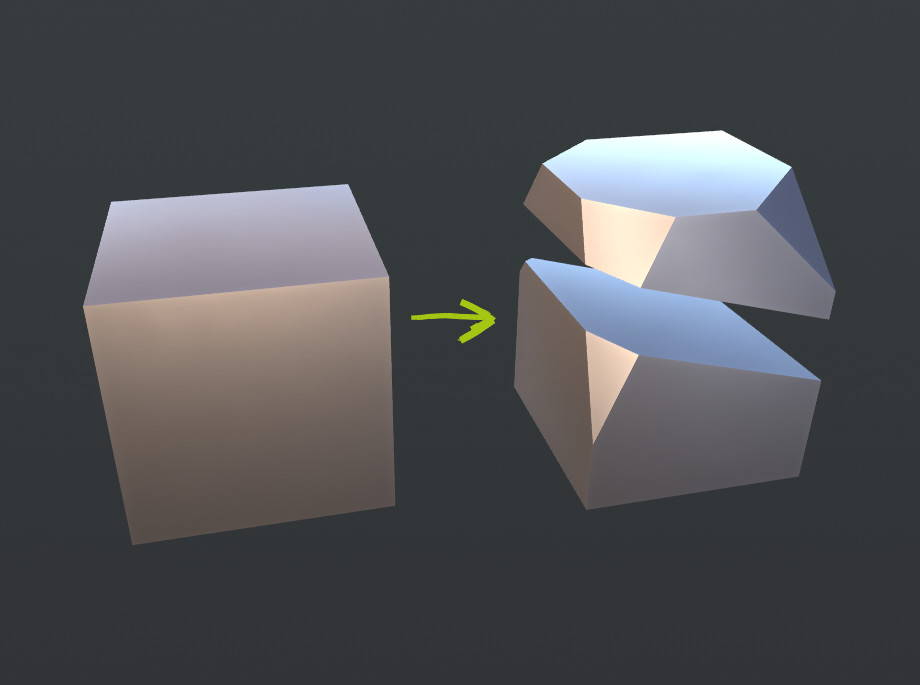
Why? Fast cutting out and slicing for art-prototyping hard surfaces with immediate result. And because Blender still not have such simple function as slice into 2 parts… Even with plane or rough surface. Sadly… Bool tool need another solid body to slice and not always working well
How: Select object, set 3D cursor with Shift-Rclick to side, that will left, activate tool (straigth line or freehand). Press, drag, release. Cut plane is oriented as view-normal. Green part (2) that was on the side with 3D cursor will left, red part will disappear, new flat polygons are ngons. Normal of new poly will look away from cursor (red direction).
In case of freehand line there should be preset, how much line should be smoothed before cut.
In case of slice, both parts remains as separate objects (set origins to centers of pieces as option). Can cut few objects.
So tool should work easier and faster than knife (K + Z). May be in the same cell as knife.
Also there can be polyline cut. I have variants for it:
- Select polyline tool: click, click another point and so on, then press special key to finish
- Press special key to switch line-polylone, press it again to finish polyline cut. The last point will be there, where you clicked last time, so this all can be made with one hand.
Why not knife? Because i should select ALL cutted parts and dissolve, because I don`t see result immediately, because I should manually separate pieces and make faces. Knife allows surface-working piplene, not solid-body pipline.
Why not bisect? No polyline, no freehand. But this tool is closest to the point of my request. So may be it should be improved.

11 Comments
Maybe something that could be added to the existing bisect tool?
* @Jason van Gumster * yes, cuz bisect is closest. I have secont simple proposal for bisect. blender.community/c/rightclickselect/Jwdbbc/
Basically you want the functions of cinema 4D Knife Tools . I hope BlenderDev are aware of these functions :( Blender 3.0 I hope ):
I like it! Sorta like Trim curve in Zbrush, but using booleans in Blender.
this should be fairly trivial to add once some of these bmesh issues are resolved: developer.blender.org/T47030 . ever since Carve was removed for 2.8 there's no way to do any type of planar/coplanar boolean operation
Is this what you want (MAYA multi-cut face tool) ?
youtu.be/lb76HqroY7Q
* @ xan2622 * No. This video shows the same, as knife/bisect already can do. I want faster cuts, that leave solid pieces. The same way as bisect can do but without selection and with ability to slice in parts, slice few objects, freehand or polyline cut.
In some ways I would like to have this kind of tools. I have also requested some kind of feature similar like this and I hope blender would integrate it soon.
I have thought of this for a while now but It really made it more significant when I saw this kind of functions being used in 3d coat's sculpting mode for hard surface modeling. The way I saw it, it was very useful and fast.
* @johnpdelacruz26 * Yup, this kind of cuts are good for fast sculpting sharp things. More complex operations anyway will cost much more time and can be made with live boolean (modifier). But straight cuts (may be even polyline cuts) can be very fast.
Please link your proposal, I am interested.
* @ Vyacheslav * The feature that I was proposing doesn't have the function as you were describing but it has something that could integrate with this.
I have thought of a cutting tool that has a auto-boolean function as the main tool to use for non destructive purposes but it would also be nice to have the option you were referring to.
blender.community/c/rightclickselect/Cwdbbc/
-deleted-