
Visual Nodes with Small Preview Thumbnail of Node Effect
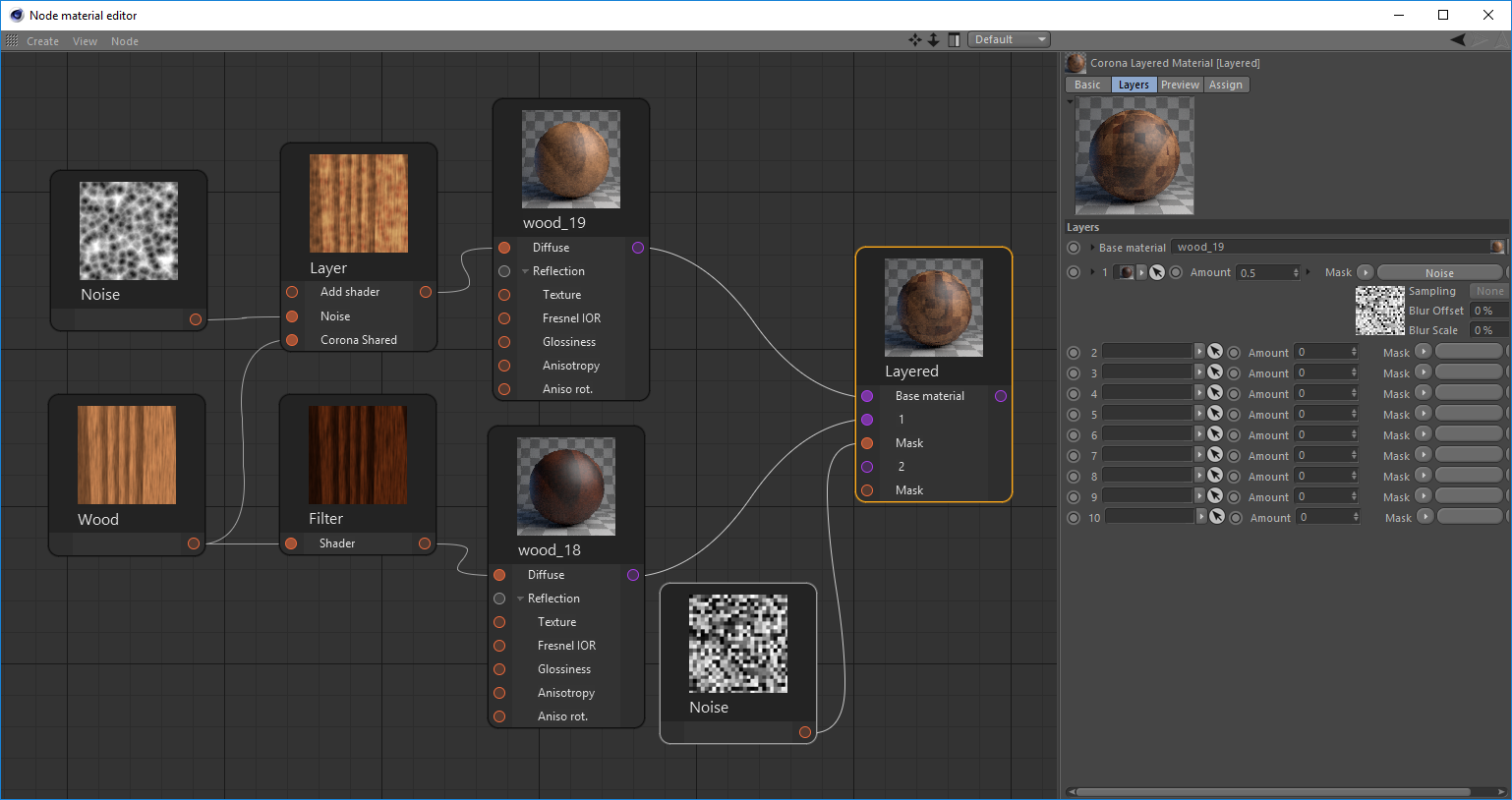
In Cinema4D when editing materials, you can see small previews of the node result attached to the node (see image). I know you can kind of do this already with the node wrangler preview function, but seeing all the nodes previews together at the same time gives a much clearer overview. This makes composing materials in the node editor much more easy and intuitive.
25 Comments
it'S a duplicate:
blender.community/c/rightclickselect/ztdbbc/
* @pipeliner * Thanks for linking that one in. I think it is good practice to empower devs to collect all upvotes and comments to various slightly different suggestions / concepts.
* @Ivo * What do you think about this:
blender.community/c/rightclickselect/L8dbbc/
This is my proposal regrading duplicates. In my post I explain the importance of having duplicates. The current solution I think is to display the duplicates inside a panel for other users to evaluate.
One main thing this proposal does is to acknowledge the original post but also promotes the consideration of additional ideas regarding a specific feature.
* @pipeliner * I would say double duplicate blender.community/c/rightclickselect/zFcbbc/
Brilliant idea, providing the thumnails are cached and not re-rendered until something downstream changes. Otherwise it will be re-rendering too much too often (like the compositor currently does :( )
This would awesome, however, if implemented, it would be the important to make it an 'opt-in' feature as it could cause considerable performance issues on complex scenes/material graphs.
* @Matthew Cooke * In UE4 you can manually select a specific node that would only have the realtime preview.
* @johnpdelacruz26 * Is real-time really a necessity? Interactive might be good enough? Obviously, the active node should be updated ASAP, but dependent nodes could follow in due course.
* @Ivo * At that point, it would it essentially be doing what the node wrangler does in the node graph, rather than the render view?
* @Ivo * No. As of now realtime preview is not necessary.
* @Matthew Cooke * The node preview function is mainly for textures and color values I believe. Makes it easier and faster to monitor the current state of each individual textures and values simultaneously.
would be so handy to have previews on the nodes! unity seems to have it also blogs.unity3d.com/2018/02/27/introduction-to-shader-graph-build-your-shaders-with-a-visual-editor/
* @linus.hechinger * good point
* @linus.hechinger * It is nice to see that Unity too did some serious simplification on the thumbnail scene. Either a square showing an image or a 3D-ish sphere with a spot- and rim-light (no other geometry). That means that global illumination nor displacement is evaluated by Unity’s thumbnail renderer. If that is the reference, it is not even a big challenge :) It can be done in real-time by a simple OpenCL script. Having said that, the OPs example from Cinema4D is al the more impressive.
Currently under development projects.blender.org/blender/blender/pulls/110065
Why isn't this closed as a duplicate of the other request?
I have created an addon that shows preview thumbnails for shader nodes: blendermarket.com/products/node-preview
I waaaaant it! This would make reading other peoples materials so much easier. Really useful in Unreal Engine.
Yes please Yes please Yes please Yes please Yes please Yes please Yes please Yes please Yes please Yes please Yes please Yes
This is a very helpful tool. No need to zoom in to read the texture name you are trying to find.
All other node editors that I use have some kind of preview and performance is not an issue there. It can be optional with a switch and a few options for example to enable only textures, procedural and utilities without shaders. An alternative to save space and performance could be just one preview slot or backdrop for only the selected node.
That would be lovely indeed, yet I see a couple of big issues. Space: in blender's nodes the parameters are shown in the node itself, so adding that might grow the nodes size a lot. Performance: previewing textures might be light, but we also have shaders and if you got plenty of them rendering 4, 5 or more at the same time might be heavy on the system and on the interactive experience of the node editor.
* @ Lsscpp * In most node editors that exhibit this type of behavior you can minimize the preview (separate from minimizing the entire node). I would suspect that if we ever ended up with a feature like this we'd do something similar.
* @ Lsscpp * The sphere in the OP's screenshot is really simple in geometric and optical terms. With limited precision, one could do away with only two refractive bounces and about three reflective bounces and highly optimized ray-sphere intersections.
In fact, given the fixed thumbnail scene, the entire tree of ray paths could be cached, loaded from disc, or even baked at coding- or install-time*. This reduces the render task to a highly parallelized render-engine independent analytical solution which can be evaluated using OpenCL. Running at the lowest priority, such renderer would maybe need one second per BSDF thumbnail on a low-end system. Running in the background, the thumbnails would be updated each second while the user is focusing on other tasks.
Further optimizations could include:
Obviously, if such renderer works, it could be used for the regular material preview(s) as well. Given that the proposed thumbnail renderer is independent* from the main render engine (e.g. Cycles, EEVEE, LuxCore, ...) it introduces a nice complexity reduction as well**.
*) Each render engine that qualifies for Blender could use the default cached ray-trees (from Cycles?) or build their own.
**) Also note that the main render engine doesn’t need to initialize to render the material preview nor the material node thumbnails.
I identified some limitations for the pre-cached-render method:
The initial method using a simplified highly-specialized traditional ray-tracer would still support those features.