
Better UV visualization with improved Random Colors and Checker Pattern Overlay.
Proposal
Blender has one of the easiest to use UV editing workflows already, and with new features like Multi-Object editing it's better than ever before. However, Blender 2.8's new shading and overlay system provides the perfect opportunity to improve the UV visualization process two steps further:
The random colors shading option is really cool, but right now it only works per-object. It would be very helpful to add the option to randomize the colors for: Objects , Loose Parts , and especially UV Islands .
Mockup #1:
Here is how the three random colors settings would behave:
gfycat.com/ElderlyBossyKitfox
(Mockup made in After Effects, please excuse how rough it is.)

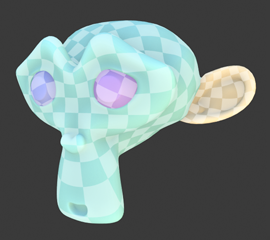
Another feature that would go hand in hand with random UV Island colors would be a checker pattern overlay. Creating a material, generating a checker pattern, and setting up the view port to display that texture is way too much work for something as important as checking UVs. If it could be done as an overlay checking your UVs would go from being a frustration, to being two clicks away!
Mockup #2:
Here is how the checker pattern overlay would behave:
gfycat.com/FrequentShallowChamois
(Mockup made in After Effects, please excuse how rough it is.)

Why We Need It
Other 3D packages such as 3D Coat and Maya 2018 already have these features and they are super helpful for new users as well as veterans of the UV workflow. Even though Blender's unwrapping algorithm is one of the best, the fact that it doesn't have this type of visualization puts it behind the competition. These two features would work fantastically together, and they could even be turned on by default in the 'UV Editing' workspace!
14 Comments
This is a fantastic idea. I'd love to see it implemented.
Awesome suggestion. Would looooove to not have to make/modify materials just to see a checker pattern.
Being able to toggle the checker on/off and optionally blend over the top of your actual texture would be so useful, and a quick toggle to show UVs on the entire scene or just objects in UV edit mode would be great for checking UV density too.
This was my immediate thought after seeing the new overlay system on the Blender Today live stream. Back on stream #24 Pablo told me to make a proposal for it, but it took me a while to find time and make the mockups.
Thank you for the up votes everyone! This is pretty crazy; My first proposal and it's in the top 10 highest rated posts after just three days. Let's hope some awesome devs can make this thing real!
Great idea! Please add a resolution slider as well so you can pick between (128, 256, 512, 1K, 2K, 4K, 8K UV grid)
Oh yeah
My student is attempting to solve this issue by writing an addon as a part of his bachelor's thesis. Check out the git page, or you can download the addon for free on gumroad.
gitlab.fi.muni.cz/xbilek2/visual-uv
werecat.gumroad.com/l/ezkqi
as a former user of Maya I can't get why STILL blender has no convenient UV-checker (and UV shell sync) option. for now it's dances with a tambourines.
the xray hassle when retope mesh building could be added to...x ray no proper back face culling ...
cool ideas presented here also maybe what for the workbench rewrite feature addition after its near now done ..developer coments shome some guy plane to do ask submit feature in RCS .. happy blending
Heck yeah this looks great!
Well this is very useful but hasn't been implimented just yet. Perhaps if we made it a bit more versitle it might just make it in Blender 2.90.
You could represent the XY texture space orientation and mapping, and find a way to represent texel density. Maybe every black square could have green 'Y' to denote Y orientation, while every white square could have an X with a line below it to represent the X orientation.
Maybe adding some subgrid options if possible to test texel density and subtle distortion ussues. It would be cool to be able to choose the sub-grid sizing.
And lastly, consider a gradient that represents the UV mapping spectrum.
Here's the best example I can find of just how versitile a UV check texture can be:
pixelcg.com/blog/wp-content/uploads/2009/03/ash_uvgrid01.jpg
How's is this not a feature yet???
This is a must! Especially in more complex scenes you can easily visualize with the checker pattern of it's simply switched on and off and not having to fiddle with seeing up New materials and so on.
bump